
如何实现预棒棒糖的材料设计标高
谷歌展示了一些很好的方式,提升效果显示在棒棒糖这里上。
android:elevation="2dp"对于纽扣来说,
android:stateListAnimator="@anim/button_state_list_animator"我如何在没有第三方库的情况下模拟前Lollipop版本的提升效果?
回答 7
Stack Overflow用户
发布于 2015-06-19 06:51:45
你可以用一种官方的方法来模拟前棒棒糖的海拔。。
我用同样的效果,
android:background="@android:drawable/dialog_holo_light_frame"我的测试输出:
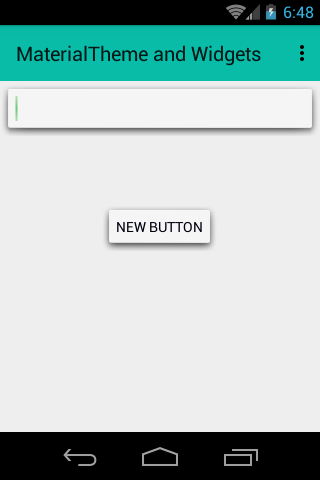
参考- https://stackoverflow.com/a/25683148/3879847
多亏了用户@Repo。
更新:如果您想要更改此绘图的颜色,请尝试@Irfan在↓下面回答
Stack Overflow用户
发布于 2015-06-11 12:34:05
你不能用官方的方法来模仿前棒棒糖的高度。
您可以使用一些绘图在组件中创建阴影。例如,谷歌在CardView中就采用了这种方式。
ViewCompat.setElevation(View, int)当前只在API21+上创建阴影。如果检查后面的代码,此方法将调用:
API 21+:
  @Override
    public void setElevation(View view, float elevation) {
        ViewCompatLollipop.setElevation(view, elevation);
    }
API < 21
@Override
public void setElevation(View view, float elevation) {

}Stack Overflow用户
发布于 2015-06-22 09:22:24
您可以使用卡视图攻击它:
<android.support.v7.widget.CardView
    xmlns:card_view="http://schemas.android.com/apk/res-auto"
    android:id="@+id/btnGetStuff"
    android:layout_width="wrap_content"
    android:layout_height="wrap_content"
    card_view:cardCornerRadius="4dp"
    card_view:cardBackgroundColor="@color/accent"
    >
    <!-- you could also add image view here for icon etc. -->
    <TextView
        android:id="@+id/txtGetStuff"
        android:layout_width="wrap_content"
        android:layout_height="wrap_content"
        android:textSize="@dimen/textSize_small"
        android:textColor="@color/primary_light"
        android:freezesText="true"
        android:text="Get Stuff"
        android:maxWidth="120dp"
        android:singleLine="true"
        android:ellipsize="end"
        android:maxLines="1"
/></android.support.v7.widget.CardView>或者看看如何使用这个第三方库:https://github.com/rey5137/Material (参见https://github.com/rey5137/Material/wiki/Button按钮上的wiki文章)
https://stackoverflow.com/questions/30778189
复制相似问题
腾讯云开发者

Copyright © 2013 - 2026 Tencent Cloud. All Rights Reserved. 腾讯云 版权所有
深圳市腾讯计算机系统有限公司 ICP备案/许可证号:粤B2-20090059  粤公网安备44030502008569号
腾讯云计算(北京)有限责任公司 京ICP证150476号 | 京ICP备11018762号