
页面结构未按预期排列
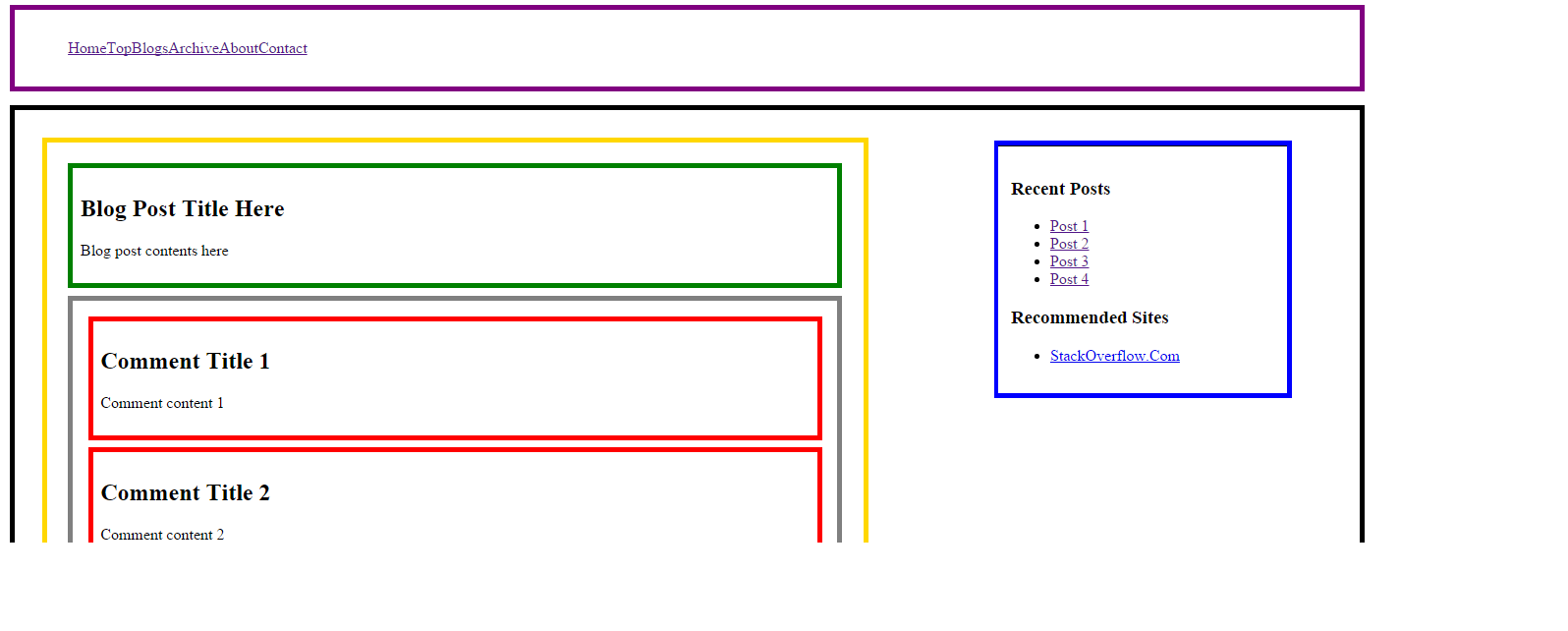
我对CSS (第一次体验)有问题,试图对我创建的部分进行调整。我有一个主<section>,坐在其他几个嵌套的<section>'s和一个<aside>里。我试图把<aside>放到页面的右边,而在彩色边框内。图片显示了我想要的东西。
我尝试过使用float:left & float:right作为CSS表中的aside和"blogcontainer"部分,也尝试过将float:right作为次要部分,但是没有得到我想要的结果。我设法把我想要的东西放在一边,但这又搅乱了我的主<section>。有人能帮忙吗?“intended.png”是我拍摄的目的。下面的代码。非常感激的帮助。
index.php:
<!doctype html>
<html lang="en">
<head>
    <meta charset="utf-8">
    <link rel="stylesheet" href="myStyle2.css" type="text/css" media="screen" />
    <title>Page Title</title>

    <!--[if lt IE 9]>

    <script src="http://html5shiv.googlecode.com/svn/trunk/html5.js"></script>
    <![endif]-->

</head>
<body>
    <!--Page header goes here-->
    <section id="top">
        <header>
            <!--Logo here -->
        </header>

        <!--Navigation Menu here -->
        <nav>
            <?php include('menu.php'); ?>
        </nav>
    </section>

    <section id="main">
        <section id="blogcontainer">

            <section id="blogpost">
                <article>
                    <header>
                        <h2>Blog Post Title Here</h2>
                    </header>
                    <p>Blog post contents here</p>
                <article>
            </section>


            <section id="comments">
                <article>
                    <header>
                        <h2>Comment Title 1</h2>
                    </header>
                    <p>Comment content 1</p>
                </article>
                <article>
                    <header>
                        <h2>Comment Title 2</h2>
                    </header>
                    <p>Comment content 2</p>
                </article>
                <article>
                    <header>
                        <h2>Comment Title 3</h2>
                    </header>
                    <p>Comment content 3</p>
                </article>
            </section>

            <section id="commentsform">

                <form action="#" method="post">
                    <h3>Post a comment</h3>
                    <p>
                        <label for="name">Name:</label>
                        <input name="name" id="name" type="text" required />
                    </p>
                    <p>
                        <label for="email">E-mail:</label>
                        <input name="email" id="email" type="email" required />
                    </p>
                    <p>
                        <label for="website">Website:</label>
                        <input name="website" id="website" type="url" />
                    </p>
                    <p>
                        <label for="comment">Comment:</label>
                        <textarea name="comment" id="comment" required></textarea>
                    </p>
                </form>
            </section>

        </section>

        <aside id="rightaside">
                <section>
                    <header>
                        <h3>Recent Posts</h3>
                    </header>
                    <ul>
                        <li><a href="#">Post 1</a></li>
                        <li><a href="#">Post 2</a></li>
                        <li><a href="#">Post 3</a></li>
                        <li><a href="#">Post 4</a></li>
                    </ul>
                </section>

                <section>
                    <header>
                        <h3>Recommended Sites</h3>
                    </header>
                    <ul>
                        <li><a href="http://www.stackoverflow.com">StackOverflow.Com</a></li>
                    </ul>
                </section>
            </aside>

    </section>

    <footer>

    </footer>

</body>
</html>
CSS:
/* Makeshift CSS Reset */
{
    margin: 0;
    padding: 0;
}

/* Tell the browser to render HTML 5 elements as block. Add more tags as needed. */
header, footer, aside, nav, article {
    display: block;
}

img.displayed {
    display: block;
    margin-left: auto;
    margin-right: auto;
}

nav {
    margin: 1%;
    padding: 1%;
    border: 5px solid purple;
}

nav li {
    display: inline;
}

#main {
    margin: 1%;
    padding: 1%;
    border: 5px solid black;
}

#blogcontainer {
    width: 60%;
    margin: 1%;
    padding: 1%;
    border: 5px solid gold;
}

#blogpost {

    margin: 1%;
    padding: 1%;
    border: 5px solid green;
}
#comments {
    margin: 1%;
    padding: 1%;
    border: 5px solid grey;
}

#comments  > article  {
    margin: 1%;
    padding: 1%;
    border: 5px solid red;
}

#commentsform {
    margin: 1%;
    padding: 1%;
    border: 5px solid yellow;
}

#rightaside {
    float: right;
    width: 20%;
    margin: 1%;
    padding: 1%;
    border: 5px solid blue;
}
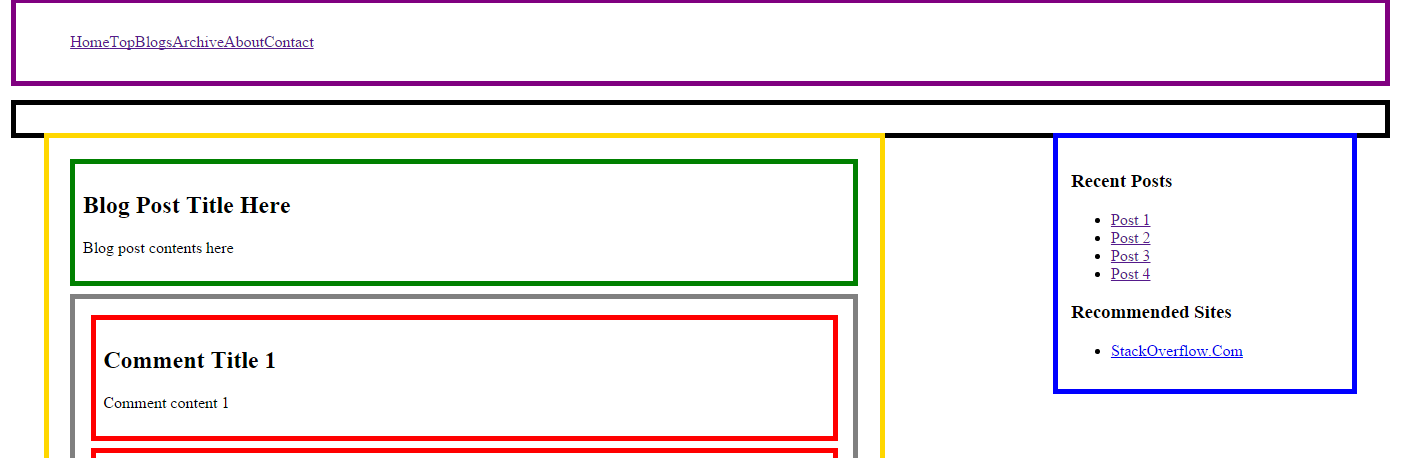
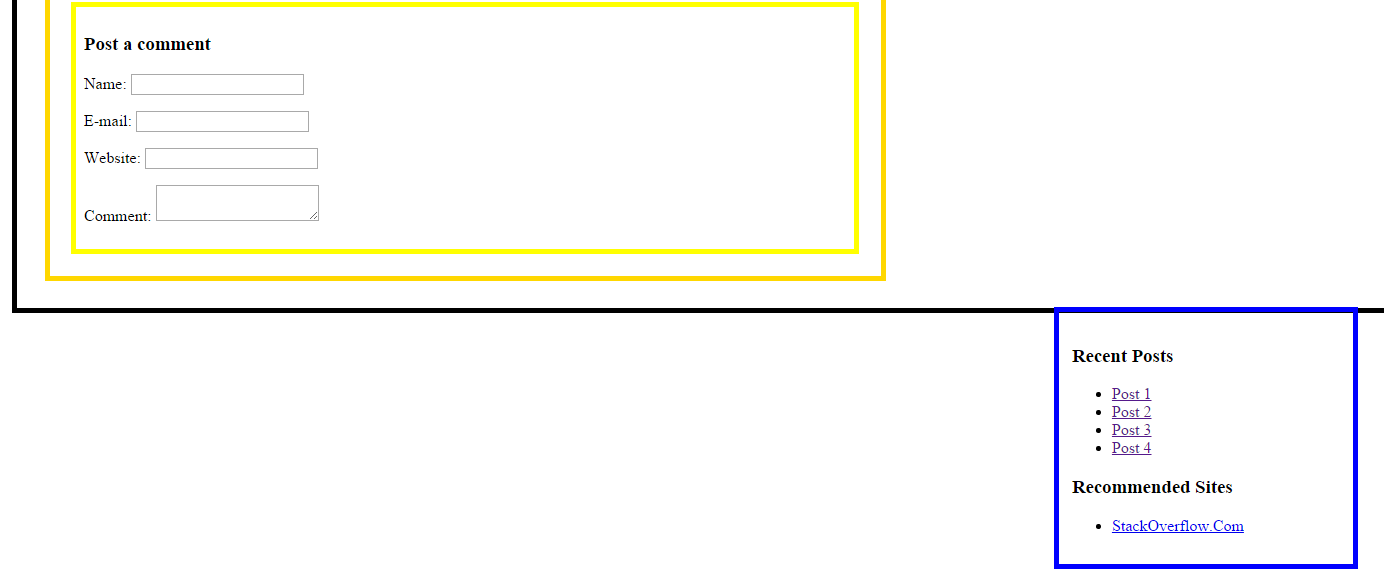
这就是下面的意图。以上是不利的结果。
回答 3
Stack Overflow用户
发布于 2015-06-10 12:34:36
您只需要向左浮动#blogcontainer。原因是,块元素将占用页面的全部宽度。浮动,它将折叠它的宽度只是它的内容,允许旁边上升到你想要的位置。
要使#main包含元素,可以添加overflow:auto; --其目的是父元素不会展开以包含浮动元素。Overflow说这些元素应该展开以包含溢出它的元素。
Stack Overflow用户
发布于 2015-06-10 12:39:01
尝试使用这个更新的css。在几个地方改变了风格。
我在css中改变了什么
添加*,它是通用的选择器,它将重置所有项目的边距和填充为0。
* {
   margin: 0;
   padding: 0;
}添加了框大小:边框框;,因为所有边框将占用您的任何div或区段中的exra像素。这将计算出perticualar宽度内的边框大小。
header, footer, aside, nav, article {
                display: block;
                box-sizing: border-box;
}将overflow:auto添加到
#main {
                margin: 1%;
                padding: 1%;
                border: 5px solid black;
                overflow: auto;
            }
最后添加了浮动和显示:内联块
  #blogcontainer {
                width: 60%;
                margin: 1%;
                padding: 1%;
                border: 5px solid gold;
                float: left;
                display: inline-block;
            }
 /* Makeshift CSS Reset */
 * {
   margin: 0;
   padding: 0;
 }
 /* Tell the browser to render HTML 5 elements as block. Add more tags as needed. */
 header,
 footer,
 aside,
 nav,
 article {
   display: block;
   box-sizing: border-box;
 }
 img.displayed {
   display: block;
   margin-left: auto;
   margin-right: auto;
 }
 nav {
   margin: 1%;
   padding: 1%;
   border: 5px solid purple;
 }
 nav li {
   display: inline;
 }
 #main {
   margin: 1%;
   padding: 1%;
   border: 5px solid black;
   overflow: auto;
 }
 #blogcontainer {
   width: 60%;
   margin: 1%;
   padding: 1%;
   border: 5px solid gold;
   float: left;
   display: inline-block;
 }
 #blogpost {
   margin: 1%;
   padding: 1%;
   border: 5px solid green;
 }
 #comments {
   margin: 1%;
   padding: 1%;
   border: 5px solid grey;
 }
 #comments > article {
   margin: 1%;
   padding: 1%;
   border: 5px solid red;
 }
 #commentsform {
   margin: 1%;
   padding: 1%;
   border: 5px solid yellow;
 }
 #rightaside {
   float: right;
   width: 20%;
   margin: 1%;
   padding: 1%;
   border: 5px solid blue;
}<!doctype html>
<html lang="en">
<head>
<meta charset="utf-8">
<link rel="stylesheet" href="myStyle2.css" type="text/css" media="screen" />
<title>Page Title</title>
<!--[if lt IE 9]>
<script src="http://html5shiv.googlecode.com/svn/trunk/html5.js"></script>
<![endif]-->
</head>
<body>
<!--Page header goes here-->
<section id="top">
<header>
<!--Logo here -->
</header>
<!--Navigation Menu here -->
<nav>
<?php include( 'menu.php'); ?>
</nav>
</section>
<section id="main">
<section id="blogcontainer">
<section id="blogpost">
<article>
<header>
<h2>Blog Post Title Here</h2>
</header>
<p>Blog post contents here</p>
<article>
</section>
<section id="comments">
<article>
<header>
<h2>Comment Title 1</h2>
</header>
<p>Comment content 1</p>
</article>
<article>
<header>
<h2>Comment Title 2</h2>
</header>
<p>Comment content 2</p>
</article>
<article>
<header>
<h2>Comment Title 3</h2>
</header>
<p>Comment content 3</p>
</article>
</section>
<section id="commentsform">
<form action="#" method="post">
<h3>Post a comment</h3>
<p>
<label for="name">Name:</label>
<input name="name" id="name" type="text" required />
</p>
<p>
<label for="email">E-mail:</label>
<input name="email" id="email" type="email" required />
</p>
<p>
<label for="website">Website:</label>
<input name="website" id="website" type="url" />
</p>
<p>
<label for="comment">Comment:</label>
<textarea name="comment" id="comment" required></textarea>
</p>
</form>
</section>
</section>
<aside id="rightaside">
<section>
<header>
<h3>Recent Posts</h3>
</header>
<ul>
<li><a href="#">Post 1</a>
</li>
<li><a href="#">Post 2</a>
</li>
<li><a href="#">Post 3</a>
</li>
<li><a href="#">Post 4</a>
</li>
</ul>
</section>
<section>
<header>
<h3>Recommended Sites</h3>
</header>
<ul>
<li><a href="http://www.stackoverflow.com">StackOverflow.Com</a>
</li>
</ul>
</section>
</aside>
</section>
<footer>
</footer>
</body>
</html>
Stack Overflow用户
发布于 2015-06-10 12:50:26
它不起作用的原因是因为#blogcontainer没有浮动。你有两个解决方案:
要么在html中将#rightaside移动到#blogcontainer上方,这样#blogcontainer就可以在左边填充空闲空间。
要么向#blogcontainer添加一个float: left规则,以便将两个容器从正常流中取出,问题是您的父容器会因为它的浮动子容器而崩溃。解决方案之一是将规则overflow: auto;添加到#main容器中。
您可以进一步探讨this post中浮动子程序的崩溃问题。
https://stackoverflow.com/questions/30756321
复制相似问题
腾讯云开发者

Copyright © 2013 - 2026 Tencent Cloud. All Rights Reserved. 腾讯云 版权所有
深圳市腾讯计算机系统有限公司 ICP备案/许可证号:粤B2-20090059  粤公网安备44030502008569号
腾讯云计算(北京)有限责任公司 京ICP证150476号 | 京ICP备11018762号