
更改默认“未选定”UITabBarItem图像颜色
更改默认“未选定”UITabBarItem图像颜色
提问于 2015-06-05 10:40:24
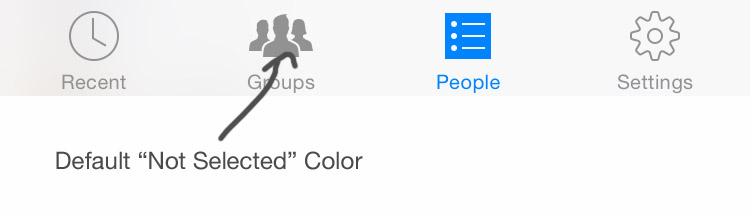
如何更改UITabBarItem中图标的“未选定”或未高亮状态?
我试着设置UITabBarItem.appearance().setTitleTextAttributes(:),但它只改变文本颜色。
有什么想法吗?
回答 3
Stack Overflow用户
回答已采纳
发布于 2015-06-05 10:46:49
如果您想要更改iOS 7及以上版本中的默认值,则必须实际使用不同的图标(对于未选定的选项卡使用的颜色),并设置文本的颜色。与创建两组图标不同,您可以应用此调整:
// set the selected colors
[self.tabBar setTintColor:[UIColor whiteColor]];
[[UITabBarItem appearance] setTitleTextAttributes:[NSDictionary dictionaryWithObjectsAndKeys: [UIColor whiteColor], NSForegroundColorAttributeName, nil] forState:UIControlStateSelected];


UIColor * unselectedColor = [UIColor colorWithRed:184/255.0f green:224/255.0f blue:242/255.0f alpha:1.0f];

// set color of unselected text
[[UITabBarItem appearance] setTitleTextAttributes:[NSDictionary dictionaryWithObjectsAndKeys:unselectedColor, NSForegroundColorAttributeName, nil]
                                     forState:UIControlStateNormal];

// generate a tinted unselected image based on image passed via the storyboard
for(UITabBarItem *item in self.tabBar.items) {
   // use the UIImage category code for the imageWithColor: method
   item.image = [[item.selectedImage imageWithColor:unselectedColor] imageWithRenderingMode:UIImageRenderingModeAlwaysOriginal];
}Stack Overflow用户
发布于 2017-01-06 11:15:59
它可以单独使用“xcode”来完成。将两组重复的“映像”添加到“Assets.xcAsset”。将第二组图像命名不同,例如,将它们命名为“yourNameSelected”。为第一组(未选定的)图标设置“呈现为原始图像”属性:
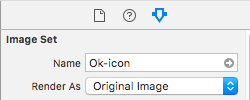
将这些图像设置为未选定的位置:
将'yourNameSelected‘复制图像设置为Selected,然后转到Tab属性检查器,并选择所选选项卡颜色所需的images。
如果目标低于ios10,则需要导入两种状态的彩色图像,并将其呈现为原始图像。
Stack Overflow用户
发布于 2015-06-05 10:50:33
在由它自己的图像所显示的快捷选项卡项图标中,您可以应用您自己的预置。
var myImage = UIImage(named: "someImageName")?.imageWithRenderingMode(UIImageRenderingMode.AlwaysTemplate)
myImageView.tintColor = UIColor.redColor()
myImageView.image = myImage页面原文内容由Stack Overflow提供。腾讯云小微IT领域专用引擎提供翻译支持
原文链接:
https://stackoverflow.com/questions/30664500
复制相关文章
相似问题
腾讯云开发者

Copyright © 2013 - 2026 Tencent Cloud. All Rights Reserved. 腾讯云 版权所有
深圳市腾讯计算机系统有限公司 ICP备案/许可证号:粤B2-20090059  粤公网安备44030502008569号
腾讯云计算(北京)有限责任公司 京ICP证150476号 | 京ICP备11018762号