
JavaFX:如何使用GraphicsContext方法appendSVGPath(AppendSVGPath)
我正在做一个利用SVG的项目,目前这个程序将SVG作为SVGPath对象存储在一个FXML文件中。然后将该文件加载到一个Group中,然后将其添加到屏幕上。在FXML文件中,大约有300个这样的SVGPaths。我相信这最终意味着场景图上有300个节点。
我最终将不得不扩大SVGPath的数量,并且担心会在场景中放置更多的节点,因此我开始考虑使用Cavas/GraphicsContext。
GraphicsContext有一个方法appendSVGPath(AppendSVGPath),我想我可以用它在空腔上绘制SVGs,但是没有办法让它们出现。
我使用来自Oracle的CanvasTest.java文件作为起点:http://docs.oracle.com/javafx/2/canvas/jfxpub-canvas.htm
我修改了该文件,使其包括以下方法:
private void appendSVG(GraphicsContext gc) {
     SVGPath svg = new SVGPath();
     svg.setContent("M 100 100 L 300 100 L 200 300 z");
     svg.setFill(Color.RED);
     svg.setStroke(Color.BLUE);
     gc.appendSVGPath(svg.getContent());
}
但我不能让这个形状出现在画布上。
这里有完整的测试代码:
package canvastest;

import javafx.application.Application;
import static javafx.application.Application.launch;
import javafx.scene.Group;
import javafx.scene.Scene;
import javafx.scene.canvas.Canvas;
import javafx.scene.canvas.GraphicsContext;
import javafx.scene.paint.Color;
import javafx.scene.shape.SVGPath;
import javafx.stage.Stage;

public class CanvasTest extends Application {

private Canvas canvas = new Canvas(200, 200);
private GraphicsContext gc = canvas.getGraphicsContext2D();
private Group root = new Group();

public static void main(String[] args) {
    launch(args);
}

@Override
public void start(Stage primaryStage) {
    primaryStage.setTitle("Canvas Test");

    appendSVG(gc);

//        SVGPath svg = new SVGPath();
//        svg.setContent("M 100 100 L 300 100 L 200 300 z");
//        svg.setFill(Color.RED);
//        svg.setStroke(Color.BLUE);

    root.getChildren().add(root);
    primaryStage.setScene(new Scene(root, 400, 400));
    primaryStage.show();
}

private void appendSVG(GraphicsContext gc) {
    SVGPath svg = new SVGPath();
    svg.setContent("M 100 100 L 300 100 L 200 300 z");
    svg.setFill(Color.RED);
    svg.setStroke(Color.BLUE);
    gc.appendSVGPath(svg.getContent());
}
}
如果我从开始取消对SVG部分的注释,并将svg添加到根用户,则svg将显示。
有人成功地使用了appendSVGPath吗?
回答 1
Stack Overflow用户
发布于 2015-06-04 07:58:29
画布不像场景图,抚摸和填充路径不是自动发生的。相反,您需要将路径段提供给画布,然后显式调用填充()或笔划()来应用这些操作。有关更多信息,请参见GraphicsContext javadoc前面的“路径呈现”部分。
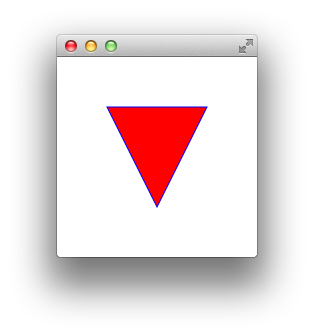
import javafx.application.Application;
import javafx.scene.*;
import javafx.scene.canvas.*;
import javafx.scene.paint.Color;
import javafx.stage.Stage;

public class CanvasTest extends Application {

    private Canvas canvas = new Canvas(200, 200);
    private GraphicsContext gc = canvas.getGraphicsContext2D();

    public static void main(String[] args) {
        launch(args);
    }

    @Override
    public void start(Stage stage) {
        appendSVG(gc);

        stage.setScene(new Scene(new Group(canvas)));
        stage.show();
    }

    private void appendSVG(GraphicsContext gc) {
        gc.setFill(Color.RED);
        gc.setStroke(Color.BLUE);
        gc.appendSVGPath("M 50 50 L 150 50 L 100 150 z");
        gc.fill();
        gc.stroke();
    }
}https://stackoverflow.com/questions/30629122
复制相似问题
腾讯云开发者

Copyright © 2013 - 2026 Tencent Cloud. All Rights Reserved. 腾讯云 版权所有
深圳市腾讯计算机系统有限公司 ICP备案/许可证号:粤B2-20090059  粤公网安备44030502008569号
腾讯云计算(北京)有限责任公司 京ICP证150476号 | 京ICP备11018762号