
<div>中的3列
我正在用ASP.NET做一个网站,我向你们展示了MasterPage,在我想要的地方,HTML文件中的<div style="width:100%; border:2px double #ff0000; height:500px;">将有三列,我在其中划分我的内容。左侧10%,中间80%,右侧10%。最后一个(右)是我遇到麻烦的地方。我已经为每个div设置了边界,所以我可以看到每个div的界限以及它们是如何被划分的。第三列,不是放在右边,而是向下,在div.底部,这是我想要解决的第一个主要问题。
第二个问题是,在80%的div中,我想要中心的所有信息,而不是,而不是,因为它不是很漂亮。
<%@ Master Language="C#" AutoEventWireup="true" CodeFile="MasterPage.master.cs" Inherits="MasterPage"%>

<!DOCTYPE html PUBLIC "-//W3C//DTD XHTML 1.0 Transitional//EN" "http://www.w3.org/TR/xhtml1/DTD/xhtml1-transitional.dtd">

<html xmlns="http://www.w3.org/1999/xhtml">
    <head runat="server">
        <title></title>
        <asp:ContentPlaceHolder id="head" runat="server">
        </asp:ContentPlaceHolder>
        <style type="text/css">
            table
            {
               -moz-border-radius:10px;
               -webkit-border-radius:10px;
                border-radius:10px;
            }
        </style>
    </head>
    <body style="margin-top:25px">
        <div style="width:100%; height:80px; border:2px solid #000000; z-index:4; text-align:center;">
            <div>
                <h1>Title</h1>
            </div>
        </div>
        <div style="width:100%; border:2px double #ff0000; height:500px;">
            <div style="width:10%; border:2px dotted #ffd800; height:100%; float:left;">

            </div>
            <div style="width:80%; border:2px dotted #b6ff00; height:100%; float:left;">
                <asp:ContentPlaceHolder id="ContentPlaceHolder1" runat="server">
                </asp:ContentPlaceHolder>
            </div>
            <div style="float:left; border:5px dotted #ef8021; width:10%; height:100%;">
            </div>
        </div>
        <div style="bottom:0px; width:100%; height:75px; border:2px dashed #f117d2; z-index:0; text-align:center;">
            <div>
                <p>Visited <%=Application["mone"] %> people.</p>
                <p>Copyrights reserved.</p>
            </div>
        </div>
    </body>
</html>
,谢谢!
回答 2
Stack Overflow用户
发布于 2015-06-01 09:21:48
边框是在DIV周围应用的,因此,如果您有一个宽度为100像素的DIV,并且您应用了1像素的边框,那么最终您将得到一个DIV的总宽度为102像素。
当您想要“查看”页面的区域时,我宁愿将颜色应用到DIVs的背景中,因为背景色不会改变HTML元素的预期大小。
这是带有建议编辑的页面(为了提高可读性,我已经删除了ASP.NET代码):
<!DOCTYPE html PUBLIC "-//W3C//DTD XHTML 1.0 Transitional//EN" "http://www.w3.org/TR/xhtml1/DTD/xhtml1-transitional.dtd">
<html xmlns="http://www.w3.org/1999/xhtml">
    <head runat="server">
        <title></title>
        <asp:ContentPlaceHolder id="head" runat="server">
        </asp:ContentPlaceHolder>
        <style type="text/css">
            table
            {
               -moz-border-radius:10px;
               -webkit-border-radius:10px;
                border-radius:10px;
            }
        </style>
    </head>
    <body style="margin-top:25px">
        <div style="width:100%; height:80px; border:2px solid #000000; z-index:4; text-align:center;">
            <div>
                <h1>Title</h1>
            </div>
        </div>
        <div style="width:100%; border:2px double #ff0000; height:500px;">
            <div style="width:10%;background-color:#f88;height:100%;float:left"></div>
            <div style="width:80%;background-color:#8f8;height:100%;float:left">
                CONTENT_PLACEHOLDER
            </div>
            <div style="width:10%;background-color:#88f; height:100%;float:left"></div>
        </div>
        <div style="bottom:0px; width:100%; height:75px; border:2px dashed #f117d2; z-index:0; text-align:center;">
            <div>
                <p>Visited # people.</p>
                <p>Copyrights reserved.</p>
            </div>
        </div>
    </body>
</html>
我希望这有助:)
Stack Overflow用户
发布于 2015-05-31 18:49:18
<body style="margin-top:25px">
  <div style="width: 100%; height: 80px; border: 2px solid #000000; z-index: 4; text-align: center;">
    <div><h1>Title</h1></div>
  </div>
  <div style="width: 100%; border: 2px double #ff0000; height: 500px;">
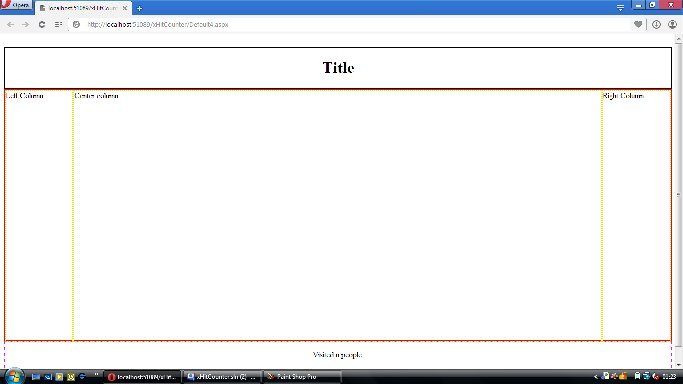
    <div style="width: 10%; border: 2px dotted #ffd800; height: 100%; float: left;">Left Column</div>
    <div style="width: 79%; border: 2px dotted #b6ff00; height: 100%; float: left;">Center column</div>
    <div style="width: 10%; border: 2px dotted #ffd800; height: 100%; float: left;">Right Column</div>
  </div>
  <div style="bottom: 0px; width: 100%; height: 75px; border: 2px dashed #f117d2; z-index: 0; text-align: center;">
    <p>Visited <%=Application["mone"] %> people.</p>
    <p>Copyrights reserved.</p>
  </div>
</body>
看起来,边框迫使您的第三列超过了可用的空间,在“影响”中,您的列被迫从布局中结束,进入下面的行。
更新我有一种鬼鬼祟祟的感觉,你的内容页面的内容正在迫使中央列的宽度更宽!
您可以通过将样式属性临时修改为中心列样式来确认这一点。
<div style="width: 79%; border: 2px dotted #b6ff00; height: 100%; float: left; overflow: hidden;">Center column</div>
https://stackoverflow.com/questions/30561017
复制相似问题
腾讯云开发者

Copyright © 2013 - 2026 Tencent Cloud. All Rights Reserved. 腾讯云 版权所有
深圳市腾讯计算机系统有限公司 ICP备案/许可证号:粤B2-20090059  粤公网安备44030502008569号
腾讯云计算(北京)有限责任公司 京ICP证150476号 | 京ICP备11018762号