
YTPlayer工具栏iOS上没有全屏按钮
YTPlayer工具栏iOS上没有全屏按钮
提问于 2015-05-26 10:38:39
我在我的iOS应用程序中使用iOS。在YTPlayer工具栏上的全屏按钮消失之前,一切都很好,现在我没有看到全屏按钮,
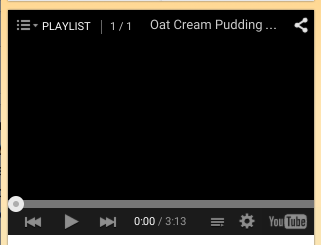
相反,我有一个视频质量按钮、播放列表按钮和youtube播放按钮,这些按钮对我没有多大帮助,也是以前没有的。因此,如何在工具栏上获得一个全屏按钮,如果可能的话,如何删除不需要的按钮。我是否必须更改html文件中的任何内容?
<!DOCTYPE html>
<html>
<head>
    <style>
        body { margin: 0; width:100%%; height:100%%; }
        html { width:100%%; height:100%%; }
    </style>
</head>
<body>
    <div id="player"></div>
    <script src="https://www.youtube.com/iframe_api"></script>
    <script>
    var player;
    YT.ready(function() {
             player = new YT.Player('player', %@);
      window.location.href = 'ytplayer://onYouTubeIframeAPIReady';
    });
    function onReady(event) {
        window.location.href = 'ytplayer://onReady?data=' + event.data;
    }
    function onStateChange(event) {
        window.location.href = 'ytplayer://onStateChange?data=' + event.data;
    }

    function onPlaybackQualityChange(event) {
        window.location.href = 'ytplayer://onPlaybackQualityChange?data=' + event.data;
    }
    function onPlayerError(event) {
        window.location.href = 'ytplayer://onError?data=' + event.data;
    }
    </script>
</body>
</html>
提前谢谢。
回答 1
Stack Overflow用户
回答已采纳
发布于 2015-06-02 05:25:39
不要紧。全屏按钮现在可见。不知道为什么它消失了,为什么它又回来了,想想youtube修改了它什么的。
页面原文内容由Stack Overflow提供。腾讯云小微IT领域专用引擎提供翻译支持
原文链接:
https://stackoverflow.com/questions/30456164
复制相关文章
相似问题
腾讯云开发者

Copyright © 2013 - 2026 Tencent Cloud. All Rights Reserved. 腾讯云 版权所有
深圳市腾讯计算机系统有限公司 ICP备案/许可证号:粤B2-20090059  粤公网安备44030502008569号
腾讯云计算(北京)有限责任公司 京ICP证150476号 | 京ICP备11018762号