
Excel加交通灯
Excel加交通灯
提问于 2015-05-22 08:51:15
我创建一个基于DataSet的Excel文件,我想添加一个有交通灯的列。
交通灯:
int trafficCollor = 1;
if (trafficCollor == 1)
{
    DataRow NR = DT.NewRow();
    NR[0] = ""; //add string with the code for the Excel traffic light yellow
}

if (trafficCollor < 1)
{
    DataRow NR = DT.NewRow();
    NR[0] = ""; //add string with the code for the Excel traffic light green
}

if (trafficCollor > 1)
{
    DataRow NR = DT.NewRow();
    NR[0] = ""; //add string with the code for the Excel traffic light red
}
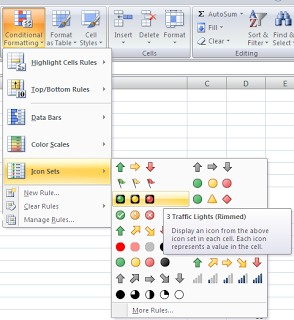
Excel如何创建:
//Create an Excel application instance
Microsoft.Office.Interop.Excel.Application excelApp = new Microsoft.Office.Interop.Excel.Application();
Microsoft.Office.Interop.Excel.Workbook excelWorkBook = excelApp.Application.Workbooks.Add();
Microsoft.Office.Interop.Excel._Worksheet worksheet = null;
excelApp.Visible = false;
worksheet = excelWorkBook.ActiveSheet;

//set headers
for (int i = 1; i < DGV.Columns.Count + 1; i++)
{
     worksheet.Cells[1, i] = DGV.Columns[i - 1].HeaderText;
 }

 createList(worksheet, DGV);

 //Create excel with the choosen name
 Worksheet sheet1 = excelWorkBook.Worksheets[1];
 worksheet.Name = fileName;
如果你有任何建议来存档这样的东西,让我知道!
回答 1
Stack Overflow用户
回答已采纳
发布于 2015-05-22 11:34:06
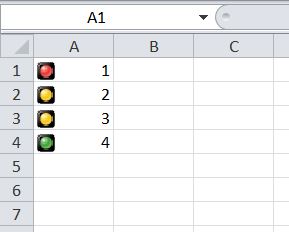
下面是我快速编写的示例代码,用于演示如何在条件格式中使用交通灯。请根据您的需要更换它。
using System;
using System.Windows.Forms;
using Excel = Microsoft.Office.Interop.Excel;

Namespace WindowsFormsApplication2
{
    public partial class Form1 : Form
    {
        Public Form1()
        {
            InitializeComponent();
        }

        private void button1_Click(object sender, EventArgs e)
        {
            Excel.Application xlexcel;
            Excel.Workbook xlWorkBook;
            Excel.Worksheet xlWorkSheet;

            object misValue = System.Reflection.Missing.Value;
            xlexcel = new Excel.Application();
            xlWorkBook = xlexcel.Workbooks.Add(misValue);
            xlWorkSheet = (Excel.Worksheet)xlWorkBook.Worksheets.get_Item(1);
            xlexcel.Visible = true;

            //add data
            xlWorkSheet.Cells[1, 1] = 1;
            xlWorkSheet.Cells[2, 1] = 2;
            xlWorkSheet.Cells[3, 1] = 3;
            xlWorkSheet.Cells[4, 1] = 4;

            Excel.Range MyRange = xlWorkSheet.get_Range("A1", "A4");

            MyRange.FormatConditions.AddIconSetCondition();
            MyRange.FormatConditions.Item (MyRange.FormatConditions.Count).SetFirstPriority();
            MyRange.FormatConditions.Item(1).ReverseOrder = false;
            MyRange.FormatConditions.Item(1).ShowIconOnly = false;
            MyRange.FormatConditions.Item(1).IconSet = xlWorkBook.IconSets[Excel.XlIconSet.xl3TrafficLights2];

            MyRange.FormatConditions.Item(1).IconCriteria(2).Type = Excel.XlConditionValueTypes.xlConditionValuePercent;
            MyRange.FormatConditions.Item(1).IconCriteria(2).Value = 33;
            MyRange.FormatConditions.Item(1).IconCriteria(2).Operator = 7;

            MyRange.FormatConditions.Item(1).IconCriteria(3).Type = Excel.XlConditionValueTypes.xlConditionValuePercent;
            MyRange.FormatConditions.Item(1).IconCriteria(3).Value = 67;
            MyRange.FormatConditions.Item(1).IconCriteria(3).Operator = 7;

            // Rest of the code
        }
    }
}
截图
页面原文内容由Stack Overflow提供。腾讯云小微IT领域专用引擎提供翻译支持
原文链接:
https://stackoverflow.com/questions/30392312
复制相关文章
相似问题
腾讯云开发者

Copyright © 2013 - 2026 Tencent Cloud. All Rights Reserved. 腾讯云 版权所有
深圳市腾讯计算机系统有限公司 ICP备案/许可证号:粤B2-20090059  粤公网安备44030502008569号
腾讯云计算(北京)有限责任公司 京ICP证150476号 | 京ICP备11018762号