
正确定位ToolStripMenu项目快捷键
在WinForms中,我列出了工具条菜单项如下:
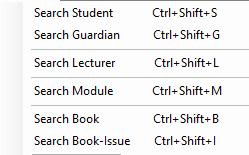
我们可以看到快捷键列表没有正确缩进。 我已经搜索了解决方案,并发现使用空间,但我尝试过,但它没有正常工作。
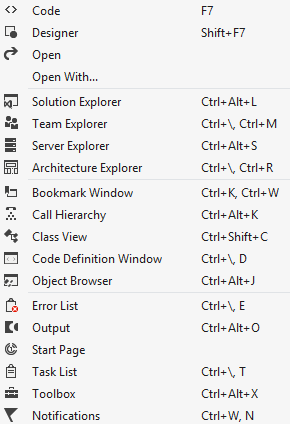
那么,是否可以将快捷键如下图所示地定位在所有菜单项的某个位置?
回答 2
Stack Overflow用户
发布于 2015-05-22 13:55:45
我搜索并阅读了一些关于这个话题的内容,但是找不到一个有用的例子。所以我想我试着创造一个。这不是完美的,而是一个开始的基础。例如,我没有尝试有附加子项目的项目。
若要呈现菜单项,不必重写项的OnPaint方法。我们最好使用ToolStripProfessionalRenderer。渲染器将管理显示菜单项目所需的一切。因此,我们必须创建自己的类MyToolStripProfessionalRenderer并设置Toolstrip.Renderer属性。
Public Class Form1

  Public Sub New()

    InitializeComponent()
    MenuStrip1.Renderer = New MyToolStripProfessionalRenderer()

  End Sub
End Class在我们的类中,我们必须重写OnRenderItemText方法。此方法绘制项名和快捷方式的字符串。基本方法很简单,用左对齐绘制名称,用右对齐绘制快捷方式。我们的自定义方法应该用左对齐绘制名称,用左对齐绘制快捷方式。因此,我们需要找出正确的地方来画捷径。我创建了一个循环,检查所有项目的快捷文本,以找到宽度最高的项。从其中创建一个矩形,并在此矩形中绘制字符串。
注意:在使用此示例时,必须手动在设计器中设置ShortcutKeyDisplayString属性,否则始终为空。
/major编辑:
我们还必须更改自动大小算法,以设置每个下拉菜单的with。
新的自动: Imagewidth +一些空间+最大的Itemtext +一些空间+最大的ShortCutText +一些空间
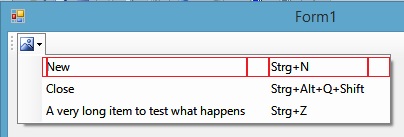
因此,我重写了Initialize(toolStrip As System.Windows.Forms.ToolStrip)方法。首先,我添加了几个常量来设置空格。要计算宽度,我将遍历所有项并找到子项的最大文本,然后为这些项设置新的宽度。
注意:如果您的下拉菜单有另一个下拉菜单,那么您必须添加递归。
    Imports System.Windows.Forms


Public Class MyToolStripProfessionalRenderer
  Inherits ToolStripProfessionalRenderer


  Protected iconwidth As Integer = 22 ' the width of image icons
  Protected paddingIconToText As Integer = 3
  Protected paddingTextToShortCut As Integer = 20
  Protected paddingShortCutToBoarder As Integer = 20


  Private Enum TextType
    Text = 0
    Shortcut = 1
  End Enum


  Protected Overrides Sub OnRenderItemText(e As System.Windows.Forms.ToolStripItemTextRenderEventArgs)

    ' render only ToolStripMenuItems
    If e.Item.IsOnDropDown And TypeOf e.Item Is ToolStripMenuItem Then

      Dim MenuItem As ToolStripMenuItem = e.Item
      Dim Name As String = MenuItem.Text
      Dim Shortcut As String = MenuItem.ShortcutKeyDisplayString


      'avoid double draw. The method is called twice for each item, check what should be drawn, Text or Shortcut?
      Dim Mode As TextType
      If e.Text = Name Then
        Mode = TextType.Text
      Else
        Mode = TextType.Shortcut
      End If


      If Mode = TextType.Text Then

        ' this is our column for the menuitem text
        Dim FirstColumn As Rectangle = New Rectangle(MenuItem.ContentRectangle.Left + iconwidth + paddingIconToText,
                                MenuItem.ContentRectangle.Top + 1,
                                MenuItem.Width - iconwidth - paddingIconToText,
                                MenuItem.Height)
        ' drawing the menu item
        e.Graphics.DrawString(Name, MenuItem.Font, New SolidBrush(MenuItem.ForeColor), FirstColumn)
        ' this is the Shortcut to display, be sure to have set it manually

      Else

        ' to align the text on the wanted position, we need to know the width for the shortcuts, this depends also on the other menu items
        Dim CurStrip As ToolStrip = MenuItem.GetCurrentParent()
        Dim fShortCutWidth As Single = 0
        ' lets find the other menuitems for this group
        For Each item As Object In CurStrip.Items
          ' lets look for the ToolStripMenuItem only
          If TypeOf item Is ToolStripMenuItem Then
            Dim ChildItem As ToolStripMenuItem = item
            Dim sCurShortcut As String = ChildItem.ShortcutKeyDisplayString
            ' how many pixels are needed to draw the current shortcut?
            Dim size As SizeF = e.Graphics.MeasureString(sCurShortcut, ChildItem.Font)
            If size.Width > fShortCutWidth Then
              fShortCutWidth = size.Width ' save it for later
            End If
          End If
        Next

        ' avoid to lose 1 pixel by casting to integer
        Dim ShortCutWidth As Integer = Convert.ToInt32(fShortCutWidth) + 1

        If fShortCutWidth > 0 Then
          ' this is our second column for the shortcut text
          Dim SecondColumn As Rectangle = New Rectangle(MenuItem.Width - ShortCutWidth - paddingShortCutToBoarder,
                               MenuItem.ContentRectangle.Top + 1,
                               ShortCutWidth,
                               MenuItem.Height)
          ' drawing the shortcut
          e.Graphics.DrawString(Shortcut, MenuItem.Font, New SolidBrush(MenuItem.ForeColor), SecondColumn)
        End If

      End If
    Else ' there might be other items, use the default method


      MyBase.OnRenderItemText(e)
    End If


  End Sub


  Protected Overrides Sub Initialize(toolStrip As System.Windows.Forms.ToolStrip)
    MyBase.Initialize(toolStrip)


    ' custom autosize algorithm
    ' 1: Find all dropdownbuttons
    ' 2: Get all Menuitems within dropdown
    ' 3: find the largest string of the dropdownitems text
    ' 4: find the latgest string of the dropdownitems shortcuttext
    ' 5: set the width for all items = picture width + padding + longest_itemtext + padding + longest_shortcuttext + padding

    For Each item As ToolStripItem In toolStrip.Items  ' get all dropdownbuttons
      If TypeOf item Is ToolStripDropDownButton Then
        Dim btn As ToolStripDropDownButton = item
        If btn.HasDropDownItems Then ' dropdownitems
          Dim MaxSizeOfItemName As Single = 0
          Dim MaxSizeOfShortCutName As Single = 0
          Dim CurSizeOfItemName As Single = 0
          Dim CurSizeOfShortCutName As Single = 0

          For Each child As ToolStripItem In btn.DropDownItems ' menu items within dropdown menu
            ' find the largest strings of dropdownitems
            If TypeOf child Is ToolStripMenuItem Then
              Dim CurrentMenuItem As ToolStripMenuItem = child
              CurSizeOfItemName = TextRenderer.MeasureText(CurrentMenuItem.Text, child.Font).Width
              CurSizeOfShortCutName = TextRenderer.MeasureText(CurrentMenuItem.ShortcutKeyDisplayString, child.Font).Width
              MaxSizeOfItemName = Math.Max(MaxSizeOfItemName, CurSizeOfItemName)
              MaxSizeOfShortCutName = Math.Max(MaxSizeOfShortCutName, CurSizeOfShortCutName)
            End If
          Next
          If MaxSizeOfItemName > 0 Then
            Dim autowidth As Integer = iconwidth + paddingIconToText + Convert.ToInt32(MaxSizeOfItemName) + 1 + paddingTextToShortCut + Convert.ToInt32(MaxSizeOfShortCutName) + 1 + paddingShortCutToBoarder
            ' it's not enough to set only the dropdownitems' width, also have to change the ToolStripDropDownMenu width
            Dim menu As ToolStripDropDownMenu = btn.DropDownItems.Item(0).GetCurrentParent() ' maybe there is a better way to get the menuobject?!
            menu.AutoSize = False
            menu.Width = autowidth
            For Each child As ToolStripItem In btn.DropDownItems
              child.AutoSize = False
              child.Width = autowidth
            Next
          End If ' MaxSizeOfItemName

          ' CAUTION: this works only for the first level of menuitems, if your dropdownmenu has another dropdownmenu, move the code above into a method and add recursion for each dropdownbutton with subitems
        End If ' btn.HasDropDownItems
      End If ' TypeOf item Is ToolStripDropDownButton
    Next 'For Each item As ToolStripItem


  End Sub
End ClassStack Overflow用户
发布于 2015-11-10 08:06:08
以下是C#中的另一种解决方案
private class MenuRenderer : ToolStripProfessionalRenderer {

    Hashtable ht = new Hashtable();
    int shortcutTextMargin = 5;
    Font cachedFont = null;

    protected override void OnRenderItemText(ToolStripItemTextRenderEventArgs e) {
        ToolStrip ts = e.Item.Owner;
        if (ts.Font != cachedFont) {
            cachedFont = ts.Font; // assumes all menu items use the same font
            ht.Clear();
        }

        var mi = e.Item as ToolStripMenuItem;

        if (mi != null && mi.ShortcutKeys != (Keys) 0) {
            if (e.Text != mi.Text) { // shortcut text
                ToolStripMenuItem owner = (ToolStripMenuItem) e.Item.OwnerItem;

                e.TextFormat = TextFormatFlags.VerticalCenter;
                Size sz = TextRenderer.MeasureText(e.Graphics, e.Text, e.TextFont);

                int w = owner.DropDown.Width;
                int x = w - (sz.Width + shortcutTextMargin);
                int? xShortcut = (int?) ht[owner];
                if (!xShortcut.HasValue || x < xShortcut.Value) {
                    xShortcut = x;
                    ht[owner] = xShortcut;
                    owner.DropDown.Invalidate();
                }

                Rectangle r = e.TextRectangle;
                r.X = xShortcut.Value;
                e.TextRectangle = r;
            }
        }

        base.OnRenderItemText(e);
    }
}https://stackoverflow.com/questions/30391181
复制相似问题
腾讯云开发者

Copyright © 2013 - 2026 Tencent Cloud. All Rights Reserved. 腾讯云 版权所有
深圳市腾讯计算机系统有限公司 ICP备案/许可证号:粤B2-20090059  粤公网安备44030502008569号
腾讯云计算(北京)有限责任公司 京ICP证150476号 | 京ICP备11018762号