
QTextDocument在QAbstractItemDelegate涂料中的应用
QTextDocument在QAbstractItemDelegate涂料中的应用
提问于 2015-05-20 15:53:10
我有一个继承QAbstractItemDelegate的类,在paint()方法中使用QTextDocument。我的模型包含两个项,但是当我运行qt应用程序时,这些项是在QListView的第一个项中绘制的。
码
void ProductItemDelegate::paint(QPainter *painter, const QStyleOptionViewItem &option,
                                const QModelIndex &index) const
{
    bool selected = (option.state & QStyle::State_Selected) == QStyle::State_Selected;

    if (selected)
    {
        painter->fillRect(option.rect, option.palette.highlight());
    }

    painter->save();
    painter->setRenderHint(QPainter::Antialiasing, true);

    if (selected)
    {
        painter->setPen(option.palette.highlightedText().color());
    }
    else
    {
        painter->setPen(option.palette.text().color());
    }

    mTextDocument.drawContents(painter);

    painter->restore();
}

QSize ProductItemDelegate::sizeHint(const QStyleOptionViewItem &option,
                              const QModelIndex &index) const
{
    MyItem *myItem = index.data(Qt::UserRole + 1).value<MyItem *>();

    mTextDocument->clear();
    mTextDocument->setDefaultFont(option.font);
    mTextDocument->setPageSize(QSizeF(option.rect.width(), -1));

    QTextCursor cursor = QTextCursor(mTextDocument);

    QVector<QTextLength> columnConstraints;
    columnConstraints << QTextLength(QTextLength::PercentageLength, 60);
    columnConstraints << QTextLength(QTextLength::PercentageLength, 30);
    columnConstraints << QTextLength(QTextLength::PercentageLength, 10);

    QTextTableFormat tableFormat;
    tableFormat.setBorder(1);
    tableFormat.setBorderBrush(QBrush(Qt::black));
    tableFormat.setColumnWidthConstraints(columnConstraints);

    QTextTable *table = cursor.insertTable(2, 3, tableFormat);
    table->mergeCells(0, 0, 1, 3);

    QTextCursor cellCursor;

    QTextTableCell cell00 = table->cellAt(0, 0);
    cellCursor = cell00.firstCursorPosition();
    cellCursor.insertText(myItem->name());

    QTextTableCell cell10 = table->cellAt(1, 0);
    cellCursor = cell10.firstCursorPosition();
    cellCursor.insertText(myItem->text1());

    QTextTableCell cell11 = table->cellAt(1, 1);
    cellCursor = cell11.firstCursorPosition();
    cellCursor.insertText(myItem->text2());

    return mTextDocument->size().toSize();
}
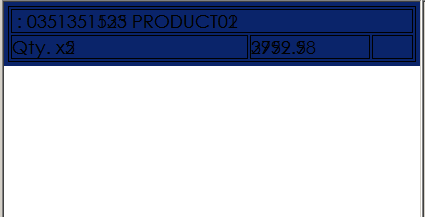
--这些是上面代码的结果.
该项目没有在第二项中抽签。
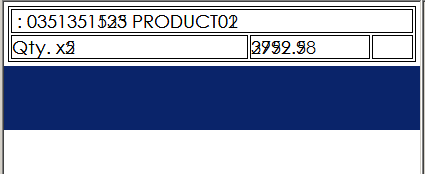
这两个项目都是在第一个条目中绘制的。
回答 1
Stack Overflow用户
回答已采纳
发布于 2015-05-20 16:30:05
你应该先把你的画家放在正确的位置,然后再用它作画。
在第一个painter->save()之后添加:
painter->resetTransform();
painter->translate(option.rect.topLeft());页面原文内容由Stack Overflow提供。腾讯云小微IT领域专用引擎提供翻译支持
原文链接:
https://stackoverflow.com/questions/30354639
复制相关文章
相似问题
腾讯云开发者

Copyright © 2013 - 2026 Tencent Cloud. All Rights Reserved. 腾讯云 版权所有
深圳市腾讯计算机系统有限公司 ICP备案/许可证号:粤B2-20090059  粤公网安备44030502008569号
腾讯云计算(北京)有限责任公司 京ICP证150476号 | 京ICP备11018762号