
纤维向日葵Tkinter
纤维向日葵Tkinter
提问于 2015-05-20 15:05:40
我试着用平纹机画出一朵斐波那契向日葵。这是正确的绘图,但我也希望能够绘制螺旋。然而,我不知道如何正确地连接它们。有什么想法吗?

这是我的密码:
import math
from tkinter import *

def s5(n,r): #works better for first direction
    spirals = []
    for i in range(n+1):
        spirals.append(((r*(i**0.5),((i*(360)/(((5**0.5)+1)/2))%360))))
    return spirals

# convert to cartesian to plot
def pol2cart(r,theta):
    x = r * math.cos(math.radians(theta))
    y = r * math.sin(math.radians(theta))
    return x,y

# set size of fib sun
num_points = 200
distance = 15

# do the cartesian conversion
coordinates = [pol2cart(r,t) for r,t in s5(num_points,distance)]

# center for the canvas
coordinates = [(x+250,y+250) for x,y in coordinates]

# create gui
master = Tk()
canvas = Canvas(master,width = 500,height=500)
canvas.pack()


# plot points
h= 1
for x,y in coordinates:
    canvas.create_oval(x+7,y+7,x-7,y-7)
    canvas.create_text(x,y,text=h)
    h += 1

mainloop()
这就是我想要达到的结果:

回答 2
Stack Overflow用户
回答已采纳
发布于 2015-05-20 16:22:12
这是一个有趣的问题,我刚刚画出了一个可能的解决方案。你可以从1到20开始,先把每个数字加到21。就是说你应该连接1到22,22到43,43到64,.再连接2到23,23到44,.
这给了你一个方向的踏板。
对于另一个方向,你可以做同样的事情,但从1开始到34,然后把34加到每个数字。这意味着你从1开始,再加上34。1,35,69,. 2,36,70,.
这两个数字显示了这些螺旋线的样子:
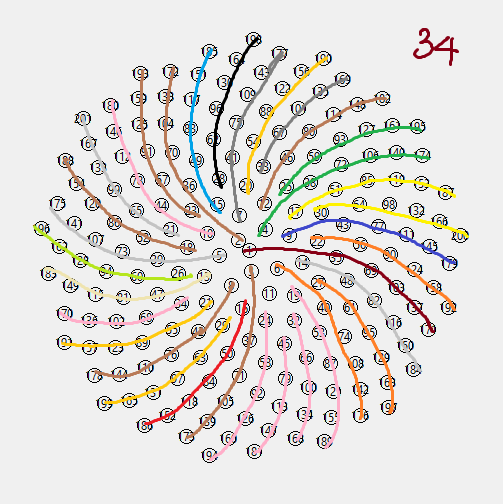
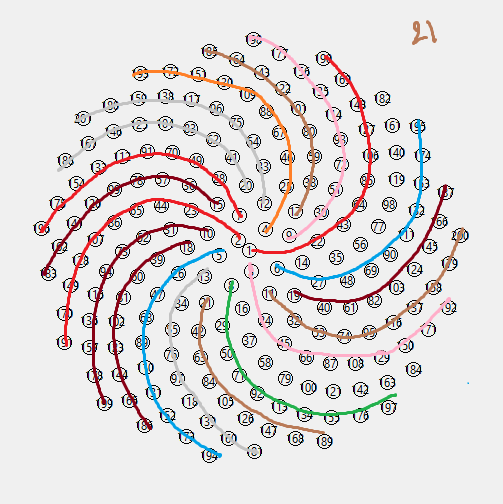
事实上,这些数字并不神奇,它们来自斐波纳契数字,基于你螺旋的层次,你应该去检测它。因此,你总是有数字差异: 0,1,1,2,3,5,8,13,21,34,55,.
Stack Overflow用户
发布于 2015-05-20 18:09:31
下面的程序实际上画了线,但我还没有找到21步和34步的动机。我怀疑这与您在s5函数( '5')中使用的数字有关。
import math
from Tkinter import *

class Fibonacci():
    def s5(self, n, r): # works better for first direction
        spirals = []
        for i in range(n+1):
            spirals.append(((r*(i**0.5),((i*(360)/(((5**0.5)+1)/2))%360))))
        return spirals

    def pol2cart(self, r, theta):
        x = r * math.cos(math.radians(theta))
        y = r * math.sin(math.radians(theta))
        return x,y

    def calculate_coordinates(self, num_points = 200, distance = 15):
        # do the cartesian conversion
        self.coordinates = [self.pol2cart(r, t) for r, t in self.s5(num_points, distance)]

        # center for the canvas
        self.coordinates = [(x+250,y+250) for x, y in self.coordinates]

    def plot_numbers(self, canvas):
        h = 1
        self.calculate_coordinates(num_points = 200, distance = 15)
        for x, y in self.coordinates:
            canvas.create_oval(x+7, y+7, x-7, y-7)
            canvas.create_text(x, y, text = h)
            h += 1

    def plot_lines(self, canvas):
        for delta in [21, 34]:
            for start in range(34):
                x0, y0 = self.coordinates[0]
                i = start
                while i < len(self.coordinates):
                    x1, y1 = self.coordinates[i]
                    canvas.create_line(x0, y0, x1, y1)
                    x0 = x1; y0 = y1
                    i += delta

    def create_gui(self):
        master = Tk()
        canvas = Canvas(master, width = 500, height = 500)
        canvas.pack()

        self.plot_numbers(canvas)
        self.plot_lines(canvas)

        mainloop()

def main():
    f = Fibonacci()
    f.create_gui()
    return 0

if __name__ == '__main__':
    main()
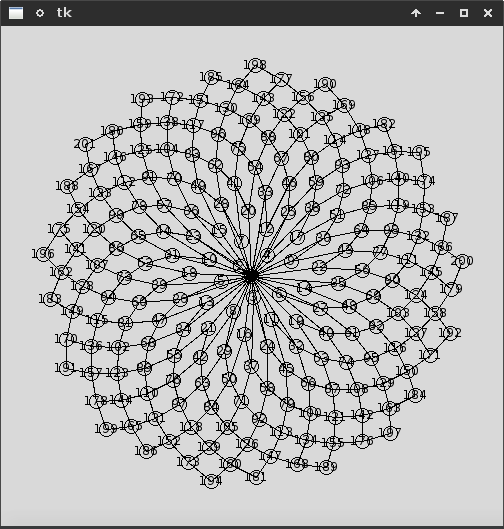
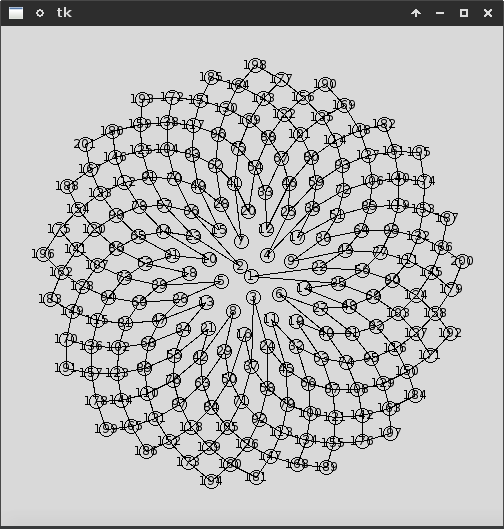
若要删除中心作为起点,请按以下方式修改plot_lines:
def plot_lines(self, canvas):
    for delta in [21, 34]:
        for start in range(34):
            x0, y0 = self.coordinates[start]
            print x0, y0
            i = start + delta
            while i < len(self.coordinates):
                x1, y1 = self.coordinates[i]
                canvas.create_line(x0, y0, x1, y1)
                x0 = x1; y0 = y1
                i += delta
这意味着:
页面原文内容由Stack Overflow提供。腾讯云小微IT领域专用引擎提供翻译支持
原文链接:
https://stackoverflow.com/questions/30353575
复制相关文章
相似问题
腾讯云开发者

Copyright © 2013 - 2026 Tencent Cloud. All Rights Reserved. 腾讯云 版权所有
深圳市腾讯计算机系统有限公司 ICP备案/许可证号:粤B2-20090059  粤公网安备44030502008569号
腾讯云计算(北京)有限责任公司 京ICP证150476号 | 京ICP备11018762号