
将PFFile转换为UIImage
将PFFile转换为UIImage
提问于 2015-05-19 05:24:54
将PFFile转换为UIImage的步骤是什么?
我设法从解析中获得了作为PFFile的映像。但是我不能向用户显示视图,因为它不是UIImage。
有人能指点我吗?
我一直在
error: [UIImageView setFile:]: unrecognized selector sent to instance 0x7ff2937a9bd0 on the console每当我试图从解析中获取图像文件并将其设置为UIImage时
下面是将文件设置为UIImageView的代码
var initialThumbnail = UIImage(named: "AppIcon")
        cell.customImage.image = initialThumbnail
        if let picture = object?["image"] as? PFFile {
            cell.customImage.file = picture
            cell.customImage.loadInBackground()
        }
这是customImage插座的代码
@IBOutlet weak var customImage: PFImageView!其他数据加载得很好,但唯一的问题是文件数据。
回答 1
Stack Overflow用户
回答已采纳
发布于 2015-05-19 05:47:22
我怀疑ImageView的班级是UIImageView而不是PFImageView.
选择你的imageView,到身份检查员那里,它一定是这样出现的.
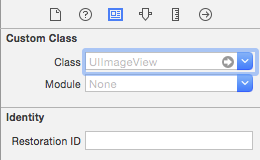
应该是这个..。
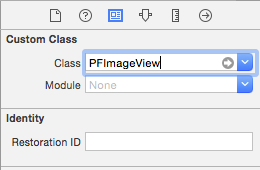
因为PFImageView理解属性“file”的getter和setter方法。
页面原文内容由Stack Overflow提供。腾讯云小微IT领域专用引擎提供翻译支持
原文链接:
https://stackoverflow.com/questions/30317367
复制相关文章
相似问题
腾讯云开发者

Copyright © 2013 - 2026 Tencent Cloud. All Rights Reserved. 腾讯云 版权所有
深圳市腾讯计算机系统有限公司 ICP备案/许可证号:粤B2-20090059  粤公网安备44030502008569号
腾讯云计算(北京)有限责任公司 京ICP证150476号 | 京ICP备11018762号