
为什么UITableViewAutomaticDimension不能工作?
嗨,有很多问题回答UITableViewCell of UITableView的动态高度。然而,当我这么做的时候,我觉得很奇怪。
以下是一些答案:
这里和这里
通常,这将响应单元格的动态高度。
tableView.estimatedRowHeight = 44.0
tableView.rowHeight = UITableView.automaticDimension
但就我而言,我不知道这句话不会起什么作用。
单击splitview中的选项卡后,将查看我的UITableView。这有用吗?
也许我漏掉了什么。有人能帮我吗?我花了两个小时做傻事。
这是我对标题的限制,标题可能很长,但标签不是。
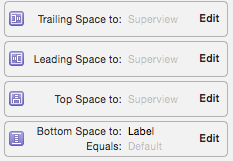
这是我的手机

回答 18
Stack Overflow用户
发布于 2015-05-18 10:32:21
为了使UITableViewAutomaticDimension工作,您必须设置与单元容器视图相关的所有左、右、底和顶约束。在您的情况下,您需要将缺少的底部空间添加到标题下标签的superview约束中。
Stack Overflow用户
发布于 2016-02-08 09:42:34
我以编程方式添加了约束,并意外地将它们直接添加到单元格中,即没有添加到contentView属性上。将约束添加到contentView解决了我的问题!
Stack Overflow用户
发布于 2017-10-17 12:01:26
若要为行高和估计行高设置自动尺寸,请确保以下步骤,对于单元格/行高布局,自动尺寸有效。
- 分配和实现tableview dataSource和委托
- 将
UITableViewAutomaticDimension分配给rowHeight & estimatedRowHeight - 实现委托/数据源方法(即
heightForRowAt并向其返回一个值UITableViewAutomaticDimension)
-
目标C:
// in ViewController.h
#import <UIKit/UIKit.h>

@interface ViewController : UIViewController <UITableViewDelegate, UITableViewDataSource>

  @property IBOutlet UITableView * table;

@end

// in ViewController.m

- (void)viewDidLoad {
    [super viewDidLoad];
    self.table.dataSource = self;
    self.table.delegate = self;

    self.table.rowHeight = UITableViewAutomaticDimension;
    self.table.estimatedRowHeight = UITableViewAutomaticDimension;
}

-(CGFloat)tableView:(UITableView *)tableView heightForRowAtIndexPath:(NSIndexPath *)indexPath {

    return UITableViewAutomaticDimension;
}
Swift:
@IBOutlet weak var table: UITableView!

override func viewDidLoad() {
    super.viewDidLoad()

    // Don't forget to set dataSource and delegate for table
    table.dataSource = self
    table.delegate = self

    // Set automatic dimensions for row height
    // Swift 4.2 onwards
    table.rowHeight = UITableView.automaticDimension
    table.estimatedRowHeight = UITableView.automaticDimension


    // Swift 4.1 and below
    table.rowHeight = UITableViewAutomaticDimension
    table.estimatedRowHeight = UITableViewAutomaticDimension

}


// UITableViewAutomaticDimension calculates height of label contents/text
func tableView(_ tableView: UITableView, heightForRowAt indexPath: IndexPath) -> CGFloat {
    // Swift 4.2 onwards
    return UITableView.automaticDimension

    // Swift 4.1 and below
    return UITableViewAutomaticDimension
}
用于UITableviewCell中的label实例
- 设置行数=0 (&换行模式=截断尾)
- 设置与其superview/ cell容器相关的所有约束(上、下、右)。
- 可选:为标签设置最小高度,如果您想要标签覆盖的最小垂直区域,即使没有数据。

备注:如果您有多个具有动态长度的标签(UIElements),则应该根据其内容大小来调整该标签:对于您希望以更高优先级展开/压缩的标签,请调整“内容拥抱和压缩优先级”。
https://stackoverflow.com/questions/30299319
复制相似问题
腾讯云开发者

Copyright © 2013 - 2026 Tencent Cloud. All Rights Reserved. 腾讯云 版权所有
深圳市腾讯计算机系统有限公司 ICP备案/许可证号:粤B2-20090059  粤公网安备44030502008569号
腾讯云计算(北京)有限责任公司 京ICP证150476号 | 京ICP备11018762号