
Imagick无法打开DNG图像。
Imagick无法打开DNG图像。
提问于 2015-05-17 01:44:57
如您所见,图像_IGP4559.DNG存在,但是Imagick无法打开它。JPEG图像效果很好。
readImage()返回相同的错误。
这是图像:IGP4559.DNG
我在终端中运行这个以排除所有其他变量。
$ ll /var/www/_IGP4559.DNG
-rw-rw-rw- 1 monsun monsun 11841201 May 17 03:37 /var/www/_IGP4559.DNG
$ php -a
Interactive mode enabled

php > new Imagick('/var/www/_IGP4559.DNG');
PHP Warning:  Uncaught exception 'ImagickException' with message 'unable to open image `/tmp/magick-29917oe6CM9MIkN8A.ppm': No such file or directory @ error/blob.c/OpenBlob/2709' in php shell code:1
Stack trace:
#0 php shell code(1): Imagick->__construct('/var/www/_IGP45...')
#1 {main}
  thrown in php shell code on line 1
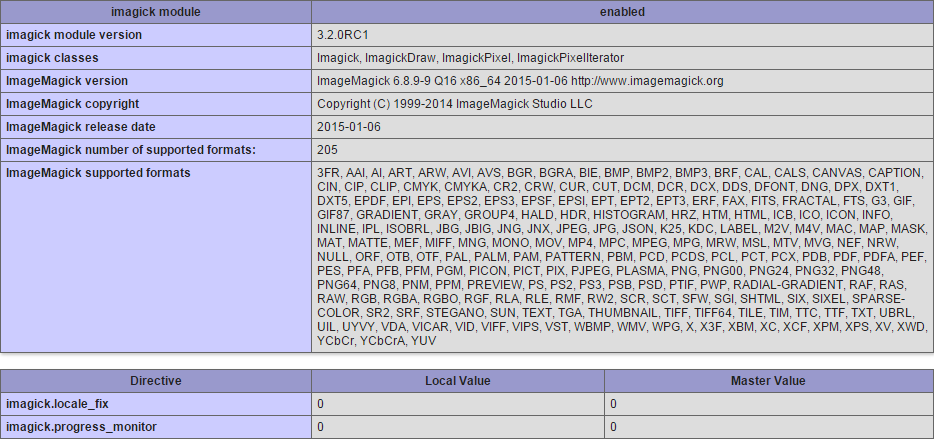
回答 1
Stack Overflow用户
回答已采纳
发布于 2015-05-17 14:12:21
ImageMagick使用其他程序读取一些图像格式,包括DNG。
可能发生的情况是,ImageMagick希望能够用于读取DNG的程序要么不在系统上,要么无法正常工作。
列出这些其他程序的文件称为delegates.xml。
在我的系统中,DNG解码的条目是:
<delegate decode="dng:decode" command=""ufraw-batch" --silent --create-id=also --out-type=png --out-depth=16 "--output=%u.png" "%i""/>也就是说,它试图使用程序‘ufraw-批处理’进行解码,就像您看到它失败了一样,因为该程序在我的系统中无法使用。
要解决这个问题,您需要安装ufraw,或者安装类似的包,可以将文件从DNG格式转换为ImageMagick可以直接读取的标准包。
页面原文内容由Stack Overflow提供。腾讯云小微IT领域专用引擎提供翻译支持
原文链接:
https://stackoverflow.com/questions/30282523
复制相关文章
相似问题
腾讯云开发者

Copyright © 2013 - 2026 Tencent Cloud. All Rights Reserved. 腾讯云 版权所有
深圳市腾讯计算机系统有限公司 ICP备案/许可证号:粤B2-20090059  粤公网安备44030502008569号
腾讯云计算(北京)有限责任公司 京ICP证150476号 | 京ICP备11018762号