
使用没有故事板的BWWalkthrough库,演练定制
我正在使用BWWalkthrough库作为我的个人漫游。实现起来非常简单,但是我在BWWalkthroughViewController上有一个错误:我不会使用故事板来创建这个主控制器,所以我已经通过代码创建了我的自定义视图,然后在viewDidLoad of BWWalkthroughViewController ive中设置了视图和pageControl。其余代码与github存储库中的示例相同。
这就是viewDidLoad of BWWalkthroughViewController:
override func viewDidLoad() {
    super.viewDidLoad()
    let welcomeview: WelcomeView = WelcomeView() // my custom view
    view = welcomeview
    self.pageControl = welcomeview.pageControl
    ...
}
而且,因为它是第一个视图,所以rootViewController是用修改了viewDidLoad的BWWalkthroughViewController设置的。因此,我有一个在AppDelegate.swift中设置本演练的功能:
func showWelcomeView() -> BWWalkthroughViewController{
    let storyboard = UIStoryboard(name: "Welcome", bundle: nil)

    let walkthrough: BWWalkthroughViewController = BWWalkthroughViewController()
    let page_zero = storyboard.instantiateViewControllerWithIdentifier("walk_0") as! UIViewController
    let page_one = storyboard.instantiateViewControllerWithIdentifier("walk_1") as! UIViewController
    let page_two = storyboard.instantiateViewControllerWithIdentifier("walk_2") as! UIViewController
    let page_three = storyboard.instantiateViewControllerWithIdentifier("walk_3") as! UIViewController
    let page_four = storyboard.instantiateViewControllerWithIdentifier("walk_4") as! UIViewController

    walkthrough.delegate = self
    walkthrough.addViewController(page_zero)
    walkthrough.addViewController(page_one)
    walkthrough.addViewController(page_two)
    walkthrough.addViewController(page_three)
    walkthrough.addViewController(page_four)


    return walkthrough
}
我在这里使用这个功能:
func application(application: UIApplication, didFinishLaunchingWithOptions launchOptions: [NSObject: AnyObject]?) -> Bool {
    // Override point for customization after application launch.


    self.window = UIWindow(frame: UIScreen.mainScreen().bounds)
    self.window?.rootViewController = showWelcomeView() // func usedhere
    return true
}
该应用程序运行时没有错误。我可以看到我的自定义视图和所有4个子视图(walk_0.walk_4),但我不能正确地滑动它们:滚动是免费的,不会在每一页上停止。
所以..。我的自定义视图错过了一些步骤?请救救我!
这是一个来自我的IPhone的屏幕截图,滚动图位于两个子视图之间:

回答 3
Stack Overflow用户
发布于 2015-06-19 15:26:56
我在BWWalkthroughViewController中使用滚动视图的属性修复了这个问题。
override func viewDidLoad() {
    super.viewDidLoad()

   ..

    scrollview.pagingEnabled = true
}干得不错,但不知道为什么。该滚动视图的默认设置为init中设置的pagingeEnabled = true:
required init(coder aDecoder: NSCoder) {
    // Setup the scrollview
    scrollview = UIScrollView()
    scrollview.showsHorizontalScrollIndicator = false
    scrollview.showsVerticalScrollIndicator = false
    scrollview.pagingEnabled = true  // Default of scrollview

    // Controllers as empty array
    controllers = Array()

    super.init(coder: aDecoder)
}Stack Overflow用户
发布于 2015-11-23 10:42:58
在BWWalkthroughViewController类中添加以下函数。
override func viewDidLayoutSubviews(){
    // Constraints
        let metricDict = ["w":view.bounds.size.width,"h":view.bounds.size.height]

        // - Generic cnst
        for vc in controllers {
            vc.view.addConstraints(NSLayoutConstraint.constraintsWithVisualFormat("V:[view(h)]", options:[], metrics: metricDict, views: ["view":vc.view]))
            vc.view.addConstraints(NSLayoutConstraint.constraintsWithVisualFormat("H:[view(w)]", options:[], metrics: metricDict, views: ["view":vc.view]))
            scrollview.addConstraints(NSLayoutConstraint.constraintsWithVisualFormat("V:|-0-[view]|", options:[], metrics: nil, views: ["view":vc.view,]))
        }
}从addViewController函数中删除以下行
// Constraints
let metricDict = ["w":vc.view.bounds.size.width,"h":vc.view.bounds.size.height]
    // - Generic cnst
        vc.view.addConstraints(NSLayoutConstraint.constraintsWithVisualFormat("V:[view(h)]", options:[], metrics: metricDict, views: ["view":vc.view]))
        vc.view.addConstraints(NSLayoutConstraint.constraintsWithVisualFormat("H:[view(w)]", options:[], metrics: metricDict, views: ["view":vc.view]))
scrollview.addConstraints(NSLayoutConstraint.constraintsWithVisualFormat("V:|-0-[view]|", options:[], metrics: nil, views: ["view":vc.view,]))Stack Overflow用户
发布于 2015-05-17 21:35:34
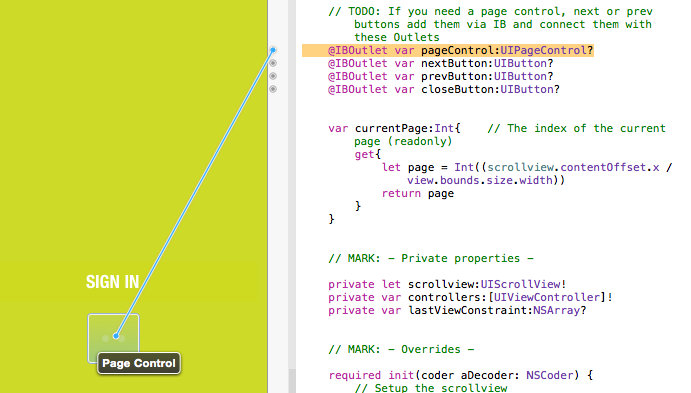
你有没有连接
@IBOutlet var pageControl:UIPageControl?
在BWWalkthroughViewController中,页面控制器在视图控制器中?
https://stackoverflow.com/questions/30258686
复制相似问题
腾讯云开发者

Copyright © 2013 - 2026 Tencent Cloud. All Rights Reserved. 腾讯云 版权所有
深圳市腾讯计算机系统有限公司 ICP备案/许可证号:粤B2-20090059  粤公网安备44030502008569号
腾讯云计算(北京)有限责任公司 京ICP证150476号 | 京ICP备11018762号