
如何调试角for循环
我正在尝试做一个批上传多个pdfs。每个文件都以特定的格式命名。
02-2015 HIP BS32
日期/管道缩写/位置缩写。
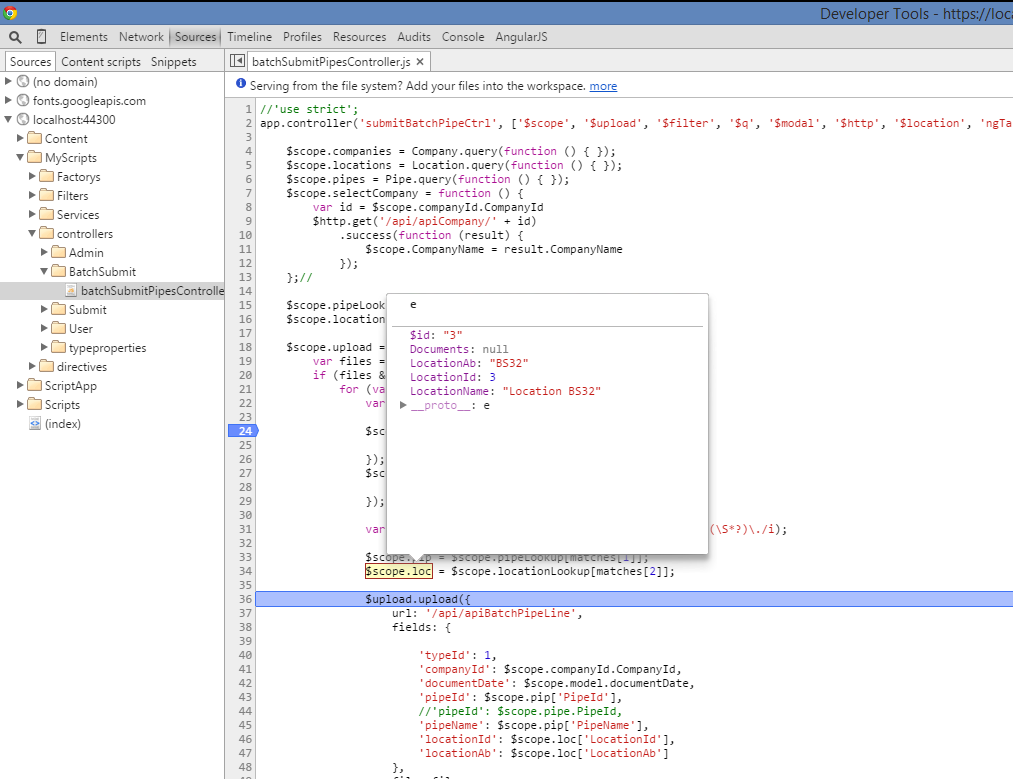
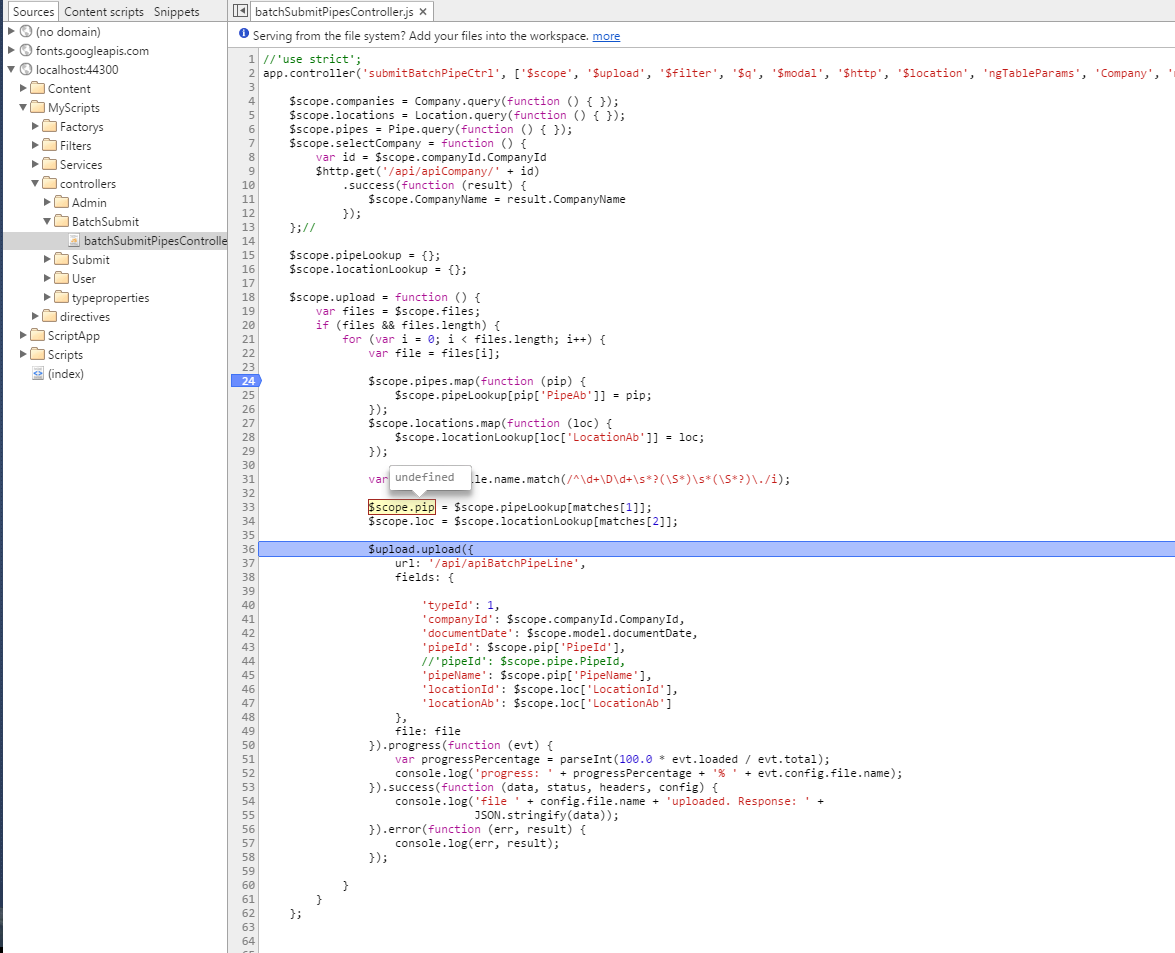
我正在通过一个循环运行这些文件,以比较数据库中列表的缩写。然后,在将这些属性传递给之前,将这些属性分配给对象。管道表和位置表的设置完全相同。我现在面临的问题是管道问题。问题就在这里,
$scope.pip = $scope.pipeLookup[matches[1]];
$scope.loc = $scope.locationLookup[matches[2]];
locationLookup正在匹配位置缩写并将其放置在$scope.loc变量中。然而,pipeLookup不起作用。当然,它是抛出错误,因为管道属性是未定义的。我不知道我是不是刚看完什么东西。如果需要更多的信息,请告诉我
 $scope.companies = Company.query(function () { });
$scope.locations = Location.query(function () { });
$scope.pipes = Pipe.query(function () { });
$scope.selectCompany = function () {
    var id = $scope.companyId.CompanyId
    $http.get('/api/apiCompany/' + id)
        .success(function (result) {
            $scope.CompanyName = result.CompanyName
        });
};//

$scope.pipeLookup = {};
$scope.locationLookup = {};

$scope.upload = function () {
    var files = $scope.files;
    if (files && files.length) {
        for (var i = 0; i < files.length; i++) {
            var file = files[i];

            $scope.pipes.map(function (pip) {
                $scope.pipeLookup[pip['PipeAb']] = pip;
            });
            $scope.locations.map(function (loc) {
                $scope.locationLookup[loc['LocationAb']] = loc;
            });

            var matches = file.name.match(/^\d+\D\d+\s*?(\S*)\s*(\S*?)\./i);

            $scope.pip = $scope.pipeLookup[matches[1]];
            $scope.loc = $scope.locationLookup[matches[2]];

            $upload.upload({
                url: '/api/apiBatchPipeLine',
                fields: {
                    'typeId': 1,
                    'companyId': $scope.companyId.CompanyId,
                    'documentDate': $scope.model.documentDate,
                    'pipeId': $scope.pip['PipeId'],
                    'pipeName': $scope.pip['PipeName'],
                    'locationId': $scope.loc['LocationId'],
                    'locationAb': $scope.loc['LocationAb']
                },
                file: file
            }).progress(function (evt) {
                var progressPercentage = parseInt(100.0 * evt.loaded / evt.total);
                console.log('progress: ' + progressPercentage + '% ' + evt.config.file.name);
            }).success(function (data, status, headers, config) {
                console.log('file ' + config.file.name + 'uploaded. Response: ' +
                            JSON.stringify(data));
            }).error(function (err, result) {
                console.log(err, result);
            });

        }
    }
$scope.pipeLookup JSON
{"ANR ":{"$id":"1","PipeId":1,"PipeAb":"ANR ","PipeName":"Transcanada ANR Pipeline","Documents":null},"CGT ":{"$id":"2","PipeId":2,"PipeAb":"CGT ","PipeName":"Columbia Gulf Transmission","Documents":null},"CHA ":{"$id":"3","PipeId":3,"PipeAb":"CHA ","PipeName":"Enterprise Channel Pipeline","Documents":null},"FGT ":{"$id":"4","PipeId":4,"PipeAb":"FGT ","PipeName":"Energy Transfer Florida Gas Transmission","Documents":null},"GAB ":{"$id":"5","PipeId":5,"PipeAb":"GAB ","PipeName":"Enbridge Garden Banks Pipeline","Documents":null},"GLO ":{"$id":"6","PipeId":6,"PipeAb":"GLO ","PipeName":"American Midstream Gloria Pipeline","Documents":null},"GSO ":{"$id":"7","PipeId":7,"PipeAb":"GSO ","PipeName":"Boardwalk Gulf South Pipeline","Documents":null},"HIO ":{"$id":"8","PipeId":8,"PipeAb":"HIO ","PipeName":"Enterprise High Island Offshore System","Documents":null},"HIP ":{"$id":"9","PipeId":9,"PipeAb":"HIP ","PipeName":"American Midstream High Point Pipeline","Documents":null},"HPL ":{"$id":"10","PipeId":10,"PipeAb":"HPL ","PipeName":"Energy Transfer Houston Pipeline","Documents":null},"TEJ ":{"$id":"11","PipeId":11,"PipeAb":"TEJ ","PipeName":"Kinder Morgan Tejas Pipeline","Documents":null},"KIN ":{"$id":"12","PipeId":12,"PipeAb":"KIN ","PipeName":"Kinetica Partners Pipeline","Documents":null},"NGP ":{"$id":"13","PipeId":13,"PipeAb":"NGP ","PipeName":" Kinder Morgan Natural Gas Pipeline","Documents":null},"SER ":{"$id":"14","PipeId":14,"PipeAb":"SER ","PipeName":" Energy Transfer Sea Robin Pipeline Company ","Documents":null},"SNT ":{"$id":"15","PipeId":15,"PipeAb":"SNT ","PipeName":"Kinder Morgan Southern Natural Gas Company","Documents":null},"SRY ":{"$id":"16","PipeId":16,"PipeAb":"SRY ","PipeName":"MCPO Stingray Pipeline Company","Documents":null},"TGT ":{"$id":"17","PipeId":17,"PipeAb":"TGT ","PipeName":"Kinder Morgan Tennessee Gas Pipeline","Documents":null},"TET ":{"$id":"18","PipeId":18,"PipeAb":"TET ","PipeName":"Spectra Energy Texas Eastern Pipeline","Documents":null},"TXG ":{"$id":"19","PipeId":19,"PipeAb":"TXG ","PipeName":"Boardwalk Texas Gas Transmission","Documents":null},"TSC ":{"$id":"20","PipeId":20,"PipeAb":"TSC ","PipeName":"Williams Transcontinental Gas Pipeline","Documents":null},"TRK ":{"$id":"21","PipeId":21,"PipeAb":"TRK ","PipeName":"Energy Transfer Trunkline Gas Company","Documents":null},"VGS ":{"$id":"22","PipeId":22,"PipeAb":"VGS ","PipeName":"Targa Venice Gathering System","Documents":null}}$scope.locationLookup Json
{"VR16":{"$id":"1","LocationId":1,"LocationAb":"VR16","LocationName":"Location VR16","Documents":null},"MP140\t":{"$id":"2","LocationId":2,"LocationAb":"MP140\t","LocationName":"Location MP140","Documents":null},"BS32":{"$id":"3","LocationId":3,"LocationAb":"BS32","LocationName":"Location BS32","Documents":null},"MP46":{"$id":"4","LocationId":4,"LocationAb":"MP46","LocationName":"Location MP46","Documents":null},"DF78":{"$id":"5","LocationId":5,"LocationAb":"DF78","LocationName":"Location DF78","Documents":null},"UR56":{"$id":"6","LocationId":6,"LocationAb":"UR56","LocationName":"Location UR56","Documents":null}}回答 1
Stack Overflow用户
发布于 2015-05-14 03:04:18
您的正则表达式期望有一个点(.)字符结尾,但字符串不包含点(.)最后,它失败了。
如果我尝试您的regex ^\d+\D\d+\s*?(\S*)\s*(\S*?)\. 这里并传入02-2015 HIP BS32,它就不匹配了,因为您的regex在末尾需要一个.文本。
更新:下面是您的pipeLookup JSON的片段
"HIP ": {
"$id": "9",
"PipeId": 9,
"PipeAb": "HIP ",
"PipeName": "American Midstream High Point Pipeline",
"Documents": null
}
这里的关键是"HIP“,注意HIP之后的额外空间。这就是为什么$scope.pipeLookup[matches[1]]什么也不返回的原因。在将尾随空间存储在pipeLookup对象中之前,先删除它
Update:更仔细地看一下,如果file.name包含这个值02-2015 HIP BS32,如果您想从其中获取HIP值,可以使用以下正则表达式
/^\d+\D\d+\s*(\S*\s*)(\S*)/i下面是这个正则表达式的jsbin现场演示
https://stackoverflow.com/questions/30228073
复制相似问题
腾讯云开发者

Copyright © 2013 - 2026 Tencent Cloud. All Rights Reserved. 腾讯云 版权所有
深圳市腾讯计算机系统有限公司 ICP备案/许可证号:粤B2-20090059  粤公网安备44030502008569号
腾讯云计算(北京)有限责任公司 京ICP证150476号 | 京ICP备11018762号