
使用Android OpenGL ES 2.0创建三维立方体
我想在我的电脑上制作3D立方体。不幸的是,在组合了来自不同站点的一些代码之后,我仍然无法创建多维数据集。
有人能看看我的代码并建议我做错了什么吗?我的想法是使一个立方体的每个面在不同的颜色和所有的中心在屏幕上。
import android.opengl.GLES20;

import java.nio.ByteBuffer;
import java.nio.ByteOrder;
import java.nio.FloatBuffer;
import java.nio.ShortBuffer;

import javax.microedition.khronos.opengles.GL10;

public class Cube {
    private FloatBuffer vertexBuffer;  // Buffer for vertex-array
    private ShortBuffer indexBuffer;
    private int numFaces = 6;
    private int colorHandle;
    private final String vertexShaderCode =
            "uniform mat4 uMVPMatrix;" +
                    "attribute vec4 vPosition;" +
                    "void main() {" +
                    "  gl_Position = uMVPMatrix * vPosition;" +
                    "}";

    private final String fragmentShaderCode =
            "precision mediump float;" +
                    "uniform vec4 vColor;" +
                    "void main() {" +
                    "  gl_FragColor = vColor;" +
                    "}";
    private int MVPMatrixHandle;
    private int positionHandle;
    private final int program;

    static final int COORDS_PER_VERTEX = 3;
    private final int vertexStride = COORDS_PER_VERTEX * 4; // 4 bytes per vertex

    private float[][] colors = {  // Colors of the 6 faces
            {1.0f, 0.5f, 0.0f, 1.0f},  // 0. orange
            {1.0f, 0.0f, 1.0f, 1.0f},  // 1. violet
            {0.0f, 1.0f, 0.0f, 1.0f},  // 2. green
            {0.0f, 0.0f, 1.0f, 1.0f},  // 3. blue
            {1.0f, 0.0f, 0.0f, 1.0f},  // 4. red
            {1.0f, 1.0f, 0.0f, 1.0f}   // 5. yellow
    };

    private float[] vertices = {  // Vertices of the 6 faces
            // FRONT
            -1.0f, -1.0f,  1.0f,  // 0. left-bottom-front
            1.0f, -1.0f,  1.0f,  // 1. right-bottom-front
            -1.0f,  1.0f,  1.0f,  // 2. left-top-front
            1.0f,  1.0f,  1.0f,  // 3. right-top-front
            // BACK
            1.0f, -1.0f, -1.0f,  // 6. right-bottom-back
            -1.0f, -1.0f, -1.0f,  // 4. left-bottom-back
            1.0f,  1.0f, -1.0f,  // 7. right-top-back
            -1.0f,  1.0f, -1.0f,  // 5. left-top-back
            // LEFT
            -1.0f, -1.0f, -1.0f,  // 4. left-bottom-back
            -1.0f, -1.0f,  1.0f,  // 0. left-bottom-front
            -1.0f,  1.0f, -1.0f,  // 5. left-top-back
            -1.0f,  1.0f,  1.0f,  // 2. left-top-front
            // RIGHT
            1.0f, -1.0f,  1.0f,  // 1. right-bottom-front
            1.0f, -1.0f, -1.0f,  // 6. right-bottom-back
            1.0f,  1.0f,  1.0f,  // 3. right-top-front
            1.0f,  1.0f, -1.0f,  // 7. right-top-back
            // TOP
            -1.0f,  1.0f,  1.0f,  // 2. left-top-front
            1.0f,  1.0f,  1.0f,  // 3. right-top-front
            -1.0f,  1.0f, -1.0f,  // 5. left-top-back
            1.0f,  1.0f, -1.0f,  // 7. right-top-back
            // BOTTOM
            -1.0f, -1.0f, -1.0f,  // 4. left-bottom-back
            1.0f, -1.0f, -1.0f,  // 6. right-bottom-back
            -1.0f, -1.0f,  1.0f,  // 0. left-bottom-front
            1.0f, -1.0f,  1.0f   // 1. right-bottom-front
    };

    short[] indeces = {
            0, 1, 3, 1, 2, 3,
            4, 5, 7, 5, 6, 7,
            8, 9, 11, 9, 10, 11,
            12, 13, 15, 13, 14, 15,
            16, 17, 19, 17, 18, 19,
            20, 21, 23, 21, 22, 23,

    };

    // Constructor - Set up the buffers
    public Cube() {
        // Setup vertex-array buffer. Vertices in float. An float has 4 bytes
        ByteBuffer vbb = ByteBuffer.allocateDirect(vertices.length * 4);
        vbb.order(ByteOrder.nativeOrder()); // Use native byte order
        vertexBuffer = vbb.asFloatBuffer(); // Convert from byte to float
        vertexBuffer.put(vertices);         // Copy data into buffer
        vertexBuffer.position(0);           // Rewind

        indexBuffer = ByteBuffer.allocateDirect(indeces.length * 2).order(ByteOrder.nativeOrder()).asShortBuffer();
        indexBuffer.put(indeces).position(0);

        int vertexShader = StageRenderer.loadShader(GLES20.GL_VERTEX_SHADER, vertexShaderCode);
        int fragmentShader = StageRenderer.loadShader(GLES20.GL_FRAGMENT_SHADER, fragmentShaderCode);

        program = GLES20.glCreateProgram();
        GLES20.glAttachShader(program, vertexShader);
        GLES20.glAttachShader(program, fragmentShader);
        GLES20.glLinkProgram(program);
    }

    // Draw the shape
    public void draw(float[] mvpMatrix) {
        GLES20.glUseProgram(program);

        positionHandle = GLES20.glGetAttribLocation(program, "vPosition");
        GLES20.glEnableVertexAttribArray(positionHandle);
        GLES20.glVertexAttribPointer(positionHandle, COORDS_PER_VERTEX, GLES20.GL_FLOAT, false, vertexStride, vertexBuffer);

        MVPMatrixHandle = GLES20.glGetUniformLocation(program, "uMVPMatrix");
        GLES20.glUniformMatrix4fv(MVPMatrixHandle, 1, false, mvpMatrix, 0);
        // Render all the faces
        for (int face = 0; face < numFaces; face++) {
            // Set the color for each of the faces
            colorHandle = GLES20.glGetUniformLocation(program, "vColor");
            GLES20.glUniform4fv(colorHandle, 1, colors[face], 0);
        }

        GLES20.glDrawElements(GLES20.GL_TRIANGLES, 36, GLES20.GL_UNSIGNED_SHORT, indexBuffer);

        GLES20.glDisableVertexAttribArray(positionHandle);
    }
}
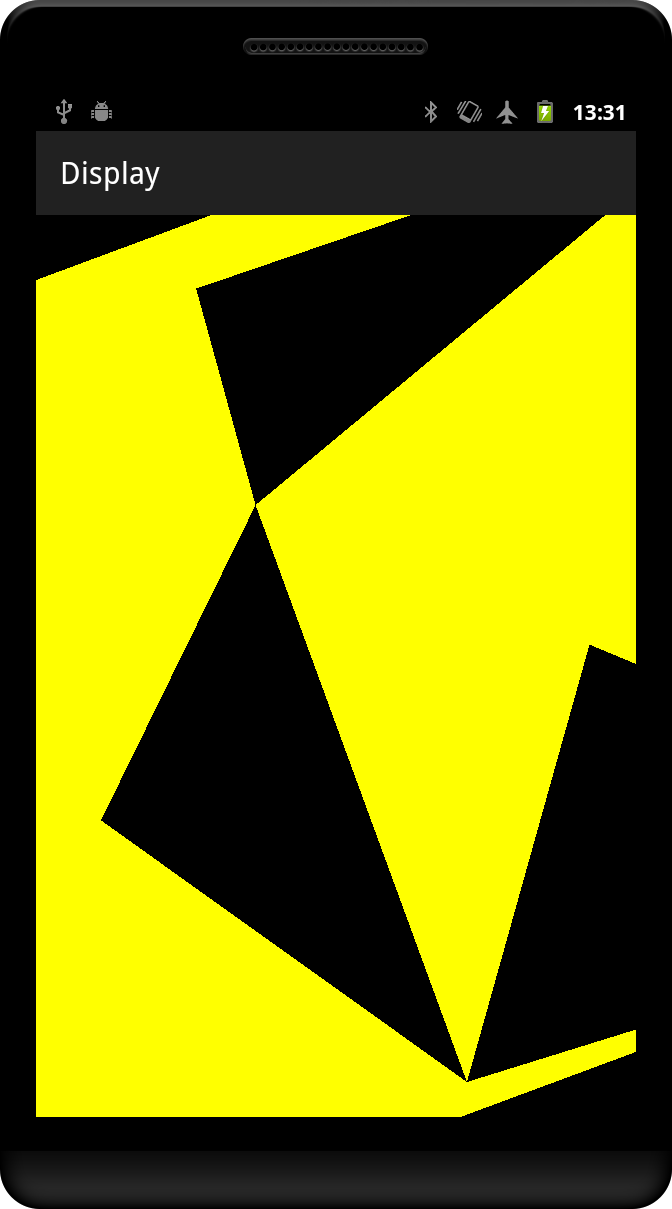
目前,我正在收到这样的结果:
回答 3
Stack Overflow用户
发布于 2015-05-13 02:39:02
您的索引根本不匹配您的顶点。让我们看看第一张脸。前4个顶点的坐标如下:
-1.0f, -1.0f,  1.0f,
 1.0f, -1.0f,  1.0f,
-1.0f,  1.0f,  1.0f,
 1.0f,  1.0f,  1.0f,
在x/y平面上绘制这方面的草图,并显示以下指标:
2---3
|   |
|   |
|   |
0---1
第一个面的索引数组中的条目是:
0, 1, 3, 1, 2, 3,将其映射到上一个图中,这些索引定义了以下两个三角形:
    3    2---3
   /|     \  |
  / |      \ |
 /  |       \|
0---1        1
如你所知,这两个三角形重叠,不覆盖整个四边形。你需要的是以下几点:
2---3
|\  |
| \ |
|  \|
0---1
因此,这张脸的一个正确的索引序列是:
0, 1, 2, 2, 1, 3,前3和第2 3指数现在匹配这两个三角形。另外,请注意,它们都是逆时针方向枚举的,如果您曾经启用过后台裁剪,则这一点变得非常重要。您将需要对所有其他面以相同的方式修正索引序列。
代码中还有一个次要问题,一旦索引被整理好,颜色就无法正常工作:
for (int face = 0; face < numFaces; face++) {
    // Set the color for each of the faces
    colorHandle = GLES20.glGetUniformLocation(program, "vColor");
    GLES20.glUniform4fv(colorHandle, 1, colors[face], 0);
}
因为在设置每个统一值之后,没有绘制任何东西,所以这里有一个循环是没有用的。最后,将为颜色设置最后一个值,其他颜色不用于任何东西。
要做到这一点,您要么必须一次只画一个脸(6个索引),在这个循环中。或者,您必须为颜色引入一个顶点属性,就像用于这些位置的属性一样。
Stack Overflow用户
发布于 2017-08-12 11:31:08
正确的做法是:
private float[] vertices = {  // Vertices of the 6 faces
        // FRONT
        -1.0f, -1.0f,  1.0f,  // 0. left-bottom-front
        1.0f, -1.0f,  1.0f,  // 1. right-bottom-front
        -1.0f,  1.0f,  1.0f,  // 2. left-top-front
        -1.0f,  1.0f,  1.0f,  // 2. left-top-front
        1.0f, -1.0f,  1.0f,  // 1. right-bottom-front
        1.0f,  1.0f,  1.0f,  // 3. right-top-front
        // BACK
        1.0f, -1.0f, -1.0f,  // 6. right-bottom-back
        1.0f,  1.0f, -1.0f,  // 7. right-top-back
        -1.0f, -1.0f, -1.0f,  // 4. left-bottom-back
        -1.0f, -1.0f, -1.0f,  // 4. left-bottom-back
        -1.0f,  1.0f, -1.0f,  // 5. left-top-back
        1.0f,  1.0f, -1.0f,  // 7. right-top-back
        // LEFT
        -1.0f, -1.0f, -1.0f,  // 4. left-bottom-back
        -1.0f, -1.0f,  1.0f,  // 0. left-bottom-front
        -1.0f,  1.0f,  1.0f,  // 2. left-top-front
        -1.0f,  1.0f,  1.0f,  // 2. left-top-front
        -1.0f,  1.0f, -1.0f,  // 5. left-top-back
        -1.0f, -1.0f, -1.0f,  // 4. left-bottom-back
        // RIGHT
        1.0f, -1.0f,  1.0f,  // 1. right-bottom-front
        1.0f, -1.0f, -1.0f,  // 6. right-bottom-back
        1.0f,  1.0f, -1.0f,  // 7. right-top-back
        1.0f,  1.0f, -1.0f,  // 7. right-top-back
        1.0f,  1.0f,  1.0f,  // 3. right-top-front
        1.0f, -1.0f,  1.0f,  // 1. right-bottom-front
        // TOP
        -1.0f,  1.0f,  1.0f,  // 2. left-top-front
        1.0f,  1.0f,  1.0f,  // 3. right-top-front
        1.0f,  1.0f, -1.0f,  // 7. right-top-back
        1.0f,  1.0f, -1.0f,  // 7. right-top-back
        -1.0f,  1.0f, -1.0f,  // 5. left-top-back
        -1.0f,  1.0f,  1.0f,  // 2. left-top-front
        // BOTTOM
        -1.0f, -1.0f, -1.0f,  // 4. left-bottom-back
        1.0f, -1.0f, -1.0f,  // 6. right-bottom-back
        1.0f, -1.0f,  1.0f,   // 1. right-bottom-front
        1.0f, -1.0f,  1.0f,   // 1. right-bottom-front
        -1.0f, -1.0f,  1.0f,  // 0. left-bottom-front
        -1.0f, -1.0f, -1.0f  // 4. left-bottom-back
};Stack Overflow用户
发布于 2018-11-16 13:21:57
由于我有完全相同的问题,这里有一些更多的实际修复的提示。
除了Reto Koradio的有益回答外,我还做了以下修改:
在draw方法中:
// can be moved outside the for loop
mColorHandle = GLES20.glGetUniformLocation(mProgram, "vColor");

// Render all the faces
for (int face = 0; face < numFaces; face++) {
  // Set the color for each of the faces
  GLES20.glUniform4fv(mColorHandle, 1, colors[face], 0);
  // update the position of the index buffer (6 indices per drawn face)
  indexBuffer.position(face * 6);
  // draw each face by using the index buffer
  GLES20.glDrawElements(GLES20.GL_TRIANGLES, 6, GLES20.GL_UNSIGNED_SHORT, indexBuffer);
}https://stackoverflow.com/questions/30202248
复制相似问题
腾讯云开发者

Copyright © 2013 - 2026 Tencent Cloud. All Rights Reserved. 腾讯云 版权所有
深圳市腾讯计算机系统有限公司 ICP备案/许可证号:粤B2-20090059  粤公网安备44030502008569号
腾讯云计算(北京)有限责任公司 京ICP证150476号 | 京ICP备11018762号