
@字体-不使用特定版本的11
我知道有很多类似的问题,但这种情况看起来真的很奇怪。@字体-脸似乎是打破了11 (Windows 7 Pro)。具体来说,版本:11.0.9600.17728,更新版本:11.0.18。
@字体-face在Chrome、Firefox、Safari、Opera ( Linux和Windows都适用)上运行良好。事实上,它甚至在Internet版本上工作:11.0.9600.17633,更新版本:11.0.16,它也运行在Windows7上的另一台机器上。
开发人员控制台中没有任何东西表明获取字体有任何问题。我已经将html/css简化为一些非常基本的东西来重现问题。在下面的情况中,两个自定义字体都不能工作(对于特定的IE版本):
<html>
<head>
    <link rel="stylesheet" type="text/css" href="test.css" />
</head>
<body>
    <p>This font should be Roboto Thin</p>
    <p>There should be icons below. If not, then font-face is not working.</p>
    <span>a</span>
    <span>b</span>
    <span>c</span>
    <span>d</span>
    <span>e</span>
    <span>f</span>
    <span>g</span>
    <span>h</span>
    <span>i</span>
    <span>j</span>
    <span>k</span>
    <span>l</span>
    <span>m</span>
</body>
</html>
...and CSS:
@charset "UTF-8";

@font-face {
    font-family: 'robotothin';
    src: url('roboto-thin-webfont.eot');
    src: url('roboto-thin-webfont.eot?#iefix') format('embedded-opentype'),
         url('roboto-thin-webfont.woff') format('woff'),
         url('roboto-thin-webfont.ttf') format('truetype'),
         url('roboto-thin-webfont.svg#robotothin') format('svg');
    font-weight: normal;
    font-style: normal;
}

@font-face {
    font-family: 'typicons';
    src: url('typicons-regular-webfont.ttf');
}

p {
    font-family: robotothin;
    font-size: 26px;
    color: #666;
}

span {
    font-family: typicons;
    font-size: 30px;
    color: #0062A8;
}你可以找到那个在这里运行的代码。
如果我使用IE版本查看该页面会导致问题,文本字体将是默认的,而不是图标,您将只看到span标签中的字母。
鉴于@字体-face在我测试过的其他浏览器(甚至不同版本的IE 11)中都能工作,这可能是IE版本的缺陷吗?我还能做些什么来进一步修复或调试吗?
回答 4
Stack Overflow用户
发布于 2015-05-11 18:17:59
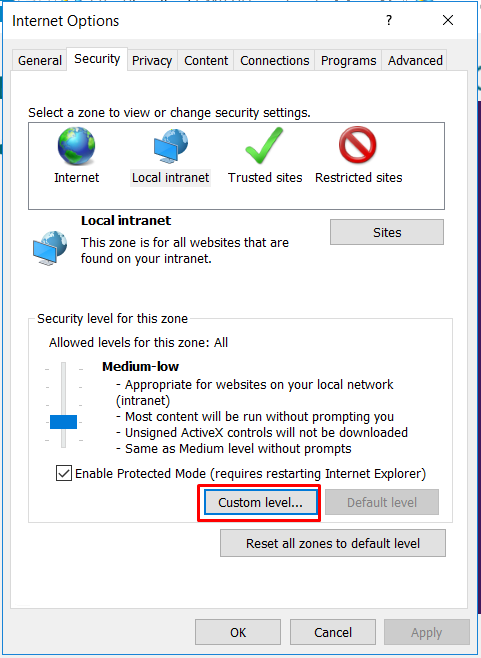
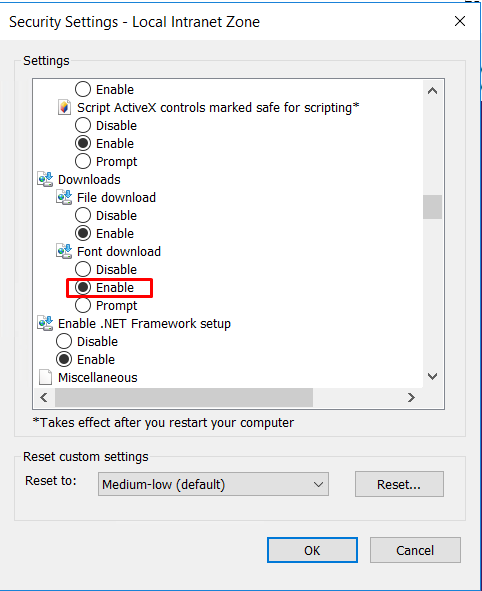
Stack Overflow用户
发布于 2018-03-09 19:04:08
如果问题是“@字体-face不使用特定版本的11”
检查字体可嵌入性:可安装性
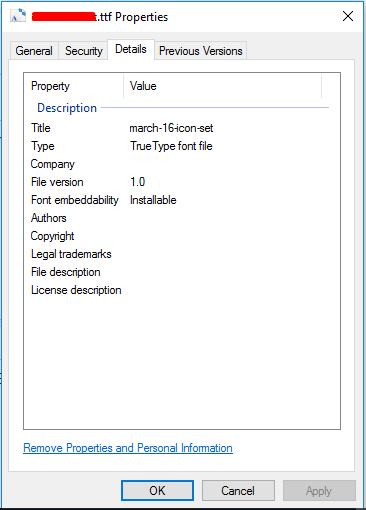
如果它不是可嵌入的:可安装的添加可安装字体,那么它将完美地工作。
Stack Overflow用户
发布于 2018-07-05 10:01:12
这个问题可能与在的特定版本上使用HTTPS有关。我发现,运行在Win 7上的版本11.0.9600.19035、更新版本11.0.65也受到影响。
尽管谷歌声明支持版本的6+,但它们的字体受影响的方式与上面描述的相同。
通过HTTP提供字体将带来“混合内容”警告。接受警告后,字体将显示在受影响的IEs上,而不显示在未受影响的IEs上。
目前,我还没有找到解决办法,甚至无法通过HTML/CSS/JavaScript来检测受影响的版本。
https://stackoverflow.com/questions/30174622
复制相似问题
腾讯云开发者

Copyright © 2013 - 2026 Tencent Cloud. All Rights Reserved. 腾讯云 版权所有
深圳市腾讯计算机系统有限公司 ICP备案/许可证号:粤B2-20090059  粤公网安备44030502008569号
腾讯云计算(北京)有限责任公司 京ICP证150476号 | 京ICP备11018762号