
.rmd文件的访问名称及其在R中的使用
.rmd文件的访问名称及其在R中的使用
提问于 2015-05-10 15:29:13
我正在编织一个名为MyFile.rmd的标记文件。如何在编织过程中访问字符串MyFile并将其用于:
- 在YAML标题的标题部分使用?
- 在后面的R块中使用?
-标题:"
r rmarkdown::metadata$title“作者:”我的名字“日期:”10.MAI 2015“输出: beamer_presentation -- ##幻灯片1{r} rmarkdown::metadata$title
导致..。
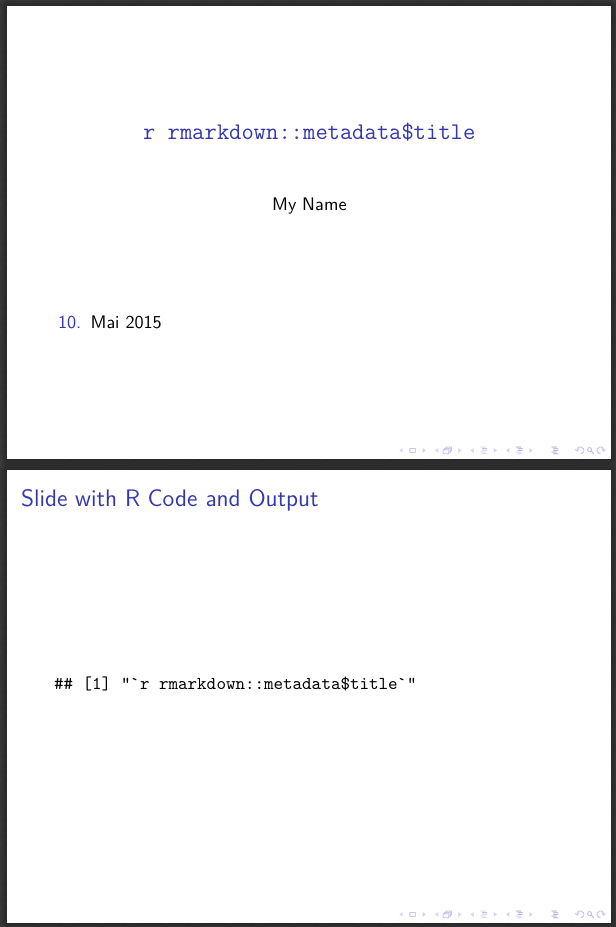
..。这是不正确的,因为我正在编织的文件被命名不同。
> sessionInfo()
R version 3.1.2 (2014-10-31)
Platform: x86_64-apple-darwin13.4.0 (64-bit)

locale:
[1] de_DE.UTF-8/de_DE.UTF-8/de_DE.UTF-8/C/de_DE.UTF-8/de_DE.UTF-8

attached base packages:
[1] stats     graphics  grDevices utils     datasets  methods   base

loaded via a namespace (and not attached):
[1] digest_0.6.8 htmltools_0.2.6 rmarkdown_0.5.1 tools_3.1.2 yaml_2.1.13回答 3
Stack Overflow用户
回答已采纳
发布于 2015-05-14 19:19:11
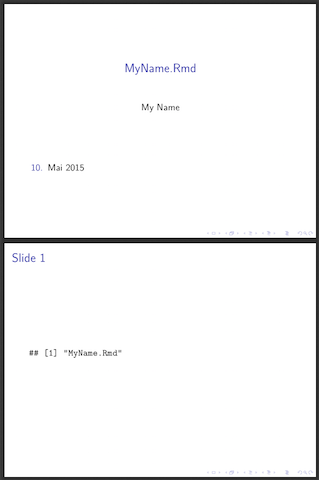
只需总结一辉的回答:
    ---
    title: "`r knitr::current_input()`"
    author: "My Name"
    date: "10. Mai 2015"
    output: beamer_presentation
    ---

    ## Slide 1

    ```{r}

    knitr::current_input()

    ```
针织品做的工作。
Stack Overflow用户
发布于 2015-05-10 19:00:37
rmarkdown::metadata给出了R标记的元数据列表,例如rmarkdown::metadata$title将是文档的标题。举个例子:
---
title: "Beamer Presentation Title"
author: "My Name"
date: "10\. Mai 2015"
output: beamer_presentation
---

## Slide 1

Print the title in a code chunk.

```{r}
rmarkdown::元数据$title
## Slide 2

The title of the document is `r rmarkdown::metadata$title`.若要获取输入文档的文件名,请使用knitr::current_input()。
Stack Overflow用户
发布于 2015-05-10 16:25:37
您可以使用yaml库,如下所示:
library(yaml)

# Read in the lines of your file
lines <- readLines("MyFile.rmd")
# Find the header portion contained between the --- lines.
header_line_nums <- which(lines == "---") + c(1, -1)
# Create a string of just that header portion
header <- paste(lines[seq(header_line_nums[1],
                          header_line_nums[2])],
                collapse = "\n")
# parse it as yaml, which returns a list of property values
yaml.load(header)如果您保存yaml.load返回的列表,则可以根据需要将其用于各种块。为了获得标题,您可以这样做:
properties <- yaml.load(header)
properties$title页面原文内容由Stack Overflow提供。腾讯云小微IT领域专用引擎提供翻译支持
原文链接:
https://stackoverflow.com/questions/30153194
复制相关文章
相似问题
腾讯云开发者

Copyright © 2013 - 2026 Tencent Cloud. All Rights Reserved. 腾讯云 版权所有
深圳市腾讯计算机系统有限公司 ICP备案/许可证号:粤B2-20090059  粤公网安备44030502008569号
腾讯云计算(北京)有限责任公司 京ICP证150476号 | 京ICP备11018762号