
Twitter BootStrap确认不适用于动态生成的元素
Twitter BootStrap确认不适用于动态生成的元素
提问于 2015-05-09 06:08:08
我使用DataTable和页面加载时生成的动态内容。在表中,我使用了引导确认。将其加载到脚本下面。
$( document ).ajaxStop(function() {
    $(document).find('[data-toggle="confirmation"]').confirmation();
});
它打开确认框,但当单击“是”或“否”时,它不起作用。
这不管用
我有下面的代码来检测‘确认’事件。
$(document).ready(function(){
    $(document).find('.delete-record').on('confirmed.bs.confirmation', function() {
        var thisEl = $(this);
        deleteForm($(this).attr('data-delid'));
    });
});
这起作用了
$(document).ajaxStop(function(){
    $(document).find('.delete-record').on('confirmed.bs.confirmation', function() {
        var thisEl = $(this);
        deleteForm($(this).attr('data-delid'));
    });
});document.ready怎么了?
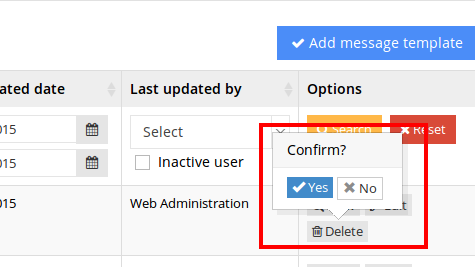
编辑:
我有相同的代码与document.ready在其他页面上工作,但没有DataTable,它是HTML结构。
回答 4
Stack Overflow用户
回答已采纳
发布于 2015-05-09 06:31:28
尝试稍微更改您的事件绑定,以便使用备用$.on语法将其绑定到每个现有和未来的.$.on元素。
$(document).ready(function(){
    $('body').on('confirmed.bs.confirmation', '.delete-record', function() {
        deleteForm($(this).attr('data-delid'));
    });
});不知道您的页面结构,我选择绑定到body,但您可以将它绑定到表的任何父元素。
Stack Overflow用户
发布于 2015-05-09 08:05:45
我认为这是因为在文档就绪后由dom操作动态生成的元素。
用.delegate代替.ready怎么样?
$(document).delegate('.delete-record', 'confirmed.bs.confirmation', function() {
    deleteForm($(this).attr('data-delid'));
});Stack Overflow用户
发布于 2020-08-13 08:10:38
一个更简单的解决方案:您有一个初始化,如
$('[data-toggle="confirmation"][data-target="service"]').confirmation({});将它放在$(Document).ready( function (){})之前的函数中,并在加载动态内容之后调用它
function confirm(){
    $('[data-toggle="confirmation"][data-target="service"]').confirmation({
        your options come here
    });
}
$(document).ready(function(){
    confirm();
});页面原文内容由Stack Overflow提供。腾讯云小微IT领域专用引擎提供翻译支持
原文链接:
https://stackoverflow.com/questions/30136652
复制相关文章
相似问题
腾讯云开发者

Copyright © 2013 - 2026 Tencent Cloud. All Rights Reserved. 腾讯云 版权所有
深圳市腾讯计算机系统有限公司 ICP备案/许可证号:粤B2-20090059  粤公网安备44030502008569号
腾讯云计算(北京)有限责任公司 京ICP证150476号 | 京ICP备11018762号