
list如何使用Apache poi将map值写入excel文件
我得到列表哈希映射键和值,如:{1=[ACSS Description1, ACSS Description2, ACSS Description3, SACSS Description4], 2=[11, 1, 4, 12]}
我想设置这样的excel单元格值:
ACSS Description1      11
ACSS Description2      1
ACSS Description3      4
ACSS Description4      12
但是我得到了这样的excel文件结果:
     empty                 11
     empty                  1
     empty                  4
     empty                 12
但是我的示例代码片段总是显示第二列值,第一列值显示空列.please,让我知道我在哪里弄错了?谢谢。
  public  void  listhashMapValues(Map<Integer,List<String>> hashmap,List<Export>list){

    List<String> listpropertvalue =new ArrayList<String>();

    for(int i=0;i<list.size();i++){  //example size is 5

    String strValue=list.get(i).getDescription();

    System.out.println(strValue);
    listpropertvalue.add(strValue);
    hashmap.put(1, listpropertvalue);
    }
    listpropertvalue =new ArrayList<String>();

    for(int i=0;i<list.size();i++){

    String strInterValue=list.get(i).getExportIntervalId().toString();

    listpropertvalue.add(strInterValue);
    hashmap.put(2, listpropertvalue);
    }
    int rownum =1;
    int cellnum = 0;
    for(int i=0;i<hashmap.size();i++){

    List<Integer> listMap =new ArrayList<Integer>(hashmap.keySet());

    Integer key = listMap.get(i);

    List<String> nameList = hashmap.get(key);

     for(Object obj : nameList){

     rowtitle =worksheet.createRow(rownum++);

    celltitle =rowtitle.createCell(cellnum);

    if (obj instanceof String){

    celltitle =rowtitle.createCell(cellnum);

    celltitle.setCellValue((String) obj);
    }
    }
}
cellnum++;
rownum=1;
}
}
我的pojo课程如下:
@Entity

@Table(name ="T_KPI_AUTO_EXPORT_CONFIG")

public class ExportReport implements Serializable  {

private String description;

private Integer exportIntervalId;

@Column(name ="Export_Interval_Id", nullable = false)

    public Integer getExportIntervalId() {

        return exportIntervalId;
    }
    public void setExportIntervalId(Integer exportIntervalId) {

        this.exportIntervalId = exportIntervalId;
    }
    @Column(name ="Description", nullable = false)

    public String getDescription() {

        return description;
    }
    public void setDescription(String description) {

        this.description = description;
    }
}回答 2
Stack Overflow用户
发布于 2015-05-09 11:31:08
我创建了一个包含方法的类,这些方法将帮助您:
将数据从Criteria criteria=hibernateTemplate.getSessionFactory().openSession().createCriteria(ExportReport.class); List<ExportReport> list = criteria.list();放到地图上
创建一个Xlsx文件,并使用从map写入数据所需的行和单元格数对其进行初始化。
将数据从map写入Xlsx文件
import java.io.File;
import java.io.FileInputStream;
import java.io.FileOutputStream;
import java.io.IOException;
import java.io.InputStream;
import java.util.ArrayList;
import java.util.List;
import java.util.Map;
import java.util.Set;
import java.util.TreeMap;

import org.apache.poi.ss.usermodel.Cell;
import org.apache.poi.xssf.usermodel.XSSFRow;
import org.apache.poi.xssf.usermodel.XSSFSheet;
import org.apache.poi.xssf.usermodel.XSSFWorkbook;


public class UtilsMethod {

    private XSSFWorkbook workbook = new XSSFWorkbook();

    /*
     * Take a Map of integer and List of string and
     *Create a Xlsx file on given path with number of row equal to size of nameList And number of Cell equal to keyset size
     */
    public void initializeExcelFile(Map<Integer,List<String>>hashmap,String path) throws IOException{

        FileOutputStream out = new FileOutputStream( new File(path));
        Set<Integer> keyset = hashmap.keySet();
        XSSFSheet sheet = workbook.createSheet();
        XSSFRow row = null;
        List<String> nameList = hashmap.get(keyset.toArray()[0]);

        for(int j=1; j<nameList.size()+1;j++){
            row = sheet.createRow(j);
            if(null != row){
                for(int i=0;i<keyset.size();i++){
                    row.createCell(i);
                }
            }
        }

        workbook.write(out);
        out.close();
    }

    /*
     * Use initializeExcelFile(hashmap,path) to initialize a Xlsx file in given path
     * After that, write the  content of hashmap into Xlsx file
     */
    public void writeToExcelfile(Map<Integer,List<String>>hashmap,String path) throws IOException{

        Set<Integer> keyset = hashmap.keySet();
        InputStream inp = new FileInputStream( new File(path));
        FileOutputStream out = new FileOutputStream( new File(path));
        int rownum = 1;
        int cellnum = 0;

        initializeExcelFile(hashmap,path);

        workbook = new XSSFWorkbook(inp);

        XSSFSheet sheet = workbook.getSheetAt(0);

        for(Integer key : keyset){
            List<String> nameList = hashmap.get(key);
            for(String s : nameList){
                XSSFRow row = sheet.getRow(rownum++);
                Cell cell = row.getCell(cellnum);
                if(null!=cell){
                    cell.setCellValue(s);
                }
            }
            cellnum++;
            rownum=1;
        }

        workbook.write(out);
        out.close();
        inp.close();
    }

    public Map<Integer,List<String>> putListIntoMap(List<ExportReport>exportReports) {

        Map<Integer,List<String>> exportRep = new TreeMap<Integer, List<String>>();
        List<String> descriptions = new ArrayList<String>();
        List<String> exportIntervalIds = new ArrayList<String>();

        for(ExportReport report:exportReports){
            descriptions.add(report.getDescription());
            exportIntervalIds.add(report.getExportIntervalId().toString());
        }

        exportRep.put(1, descriptions);
        exportRep.put(2, exportIntervalIds);

        return exportRep;
    }

    public static void main(String[] args) {
        // TODO Auto-generated method stub

    }

}
和用于测试所有UtilsMethod类方法的测试类
import java.io.IOException;
import java.util.ArrayList;
import java.util.List;
import java.util.Map;


public class Test {


    public static void main(String[] args) throws IOException {

        ExportReport exportReport = new ExportReport();
        exportReport.setExportIntervalId(11);
        exportReport.setDescription("ACCSDESCRIPTION1");

        ExportReport exportReport2 = new ExportReport();
        exportReport2.setExportIntervalId(1);
        exportReport2.setDescription("ACCSDESCRIPTION2");

        ExportReport exportReport3 = new ExportReport();
        exportReport3.setExportIntervalId(4);
        exportReport3.setDescription("ACCSDESCRIPTION3");

        ExportReport exportReport4 = new ExportReport();
        exportReport4.setExportIntervalId(12);
        exportReport4.setDescription("ACCSDESCRIPTION4");

        List<ExportReport> exportReports = new ArrayList<ExportReport>();

        exportReports.add(exportReport);
        exportReports.add(exportReport2);
        exportReports.add(exportReport3);
        exportReports.add(exportReport4);

        UtilsMethod utilsMethod = new UtilsMethod();

        Map<Integer,List<String>> map = utilsMethod.putListIntoMap(exportReports);
        System.out.println(map);


        utilsMethod.writeToExcelfile(map, "Writesheet.xlsx");

        System.out.println("Writesheet.xlsx written successfully" );

    }

}
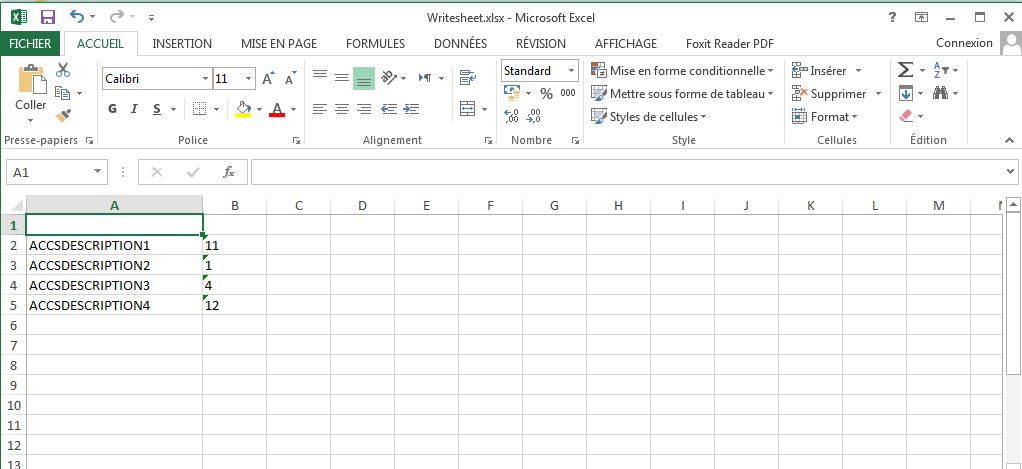
运行Test类之后,您将得到以下Xlsx文件
Stack Overflow用户
发布于 2016-06-16 05:45:52
HashMap Sheetmap =新HashMap();
     SheetColumnName s1 = new  SheetColumnName(1);
     s1.setFile_Name("Censtar Energy- Elect.xlsx");

     Sheetmap.put(s1, s1.setState("A7"));
     Sheetmap.put(s1, s1.setZone("B7"));

     SheetColumnName s2 = new  SheetColumnName(2);
     s2.setFile_Name("Direct Energy- Elect.xls");
     Sheetmap.put(s2, s2.setState("A55"));

     System.out.println(Sheetmap.get(s1));
     System.out.println(Sheetmap.get(s2));

    Collection<String> values = Sheetmap.values();

     ArrayList<String> listOfValues = new ArrayList<String>(values);

     for (String value : listOfValues)
     {
            System.out.println(value);
            FileReader fileReader=new FileReader();
            fileReader.ProcessFile(s1.getFile_Name(),value);
}https://stackoverflow.com/questions/30135152
复制相似问题
腾讯云开发者

Copyright © 2013 - 2026 Tencent Cloud. All Rights Reserved. 腾讯云 版权所有
深圳市腾讯计算机系统有限公司 ICP备案/许可证号:粤B2-20090059  粤公网安备44030502008569号
腾讯云计算(北京)有限责任公司 京ICP证150476号 | 京ICP备11018762号