
在ActionBar中左转Logo
在ActionBar中左转Logo
提问于 2015-05-08 10:05:01
首先,我必须说,我知道这是不正确的谷歌指导方针。但我还是要知道。
我正在尝试在我的ActionBar中添加Android图标。Logo are not displayed in Actionbar, using AppCompat
这给了我答案。但我现在的问题是,标志是在中间的ActionBar。我要在左边。
代码:
<style name="AppTheme" parent="Theme.AppCompat.Light.DarkActionBar">
    <item name="actionBarStyle">@style/MyActionBarLogo</item>
</style>

<style name="MyActionBarLogo" parent="@style/Widget.AppCompat.Light.ActionBar">
    <item name="background">@color/background_material_dark</item>
    <item name="logo">@drawable/icon</item>
    <item name="displayOptions">useLogo|showHome</item>
</style>
印刷屏幕:
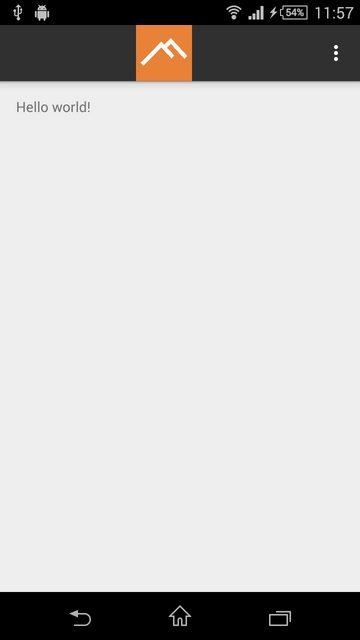
有什么主意吗?我觉得这是件蠢事..。
编辑:添加报表:
<?xml version="1.0" encoding="utf-8"?>
<manifest xmlns:android="http://schemas.android.com/apk/res/android"
    package="com.ap.brecht.myapplication" >

    <application
        android:allowBackup="true"
        android:icon="@drawable/icon"
        android:label="@string/app_name"
        android:theme="@style/AppTheme" >
        <activity
            android:name=".MainActivity"
            android:label="@string/app_name"
            android:theme="@style/AppTheme"
            >
            <intent-filter>
                <action android:name="android.intent.action.MAIN" />

                <category android:name="android.intent.category.LAUNCHER" />
            </intent-filter>
        </activity>
    </application>

</manifest>回答 3
Stack Overflow用户
回答已采纳
发布于 2015-05-08 13:35:01
是的,我发现了问题。太蠢了!
这个图标的大小太大了!在将它更改为48 * 48之后,它就能工作了!
Stack Overflow用户
发布于 2015-05-08 10:32:52
为什么不使用工具栏呢?
我认为在你的情况下你应该使用工具栏。
这是样本代码..。
 <android.support.v7.widget.Toolbar
    android:id="@+id/toolbar"
    android:layout_width="match_parent"
    android:layout_height="?android:attr/actionBarSize"
    android:theme="@style/Toolbar"
    android:background="@color/primary"
    app:theme="@style/Toolbar">


    <TextView
        android:id="@+id/toolbarTitle"
        android:layout_width="match_parent"
        android:layout_height="wrap_content"
        android:gravity="center_horizontal"
        android:textSize="22dp"
        android:textColor="@android:color/white"/>

</android.support.v7.widget.Toolbar>这是我的工具栏,在工具栏中间有文本视图。你可以放任何你想要的,而不是,TextView,,我用的是霍普,这会帮你的。
Stack Overflow用户
发布于 2018-10-29 15:22:53
您还可以使用矢量格式的徽标*.svg。它会成功的。
页面原文内容由Stack Overflow提供。腾讯云小微IT领域专用引擎提供翻译支持
原文链接:
https://stackoverflow.com/questions/30121136
复制相关文章
相似问题
腾讯云开发者

Copyright © 2013 - 2026 Tencent Cloud. All Rights Reserved. 腾讯云 版权所有
深圳市腾讯计算机系统有限公司 ICP备案/许可证号:粤B2-20090059  粤公网安备44030502008569号
腾讯云计算(北京)有限责任公司 京ICP证150476号 | 京ICP备11018762号