
如何循环8*1 svg映像(由java生成)以获得8*8 svg映像?
如何循环8*1 svg映像(由java生成)以获得8*8 svg映像?
提问于 2015-05-07 06:40:48
import java.util.Random;

class svg{
    public static void main(String[] args){
        String f="\""; //use f to stand for \" in order to avoid confusing when writing svg codes.
        System.out.format("<?xml version=%s1.0%s standalone=%sno%s?>\n", f,f,f,f);
        System.out.format("<!DOCTYPE svg PUBLIC %s-//W3C//DTD SVG 1.1//EN%s\n%shttp://www.w3.org/Graphics/SVG/1.1/DTD/svg11.dtd%s>\n",f,f,f,f);
        System.out.format("<svg height=%s800%s width=%s800%s xmlns=%shttp://www.w3.org/2000/svg%s version=%s1.1%s>\n",f,f,f,f,f,f,f,f);
        verticleAliens();
        System.out.println("</svg>");
    }


    public static void verticleAliens(){
        String f="\"";
        for(int i=0; i<=800; i+=100){
            String randomColor1 = color();
            String randomColor2 = color();
            String randomColor3 = color();
            String randomColor4 = color();
            String randomColor5 = color();
            String randomColor6 = color();
            String randomColor7 = color();

            System.out.format("<circle cx=%s50%s cy=%s%d%s r=%s20%s stroke=%s"+randomColor1+"%s stroke-width=%s3%s fill=%s"+randomColor2+"%s />\n", f,f,f,60+i,f,f,f,f,f,f,f,f,f);
            System.out.format("<line x1=%s50%s y1=%s%d%s x2=%s50%s y2=%s%d%s stroke=%s"+randomColor3+"%s stroke-width=%s5%s />\n", f,f,f,50+i,f,f,f,f,30+i,f,f,f,f,f);
            System.out.format("<line x1=%s40%s y1=%s%d%s x2=%s20%s y2=%s%d%s stroke=%s"+randomColor4+"%s stroke-width=%s3%s />\n", f,f,f,60+i,f,f,f,f,50+i,f,f,f,f,f);
            System.out.format("<circle cx=%s36%s cy=%s%d%s r=%s3%s fill=%s"+randomColor5+"%s />\n", f,f,f,15+i,f,f,f,f,f);
            System.out.format("<rect x=%s40%s y=%s%d%s width=%s20%s height=%s20%s style=%sfill:"+randomColor6+";stroke-width:3;stroke:"+randomColor7+"%s/>\n\n",f,f,f,10+i,f,f,f,f,f,f,f);
        }
    }

    public static String color(){
        Random randomGenerator = new Random();
        int r = randomGenerator.nextInt(256);
        int g = randomGenerator.nextInt(256);
        int b = randomGenerator.nextInt(256);
        return String.format("#%02x%02x%02x",r,g,b);
    }
}
这些Java代码可以生成一个svg映像,其中包含8个不同的“外星人”,如下所示:

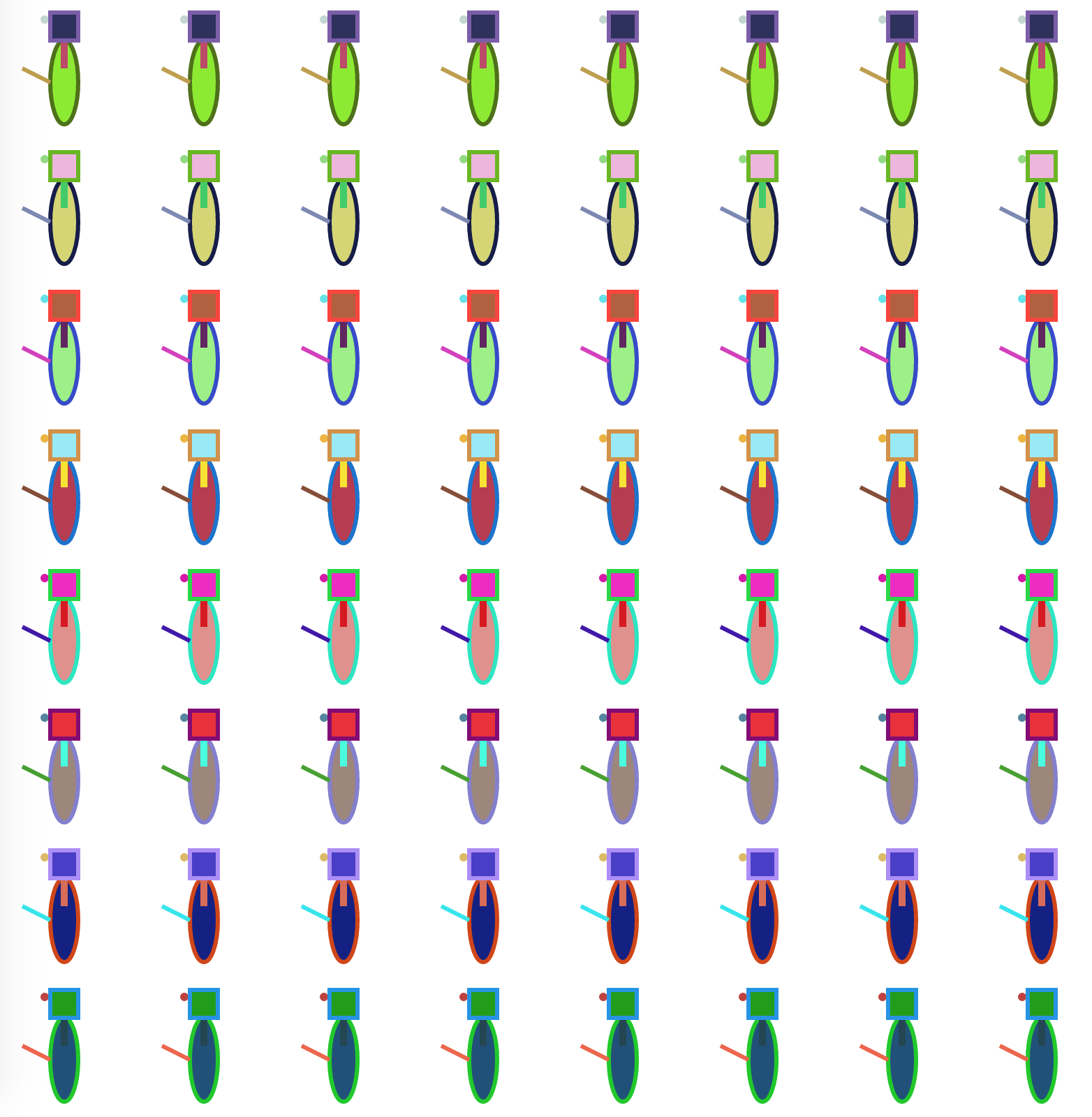
如你所能,这张svg图片有8*1个不同的外星人。但我想得到一个8*8外星人svg图像(外星人应该有相同的颜色模式水平)。如何编写循环来实现这一点(或者,如何修改for循环)?谢谢!
注意:如果要在计算机上尝试这些代码,可以使用java svg>aliens.svg生成一个名为svg的svg文件。
aliens.svg
在你编译程序之后。然后在浏览器中打开它。
回答 1
Stack Overflow用户
回答已采纳
发布于 2015-05-07 08:26:49
@Manuel_Jain给了我一个非常有用的建议,我可以编写两个嵌套循环来解决我的问题。以下是更新的代码:
import java.util.Random;

class svg{
    public static void main(String[] args){
        //use slashQuote to stand for \" in order to avoid confusing when modifying svg codes.
        String slashQuote="\"";
        System.out.format("<?xml version=%s1.0%s standalone=%sno%s?>\n",
            slashQuote,slashQuote,slashQuote,slashQuote);
        System.out.format("<!DOCTYPE svg PUBLIC %s-//W3C//DTD SVG 1.1//EN%s\n%shttp://www.w3.org/Graphics/SVG/1.1/DTD/svg11.dtd%s>\n",
            slashQuote,slashQuote,slashQuote,slashQuote);
        System.out.format("<svg height=%s800%s width=%s800%s xmlns=%shttp://www.w3.org/2000/svg%s version=%s1.1%s>\n",
            slashQuote,slashQuote,slashQuote,slashQuote,slashQuote,slashQuote,slashQuote,slashQuote);
        aliens();
        System.out.println("</svg>");
    }


    //Most of works were done in this function. It prints all aliens.
    public static void aliens(){
        //use slashQuote to stand for \" in order to avoid confusing when modifying svg codes.
        String slashQuote="\"";

        //This loop generates different aliens (because of randomColor) verticlely. It is looping 1*8 aliens to get 8*8 aliens.
        for(int i=0; i<=800; i+=100){

            //get 7 colors by calling color() function for 7 times. The number is 7 because there will be 7 different color in one alien.
            String randomColor1 = color();
            String randomColor2 = color();
            String randomColor3 = color();
            String randomColor4 = color();
            String randomColor5 = color();
            String randomColor6 = color();
            String randomColor7 = color();

            //This loop generates identicle aliens horizontaly. It is looping a 1*1 alien to get 1*8 aliens.
            //It will not affected by "String randomColorN = color();" because I only defined colors in outer loop.
            for(int j=0;j<=800;j+=100){
                //Here is my alien!!!!!!!!!!!!!!!!!!!!!
                System.out.format("<ellipse cx=%s%d%s cy=%s%d%s rx=%s10%s ry=%s30%s stroke=%s"+randomColor1+
                    "%s stroke-width=%s3%s fill=%s"+randomColor2+"%s />\n",
                    slashQuote,50+j,slashQuote,slashQuote,60+i,slashQuote,slashQuote,slashQuote,slashQuote,
                    slashQuote,slashQuote,slashQuote,slashQuote,slashQuote,slashQuote,slashQuote,slashQuote);

                System.out.format("<line x1=%s%d%s y1=%s%d%s x2=%s%d%s y2=%s%d%s stroke=%s"+randomColor3+
                    "%s stroke-width=%s5%s />\n",
                    slashQuote,50+j,slashQuote,slashQuote,50+i,slashQuote,slashQuote,50+j,slashQuote,
                    slashQuote,30+i,slashQuote,slashQuote,slashQuote,slashQuote,slashQuote);

                System.out.format("<line x1=%s%d%s y1=%s%d%s x2=%s%d%s y2=%s%d%s stroke=%s"+randomColor4+
                    "%s stroke-width=%s3%s />\n",
                    slashQuote,40+j,slashQuote,slashQuote,60+i,slashQuote,slashQuote,20+j,slashQuote,
                    slashQuote,50+i,slashQuote,slashQuote,slashQuote,slashQuote,slashQuote);
                System.out.format("<circle cx=%s%d%s cy=%s%d%s r=%s3%s fill=%s"+randomColor5+"%s />\n",
                    slashQuote,36+j,slashQuote,slashQuote,15+i,slashQuote,slashQuote,slashQuote,slashQuote,slashQuote);
                System.out.format("<rect x=%s%d%s y=%s%d%s width=%s20%s height=%s20%s style=%sfill:"+randomColor6+
                    ";stroke-width:3;stroke:"+randomColor7+"%s/>\n\n",
                    slashQuote,40+j,slashQuote,slashQuote,10+i,slashQuote,slashQuote,slashQuote,slashQuote,
                    slashQuote,slashQuote,slashQuote);
            }
        }
    }

    //Generate a random number.
    public static String color(){
        Random randomGenerator = new Random();
        int r = randomGenerator.nextInt(256);
        int g = randomGenerator.nextInt(256);
        int b = randomGenerator.nextInt(256);
        /*#%02x%02x%02x converts the RGB color to the hexadecimal value. I tried to use RGB color at first
        but it doesn't work in svg. Then I found this method in stack overflow. Here is the link:
        http://stackoverflow.com/questions/3607858/how-to-convert-a-rgb-color-value-to-an-hexadecimal-value-in-java*/
        return String.format("#%02x%02x%02x",r,g,b);
    }
}
顺便说一下,这是新的svg图片:
谢谢,@Manuel_Jain!
页面原文内容由Stack Overflow提供。腾讯云小微IT领域专用引擎提供翻译支持
原文链接:
https://stackoverflow.com/questions/30093680
复制相关文章
相似问题
腾讯云开发者

Copyright © 2013 - 2026 Tencent Cloud. All Rights Reserved. 腾讯云 版权所有
深圳市腾讯计算机系统有限公司 ICP备案/许可证号:粤B2-20090059  粤公网安备44030502008569号
腾讯云计算(北京)有限责任公司 京ICP证150476号 | 京ICP备11018762号