
可可osx PDFView NSPrintOperation PrintPanel没有显示页面预览
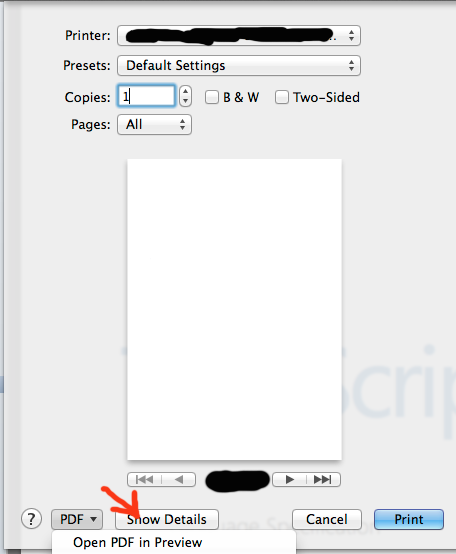
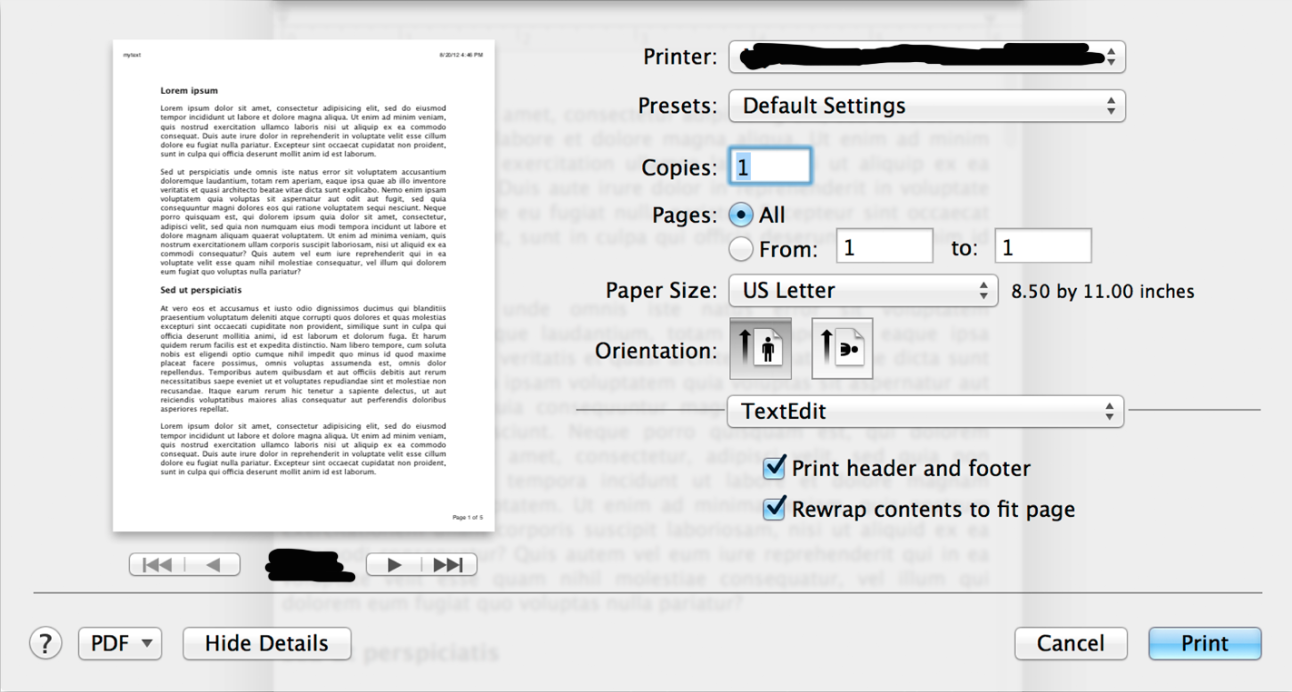
在我的Mac应用程序中,我有一个显示一些html内容的app视图。我从那个网页视图创建一个PDFDocument,然后我想打印那个文档。因此,我从文档中创建一个PDFView,然后调用NSPrintOperation printOperationWithView。当显示打印面板时,除了显示为空白的页面预览外,所有显示都是正确的,但如果我按下详细信息按钮,面板将被刷新,页面预览将正确显示。
我怎么解决这个问题??需要帮助。提前谢谢。
这就是我的问题的一个例子:
1-打印面板显示为空白页预览。接下来我按下节目细节。
2-刷新面板后,页面预览将正确显示。
这是我的密码:
NSPrintInfo *printInfo = [NSPrintInfo sharedPrintInfo];
[printInfo setTopMargin:0.0];
[printInfo setBottomMargin:0.0];
[printInfo setLeftMargin:0.0];
[printInfo setRightMargin:0.0];
[printInfo setHorizontalPagination:NSFitPagination];
[printInfo setVerticalPagination:NSAutoPagination];
[printInfo setVerticallyCentered:NO];
[printInfo setHorizontallyCentered:YES];

NSData *pdfFinal = [[[[webView mainFrame] frameView] documentView] dataWithPDFInsideRect:[[[webView mainFrame] frameView] documentView].frame];

PDFDocument *doc = [[PDFDocument alloc] initWithData:pdfFinal];
PDFView *pdfView = [[PDFView alloc] init];
[pdfView setDocument:doc];

NSPrintOperation *op;
op = [NSPrintOperation printOperationWithView:pdfView.documentView printInfo:printInfo];

[op setShowsProgressPanel:YES];
[op setShowsPrintPanel:YES];
[op runOperation];回答 2
Stack Overflow用户
发布于 2015-09-25 20:29:05
来自这链接:
PDFDocument *doc = ...;

// Invoke private method.
// NOTE: Use NSInvocation because one argument is a BOOL type. Alternately, you could declare the method in a category and just call it.
BOOL autoRotate = NO; // Set accordingly.
NSMethodSignature *signature = [PDFDocument instanceMethodSignatureForSelector:@selector(getPrintOperationForPrintInfo:autoRotate:)];
NSInvocation *invocation = [NSInvocation invocationWithMethodSignature:signature];
[invocation setSelector:@selector(getPrintOperationForPrintInfo:autoRotate:)];
[invocation setArgument:&printInfo atIndex:2];
[invocation setArgument:&autoRotate atIndex:3];
[invocation invokeWithTarget:doc];

// Grab the returned print operation.
void *result;
[invocation getReturnValue:&result];

NSPrintOperation *op = (__bridge NSPrintOperation *)result;
[op setShowsPrintPanel:YES];
[op setShowsProgressPanel:YES];
[op runOperation];
这在OSX上工作,从10.4到10.10 (约塞米蒂)。
编辑:--您还可以看到类似的这答案,但代码行数较少。
Stack Overflow用户
发布于 2015-05-06 16:09:58
猜测一下,由于PDFView是NSView的子类,其指定的初始化器是-initWithFrame:,而不是-init,所以对PDFView *pdfView = [[PDFView alloc] init]的调用可能不允许PDFView设置其初始状态,尽管对其机器的后续调用可能会神奇地为您解决此状态,但是当您不使用适当的指定初始化器(这意味着它的帧和边界等于NSZeroRect)时,NSView和子类的行为往往很奇怪(特别是在绘图方面)。
尝试使用-initWithFrame:与一些合理的,非零矩形.
更新
好的,在黑暗中只是一次疯狂的尝试,但是NSPrintOperation的文档说-runOperation阻塞了主线程,并建议使用-runOperationModalForWindow:delegate:didRunSelector:contextInfo:来避免完全阻塞主线程。通过阻塞主线程,是否有可能阻止其他线程完成其最初的工作(我将其称为无文档行为或API错误,但是.)?尝试实现模态版本,看看这是否有帮助。如果没有,我实际上会向苹果公司提交一份错误报告。
https://stackoverflow.com/questions/30080344
复制相似问题
腾讯云开发者

Copyright © 2013 - 2026 Tencent Cloud. All Rights Reserved. 腾讯云 版权所有
深圳市腾讯计算机系统有限公司 ICP备案/许可证号:粤B2-20090059  粤公网安备44030502008569号
腾讯云计算(北京)有限责任公司 京ICP证150476号 | 京ICP备11018762号