
在UILabel中垂直对齐文本(xcode)
在UILabel中垂直对齐文本(xcode)
提问于 2015-05-05 10:44:58
很长时间的读者,第一次海报。我找遍了所有的解决方案,但我还没有找到一个有效的答案。
问题是:我有一个UILabel,它获得动态分配给它的文本。如果我调整标签的大小以覆盖整个视图控制器,文本就卡在中间。我找到了一堆解决方案,其中说要添加以下代码:
detailsLabel.numberOfLines = 0;
detailsLabel.sizeToFit()
不过,这没什么用。
有人能看看我的代码并提供建议吗?
import UIKit

class DetailsViewController: UIViewController {

@IBOutlet weak var detailsLabel: UILabel!
@IBOutlet weak var lbldetails: UILabel!


var selectedBeach : Beach?


override func viewDidLoad() {
    super.viewDidLoad()

    // Do any additional setup after loading the view.
    detailsLabel.text = selectedBeach?.greaterDetails
    lbldetails.text = (selectedBeach?.beachName ?? "") + " Details"

    detailsLabel.numberOfLines = 0;
    [detailsLabel .sizeToFit()]

}

@IBAction func dismiss(sender: AnyObject) {
    self.dismissViewControllerAnimated(true, completion: nil)
}

override func didReceiveMemoryWarning() {
    super.didReceiveMemoryWarning()
    // Dispose of any resources that can be recreated.
}


/*
// MARK: - Navigation

// In a storyboard-based application, you will often want to do a little preparation before navigation
override func prepareForSegue(segue: UIStoryboardSegue, sender: AnyObject?) {
    // Get the new view controller using segue.destinationViewController.
    // Pass the selected object to the new view controller.
}
*/回答 3
Stack Overflow用户
回答已采纳
发布于 2015-05-05 11:20:52
好的。做以下工作:
- 从标签左拖到视图,释放并选择引导空间到容器边距
- 从标签拖动到视图,释放并选择拖尾空间到容器边缘
- 从标签向上拖动到视图,释放并选择顶部空间到顶层布局指南
在此之后,转到标签的大小检查器,并确保约束都具有标准常量。
最后,但并非最不重要的是,转到标签的属性检查器,并确保Line属性设置为0。
如果你有什么问题可以问:)
Stack Overflow用户
发布于 2015-05-05 10:48:27
Swift中正确的代码是
detailsLabel.sizeToFit()如果没有
为了目标-C是
[detailsLabel sizeToFit];Stack Overflow用户
发布于 2015-05-05 10:54:52
您可以执行以下操作来启用支持多行的UILabel。
 lbldetails.numberOfLines = 0
lbldetails.preferredMaxLayoutWidth = lbldetails.frame.size.width在这里,我认为您的支持动态高度,因为它的文本只是关于不显示多行.的问题。
请向UILabel提供以下约束。
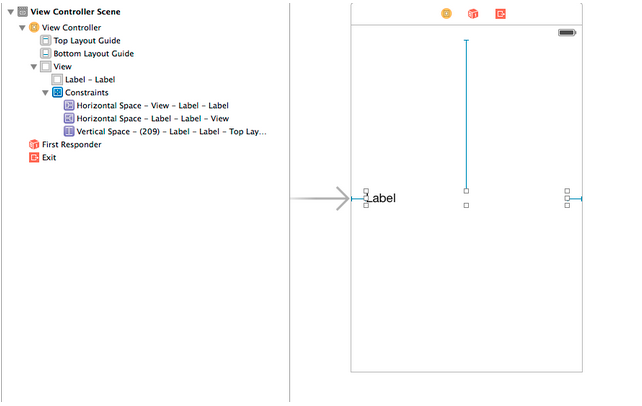
希望这能帮到你。
页面原文内容由Stack Overflow提供。腾讯云小微IT领域专用引擎提供翻译支持
原文链接:
https://stackoverflow.com/questions/30050825
复制相关文章
相似问题
腾讯云开发者

Copyright © 2013 - 2026 Tencent Cloud. All Rights Reserved. 腾讯云 版权所有
深圳市腾讯计算机系统有限公司 ICP备案/许可证号:粤B2-20090059  粤公网安备44030502008569号
腾讯云计算(北京)有限责任公司 京ICP证150476号 | 京ICP备11018762号