
Json Parser数据
Json Parser数据
提问于 2015-05-01 00:47:10
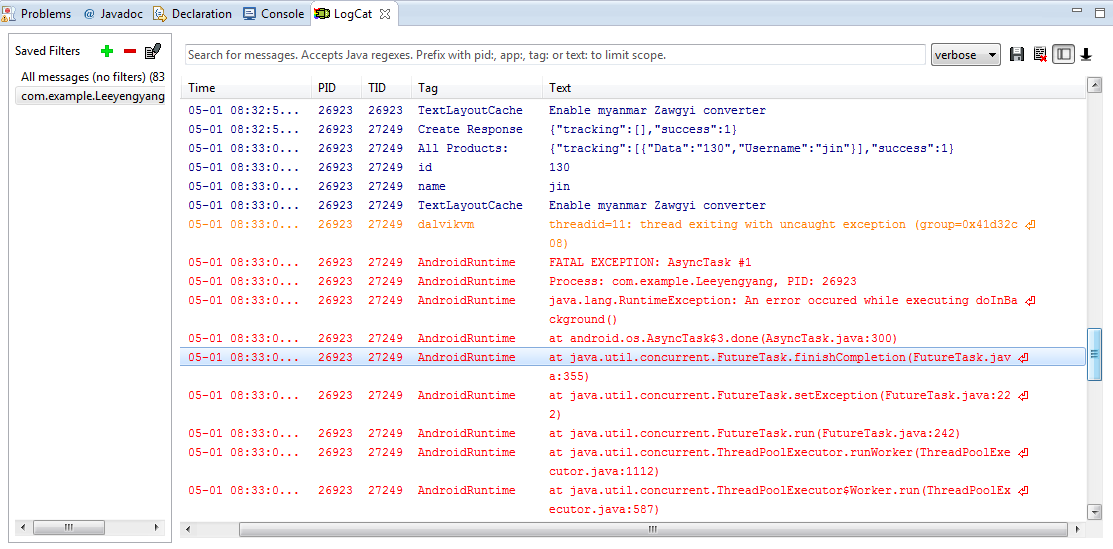
我已经为我的android应用程序创建了JSONPARSE数据。我使用LogCat能够使用Log.d(" id ",id )查看Json响应,但是当我想将textview值设置为id时,它显示了错误。帮帮忙,谢谢。下面是我为java和php使用的代码
下面是我的密码。
原木猫:
MainActivity.Java


   private static String url_Retrieve =       "http://hospital.leeyengyang.com/android_connect/Retrieve.php";
    List<NameValuePair> params = new ArrayList<NameValuePair>();
                // getting JSON string from URL

                JSONObject json2 = jsonParser.makeHttpRequest(url_Retrieve, "GET", params);

                // Check your log cat for JSON reponse
                Log.d("All Products: ", json2.toString());

                try {
                    // Checking for SUCCESS TAG
                    int success2 = json2.getInt(TAG_SUCCESS);

                    if (success2 == 1) {
                        // products found
                        // Getting Array of Products
                        JSONArray Retrieve = json2.getJSONArray("tracking");

                        // looping through All Products
                        for (int i = 0; i < Retrieve.length(); i++) {
                            JSONObject c = Retrieve.getJSONObject(i);

                            // Storing each json item in variable
                            String id = c.getString("Data");
                            String name = c.getString("Username");


                            Log.d("id", id);
                            Log.d("name", name);
                            // creating new HashMap


                            txtUpdate.setText(id);
                            // adding each child node to HashMap key => value

                        }
                    } else {
                        // no products found
                        // Launch Add New product Activity
                        Intent i = new Intent(getApplicationContext(),
                                Bluetooth.class);
                        // Closing all previous activities
                        i.addFlags(Intent.FLAG_ACTIVITY_CLEAR_TOP);
                        startActivity(i);
                    }
                } catch (JSONException e) {
                    e.printStackTrace();
                }


Retrive.php
  <?php
// Locate WP Location
$location = $_SERVER['DOCUMENT_ROOT'];

include ($location . '/wp-config.php');
include ($location . '/wp-load.php');
include ($location . '/wp-includes/pluggable.php');

// array for JSON response
$response = array();


    date_default_timezone_set('Asia/Kuala_Lumpur');
    $date =  date("Y-m-d");
$sql="SELECT Data,Username FROM tracking Where Username='jin' AND Date= '".$date."'";

// Initial Add data to HM
$result = mysql_query($sql) or die(mysql_error());

// check for empty result
if (mysql_num_rows($result) > 0) {
// looping through all results
// products node
$response["tracking"] = array();

while ($row = mysql_fetch_array($result)) {
    // temp user array
    $tracking = array();
    $tracking["Data"] = $row["Data"];
    $tracking["Username"] = $row["Username"];


    // push single product into final response array
    array_push($response["tracking"], $tracking);
}
// success
$response["success"] = 1;

// echoing JSON response
echo json_encode($response);
}

else {
// no products found
$response["success"] = 0;
$response["message"] = "No products found";

// echo no users JSON
echo json_encode($response);
}
?>

JsonParser.Java

package com.example.Leeyengyang;

import java.io.BufferedReader;
import java.io.IOException;
import java.io.InputStream;
import java.io.InputStreamReader;
import java.io.UnsupportedEncodingException;
import java.util.List;

import org.apache.http.HttpEntity;
import org.apache.http.HttpResponse;
import org.apache.http.NameValuePair;
import org.apache.http.client.ClientProtocolException;
import org.apache.http.client.entity.UrlEncodedFormEntity;
import org.apache.http.client.methods.HttpGet;
import org.apache.http.client.methods.HttpPost;
import org.apache.http.client.utils.URLEncodedUtils;
import org.apache.http.impl.client.DefaultHttpClient;
import org.json.JSONException;
import org.json.JSONObject;

import android.util.Log;

public class JSONParser {

    static InputStream is = null;
    static JSONObject jObj = null;
    static String json = "";

    // constructor
    public JSONParser() {

    }

    // function get json from url
    // by making HTTP POST or GET mehtod
    public JSONObject makeHttpRequest(String url, String method,
            List<NameValuePair> params) {

        // Making HTTP request
        try {

            // check for request method
            if(method == "POST"){
                // request method is POST
                // defaultHttpClient
                DefaultHttpClient httpClient = new DefaultHttpClient();
                HttpPost httpPost = new HttpPost(url);
                httpPost.setEntity(new UrlEncodedFormEntity(params));

                HttpResponse httpResponse = httpClient.execute(httpPost);
                HttpEntity httpEntity = httpResponse.getEntity();
                is = httpEntity.getContent();

            }else if(method == "GET"){
                // request method is GET
                DefaultHttpClient httpClient = new DefaultHttpClient();
                String paramString = URLEncodedUtils.format(params, "utf-8");
                url += "?" + paramString;
                HttpGet httpGet = new HttpGet(url);

                HttpResponse httpResponse = httpClient.execute(httpGet);
                HttpEntity httpEntity = httpResponse.getEntity();
                is = httpEntity.getContent();
            }


        } catch (UnsupportedEncodingException e) {
            e.printStackTrace();
        } catch (ClientProtocolException e) {
            e.printStackTrace();
        } catch (IOException e) {
            e.printStackTrace();
        }

        try {
            BufferedReader reader = new BufferedReader(new InputStreamReader(
                    is, "iso-8859-1"), 8);
            StringBuilder sb = new StringBuilder();
            String line = null;
            while ((line = reader.readLine()) != null) {
                sb.append(line + "\n");
            }
            is.close();
            json = sb.toString();
        } catch (Exception e) {
            Log.e("Buffer Error", "Error converting result " + e.toString());
        }

        // try parse the string to a JSON object
        try {
            jObj = new JSONObject(json);
        } catch (JSONException e) {
            Log.e("JSON Parser", "Error parsing data " + e.toString());
        }

        // return JSON String
        return jObj;

    }
}回答 3
Stack Overflow用户
回答已采纳
发布于 2015-05-01 05:35:55
SetText就像那样。
runOnUiThread(new Runnable() { @Override
public void run() {
txtUpdate.setText(id);
}
});我希望这能帮到你!
Stack Overflow用户
发布于 2015-05-01 04:53:50
将int值设置为TextView使用
txtUpdate.setText(""+id);
// OR
txtUpdate.setText(Integer.toString(id));
基本上,您需要将int值转换为字符串。它不直接将int值设置为TextView。
确保您只从主线程中提升UI。
希望这能帮上忙!
谢谢。
Stack Overflow用户
发布于 2015-05-01 05:27:59
您不能从UI线程外部更改UI (例如,doInBackground()方法的AsyncTask)。
尽管-您仍然可以在onPostExecute中执行此更新,这是在后台工作完成并在主(UI)线程上运行之后调用的。
另外,考虑使用一个可以简化整个过程的库,比如Jake的Retrofit:http://square.github.io/retrofit/
页面原文内容由Stack Overflow提供。腾讯云小微IT领域专用引擎提供翻译支持
原文链接:
https://stackoverflow.com/questions/29980099
复制相关文章
相似问题
腾讯云开发者

Copyright © 2013 - 2026 Tencent Cloud. All Rights Reserved. 腾讯云 版权所有
深圳市腾讯计算机系统有限公司 ICP备案/许可证号:粤B2-20090059  粤公网安备44030502008569号
腾讯云计算(北京)有限责任公司 京ICP证150476号 | 京ICP备11018762号