
Canvas SignaturePad不清楚Mobile (安卓)
我们的应用程序具有在便笺上绘制签名的功能。我们使用的是施密克创建的签名板,也使用了Ionic AngularJS框架。
Usecase描述
这个人点击一个按钮,系统打开一个Modal屏幕,然后显示签名垫。用户可以清除并保存图像。当他保存它并再次打开签名垫(按下按钮)时,会显示先前绘制的图像,用户可以在其中添加一些内容。
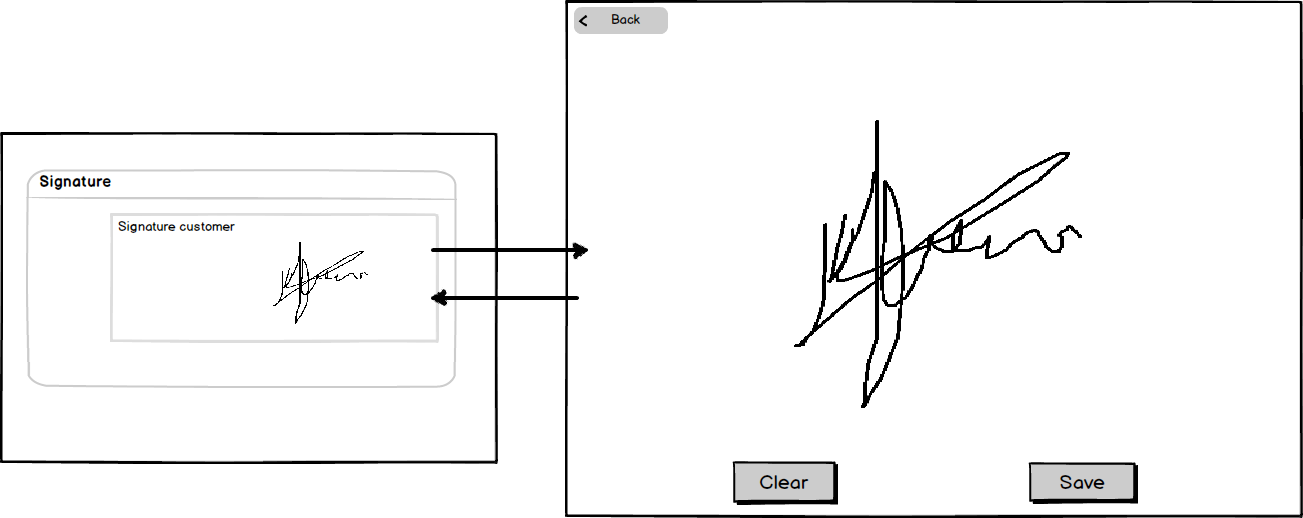
问题
我们遇到的问题是在Android设备上。当用户绘制了一个图像并返回到签名视图时,它将显示前面绘制的图像,但当用户清除该图像时,它不会丢失。它会“清除”它,因为在保存它之后,它会保存一个空的图像。就像它显示了一个缓存的图像。我们想要屏幕清除任何图像后,按下‘清除’-按钮。
在擦拭画布的过程中,Android做得不对。在彼此测试的设备(IPad,桌面浏览器)中,它似乎工作得很好。
代码
模态开度
一切都是从orderView.html开始的。在那里,我指定了一个单击事件来打开一个带有签名垫的模式屏幕:
<ion-item ng-click="openModal('app/components/order/signature/signaturepadView.html', $event)">
                    <div class="signature padding" ng-switch="_signatureImage || '_undefined_'">
                        <img ng-switch-when="_undefined_" ng-src="assets/img/signature_placeholder.png" alt="" />
                        <img ng-switch-default ng-src="{{_signatureImage}}" alt="" />
                    </div>
                </ion-item>
离子模态代码:
// Ionic Modal
    $ionicModal.fromTemplateUrl('modal', {
        scope: $scope,
        animation: 'slide-in-up'
    }).then(function (modal) {
        $scope.modal = modal;
    });
    $scope.openModal = function (include, $event) {
        $event.stopPropagation();
        $scope.include = include;
        $scope.modal.show();
    };
    $scope.closeModal = function () {
        $scope.modal.hide();
        $scope._signatureImage = OrderService.getSignatureImage();
    };

    // Cleanup the modal when we're done with it!
    $scope.$on('$destroy', function () {
        $scope.modal.remove();
    });
signatureView.html
这是signatureView.html文件中的代码。
<ion-modal-view class="modal" ng-controller="SignatureCtrl">
    <ion-pane>
        <ion-header-bar class='bar-stable'>
            <h1 class='title'> Signature </h1>
            <ion-header-buttons side="left">
                <button class="button signature-back-button" ng-click="closeModal()"><i class="icon ion-ios-arrow-back"></i> Back</button>
            </ion-header-buttons>
        </ion-header-bar>
        <ion-content class='has-header' scroll='false'>
            <canvas id='signatureCanvas'></canvas>
            <div class='button-bar'>
                <a class='button button-positive' ng-click='clearCanvas()'>Clear</a>
                <a class='button button-balanced' ng-click='saveCanvas(); closeModal()'>Save</a>
            </div>
            <br>
        </ion-content>
    </ion-pane>
</ion-modal-view>
signatureController.js
该函数正在signatureController.js中处理:
angular.module('directory.signatureController', [])

    .controller('SignatureCtrl', function ($scope, OrderService) {
        var canvas = document.getElementById('signatureCanvas');
        resizeCanvas();
        var signaturePad = new SignaturePad(canvas);
        signaturePad.backgroundColor = "white";

        signaturePad.minWidth = 2;
        signaturePad.maxWidth = 4.5;

        $scope.clearCanvas = function () {
            signaturePad.clear();
        }

        $scope.saveCanvas = function () {
            var sigImg = signaturePad.toDataURL();
            $scope.signature = sigImg;
            OrderService.setSignatureImage(sigImg);
        }

        function resizeCanvas() {
            var ratio = window.devicePixelRatio || 1;
            canvas.width = window.innerWidth; //document.width is obsolete
            canvas.height = window.innerHeight - 96; //document.height is obsolete
        };
    });
signature_pad.js
从这里开始,我建议在signature_pad.js中查找代码。我认为问题在于清除函数,所以我可以链接到签名文件中的清除函数。这里的完整代码是指向他的github的链接。
SignaturePad.prototype.clear = function () {
    var ctx = this._ctx,
        canvas = this._canvas;

    ctx.fillStyle = this.backgroundColor;
    ctx.clearRect(0, 0, canvas.width, canvas.height);
    ctx.fillRect(0, 0, canvas.width, canvas.height);
    this._reset();
};
帮助
请帮助我们,如果这个问题的格式太模糊或需要一些细节,请告诉我,我会编辑它。
回答 1
Stack Overflow用户
发布于 2015-04-29 07:41:37
在所有以前的测试中,
signaturePad.backgroundColor = "white";不需要。我们添加了它,之后没有测试这是否是解决方案。经过今天上午的简短测试,设置SignaturePad背景色似乎解决了这个问题。
所以我们的问题的答案已经在我们的代码中了。因此,请考虑解决这一问题。
https://stackoverflow.com/questions/29922621
复制相似问题
腾讯云开发者

Copyright © 2013 - 2026 Tencent Cloud. All Rights Reserved. 腾讯云 版权所有
深圳市腾讯计算机系统有限公司 ICP备案/许可证号:粤B2-20090059  粤公网安备44030502008569号
腾讯云计算(北京)有限责任公司 京ICP证150476号 | 京ICP备11018762号