
在Android中,Html文本与Textview中的图像重叠
在Android中,Html文本与Textview中的图像重叠
提问于 2015-04-28 13:02:12
--请不要将其标记为复制,因为其他帖子不帮助我在4.2以上的安卓系统
我正在实现一个任务,在这个任务中,我必须将HTML内容显示到TextView中,除了图像之外,一切都很正常。在某些地方,文字与图像重叠,我也为此浏览了很多帖子,即使是在堆栈溢出上,也没有取得任何成功。我从This帖子中找到了一个解决方案,并获得了更好的形象,然而,我仍然得到了同样的关注。作为参考,我还附上了一个屏幕截图。看一看
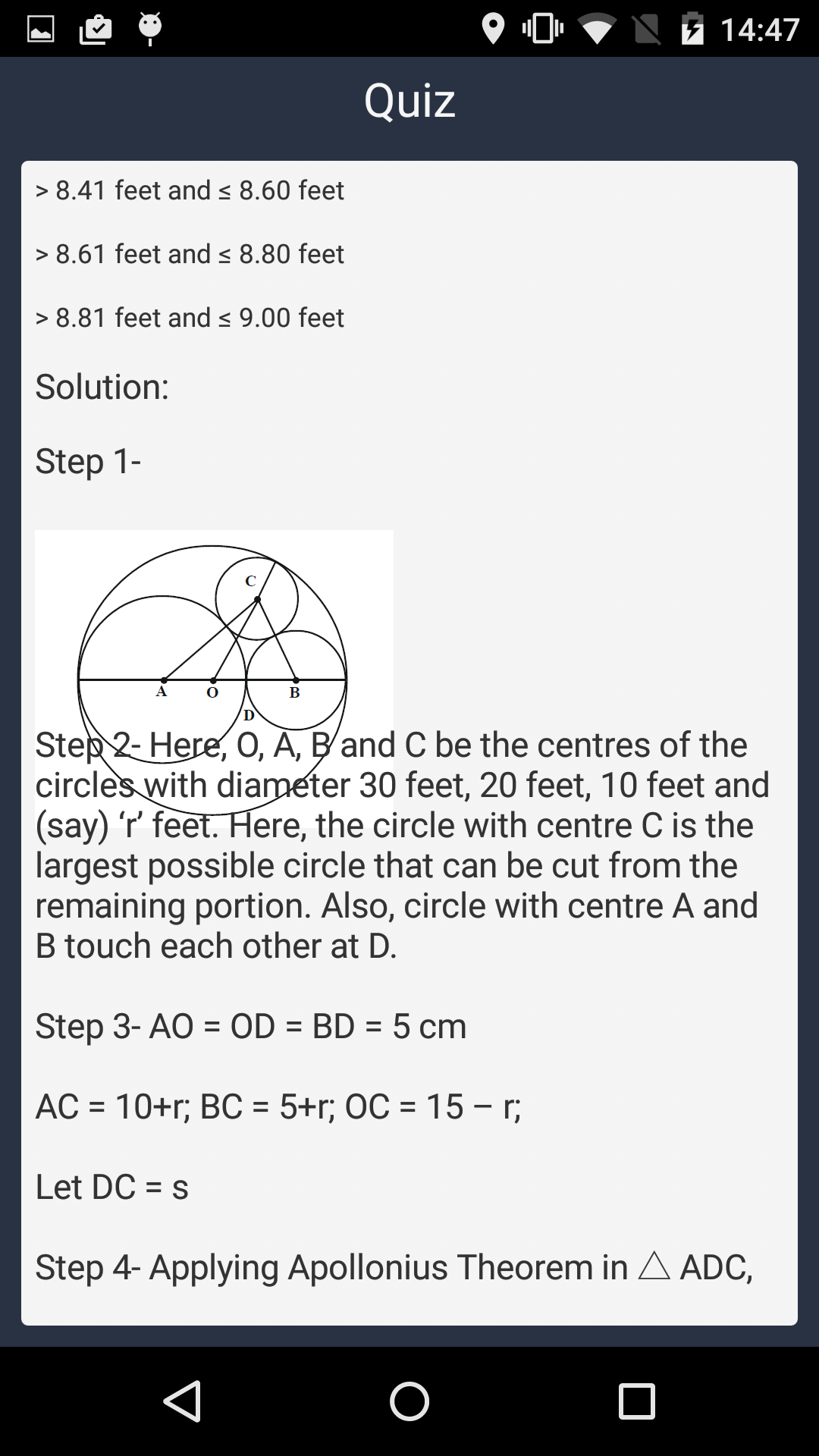
。
我在一些设备上得到了这样的关注,比如: Nexus-5,Galaxy-S3和所有这些设备都有android版本的4.2+
以下是我的代码:
public class URLImageParser implements ImageGetter
{
    private Context oContext;
    private TextView container;
    private LayoutCustomization oLayoutCustomization;

/***
 * Construct the URLImageParser which will execute AsyncTask and refresh the container
 * @param oTextView
 * @param oContext
 */
public URLImageParser(TextView oTextView, Context oContext)
{
    this.oContext = oContext;
    this.container = oTextView;
    oLayoutCustomization    = new LayoutCustomization(this.oContext.getResources().getDisplayMetrics());
}

public Drawable getDrawable(String source)
{
    URLDrawable urlDrawable = new URLDrawable();

    // get the actual source
    ImageGetterAsyncTask asyncTask =
        new ImageGetterAsyncTask( urlDrawable);

    asyncTask.execute(source);

    // return reference to URLDrawable where I will change with actual image from
    // the src tag
    return urlDrawable;
}

public class ImageGetterAsyncTask extends AsyncTask<String, Void, Drawable>
{
    URLDrawable urlDrawable;

    public ImageGetterAsyncTask(URLDrawable d)
    {
        this.urlDrawable = d;
    }

    @Override
    protected Drawable doInBackground(String... params)
    {
        String source = params[0];
        return fetchDrawable(source);
    }

    @Override
    protected void onPostExecute(Drawable result)
    {
        if(result == null)
        {
            urlDrawable.drawable = oContext.getResources().getDrawable(R.drawable.ic_launcher);

            // redraw the image by invalidating the container
            URLImageParser.this.container.invalidate();
            return;
        }
        // set the correct bound according to the result from HTTP call
        urlDrawable.setBounds(0, 0, 0 + result.getIntrinsicWidth(),
                0 + result.getIntrinsicHeight());

        // change the reference of the current drawable to the result
        // from the HTTP call
        urlDrawable.drawable = result;

        // redraw the image by invalidating the container
        URLImageParser.this.container.invalidate();

     // For ICS
        URLImageParser.this.container.setHeight((URLImageParser.this.container.getHeight() + result.getIntrinsicHeight()));

        // Pre ICS
        URLImageParser.this.container.setEllipsize(null);

        URLImageParser.this.container.setText(URLImageParser.this.container.getText());
    }

    /***
     * Get the Drawable from URL
     * @param urlString
     * @return
     */
    public Drawable fetchDrawable(String urlString)
    {
        try
        {
            URL aURL = new URL(urlString);
            final URLConnection conn = aURL.openConnection();
            conn.connect();
            final BufferedInputStream bis = new BufferedInputStream(conn.getInputStream());
            final Bitmap bm = BitmapFactory.decodeStream(bis);
            @SuppressWarnings("deprecation")
            Drawable drawable = new BitmapDrawable(bm);
            drawable.setBounds(0,0,bm.getWidth(),bm.getHeight());
            return drawable;
        }
        catch (Exception e)
        {
            return null;
        }
    }
}`
和
public class URLDrawable extends BitmapDrawable
{
    // the drawable that you need to set, you could set the initial drawing
    // with the loading image if you need to
    protected Drawable drawable;

    @Override
    public void draw(Canvas canvas)
    {
        // override the draw to facilitate refresh function later
        if(drawable != null)
        {
            drawable.draw(canvas);
        }
    }
}
我就是这样实现上面的代码的:
URLImageParser oImageParser = new URLImageParser(oTextView, oContext);
Spanned htmlSpan = Html.fromHtml("SOME_HTML_STRING", null);
oTextView.setText(htmlSpan);
请帮帮忙。
回答 2
Stack Overflow用户
发布于 2016-12-15 11:25:58
在onPostExecute中再次设置文本。
例如。txtTest.setText(txtTest.getText());
Stack Overflow用户
发布于 2016-03-07 09:20:37
更改下面的代码
Spanned htmlSpan = Html.fromHtml("SOME_HTML_STRING", null); 至
Spanned htmlSpan = Html.fromHtml("SOME_HTML_STRING", oImageParser);页面原文内容由Stack Overflow提供。腾讯云小微IT领域专用引擎提供翻译支持
原文链接:
https://stackoverflow.com/questions/29920316
复制相关文章
相似问题
腾讯云开发者

Copyright © 2013 - 2026 Tencent Cloud. All Rights Reserved. 腾讯云 版权所有
深圳市腾讯计算机系统有限公司 ICP备案/许可证号:粤B2-20090059  粤公网安备44030502008569号
腾讯云计算(北京)有限责任公司 京ICP证150476号 | 京ICP备11018762号