
iOS-8及更高版本- UITableView在UIAlertController中
iOS-8及更高版本- UITableView在UIAlertController中
提问于 2015-04-27 12:36:53
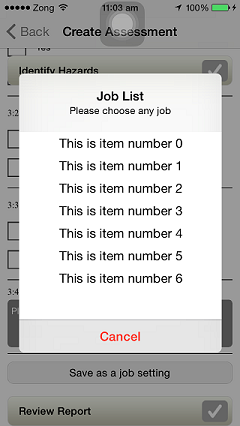
我知道如何通过使用类似于Custom UI的accessoryView在UIAlertView中添加任何Custom UI,但我现在很好奇,如果我们仍然可以选择在UIAlertController中添加Custom UI,那么我想要的是在UIAlertController中添加一个具有清晰理解的UITableViewController。
回答 4
Stack Overflow用户
回答已采纳
发布于 2015-04-28 04:18:51
多亏了StackOverflow用户,我才能完成这个任务。
这是我的代码:
UIViewController *controller = [[UIViewController alloc]init];
UITableView *alertTableView;
CGRect rect;
if (array.count < 4) {
    rect = CGRectMake(0, 0, 272, 100);
    [controller setPreferredContentSize:rect.size];

}
else if (array.count < 6){
    rect = CGRectMake(0, 0, 272, 150);
    [controller setPreferredContentSize:rect.size];
}
else if (array.count < 8){
    rect = CGRectMake(0, 0, 272, 200);
    [controller setPreferredContentSize:rect.size];

}
else {
    rect = CGRectMake(0, 0, 272, 250);
    [controller setPreferredContentSize:rect.size];
 }

alertTableView  = [[UITableView alloc]initWithFrame:rect];
alertTableView.delegate = self;
alertTableView.dataSource = self;
alertTableView.tableFooterView = [[UIView alloc]initWithFrame:CGRectZero];
[alertTableView setSeparatorStyle:UITableViewCellSeparatorStyleSingleLine];
[alertTableView setTag:kAlertTableViewTag];
[controller.view addSubview:alertTableView];
[controller.view bringSubviewToFront:alertTableView];
[controller.view setUserInteractionEnabled:YES];
[alertTableView setUserInteractionEnabled:YES];
[alertTableView setAllowsSelection:YES];
UIAlertController *alertController = [UIAlertController alertControllerWithTitle:@"Title" message:@"Message" preferredStyle:UIAlertControllerStyleAlert];
[alertController setValue:controller forKey:@"contentViewController"];
UIAlertAction *cancelAction = [UIAlertAction actionWithTitle:@"Cancel" style:UIAlertActionStyleDestructive handler:^(UIAlertAction *action) {

}];
[alertController addAction:cancelAction];
[self presentViewController:alertController animated:YES completion:nil];
Stack Overflow用户
发布于 2016-08-31 15:13:22
以下是Swift中简化形式的@Syed Ali Salman的答复:
let alertController = UIAlertController(title: "The Title",
                                        message: "Here's a message.",
                                        preferredStyle: .Alert)

let cancelAction = UIAlertAction(title: "Cancel", style: .Cancel)
{ (action) in
    // ...
}
alertController.addAction(cancelAction)

let okAction = UIAlertAction(title: "OK", style: .Default)
{ (action) in
    // ...
}
alertController.addAction(okAction)

let tableViewController = UITableViewController()
tableViewController.preferredContentSize = CGSize(width: 272, height: 176) // 4 default cell heights.
alertController.setValue(tableViewController, forKey: "contentViewController")

yourTopViewController().presentViewController(alertController, animated: true)
{
    // ...
}Stack Overflow用户
发布于 2015-04-27 12:45:17
UIViewController *tempViewController = [[UIViewController alloc] init];
    tempViewController.view.backgroundColor = [UIColor redColor];

[alertController setValue:tempViewController forKey:@"contentViewController"];这段代码将在警报视图上显示一个红色视图,现在您可以轻松地将一个UITableView放在UIViewController.Happy UIAlertController自定义中;)
页面原文内容由Stack Overflow提供。腾讯云小微IT领域专用引擎提供翻译支持
原文链接:
https://stackoverflow.com/questions/29896005
复制相关文章
相似问题
腾讯云开发者

Copyright © 2013 - 2026 Tencent Cloud. All Rights Reserved. 腾讯云 版权所有
深圳市腾讯计算机系统有限公司 ICP备案/许可证号:粤B2-20090059  粤公网安备44030502008569号
腾讯云计算(北京)有限责任公司 京ICP证150476号 | 京ICP备11018762号