
SNMP代理配置windows/linux
我需要通过snmp检索信息,然后使用这些信息来创建某种图形应用程序。
我找到了SnmpSharp库http://www.snmpsharpnet.com/
我使用这个库创建了一个小程序,然后我在我的windows机器上安装了snmp (使用windows官方指南),在本地主机上它可以工作!
现在我的问题是如何连接到我的局域网网络上的其他代理?如何在我的另一个设备示例linux pc上安装代理?我有点困惑,因为我试图在另一个windows pc上安装snmp,但我无法从它中检索snmp信息;我试图在linux pc上安装snmp代理,但我不知道如何正确安装一个必须通过局域网进行通信的代理。
这是在本地主机上工作的代码。
using UnityEngine;
using UnityEngine.UI;
using System.Collections;
using SnmpSharpNet;
using System.Net;


public class SNMP_walk : MonoBehaviour {

[SerializeField] public InputField community_str;
[SerializeField] public InputField agent_ip_address;
[SerializeField] public Button MyButton ;
string str_community  = null;
string ip  = null;
void Start () {
    //test button

    MyButton.onClick.AddListener (() => {
        str_community = community_str.text;
        ip = agent_ip_address.text;
        Debug.Log (str_community);
        Debug.Log(ip);
        snmp_walk (str_community, ip);
    });
}

// Update is called once per frame
void Update () {

}

void snmp_walk(string str_community, string ip){

    OctetString community = new OctetString (str_community);
    // Define agent parameters class
    AgentParameters param = new AgentParameters (community);
    // Set SNMP version to 1 (or 2)
    // settare in base alla versione usata
    param.Version = SnmpVersion.Ver1;
    // Construct the agent address object
    // IpAddress class is easy to use here because
    //  it will try to resolve constructor parameter if it doesn't *
    //  parse to an IP address
    IpAddress agent = new IpAddress (ip);

    // Construct target
    // IP, port,timeout,retry
    UdpTarget target = new UdpTarget ((IPAddress)agent, 161, 4000, 2);
    //necessario per tutte le richieste
    Pdu pdu = new Pdu (PduType.Get);

    pdu.VbList.Add ("1.3.6.1.2.1.1.1.0"); //sysDescr
    pdu.VbList.Add("1.3.6.1.2.1.1.2.0"); //sysObjectID
    pdu.VbList.Add("1.3.6.1.2.1.1.3.0"); //sysUpTime
    pdu.VbList.Add("1.3.6.1.2.1.1.4.0"); //sysContact
    pdu.VbList.Add("1.3.6.1.2.1.1.5.0"); //sysName
    pdu.VbList.Add ("1.3.6.1.2.1.25.2.2.0"); //Load for one core
    //pdu.VbList.Add ("1.3.6.1.2.1.25.6.3.1.1.11"); //Memory ? occupata
    //pdu.VbList.Add ("1.3.6.1.2.1.25.3.3.1.2.4"); //CPU ?

    SnmpV1Packet result = (SnmpV1Packet)target.Request (pdu, param);


    // If result is null then agent didn't reply or we couldn't parse the reply.
    if (result != null) {
        // ErrorStatus other then 0 is an error returned by
        // the Agent - see SnmpConstants for error definitions
        if (result.Pdu.ErrorStatus != 0) {
            // agent reported an error with the request
            Debug.Log ("Error in SNMP reply. Error {"+result.Pdu.ErrorStatus+"} " +
                       "index {"+result.Pdu.ErrorIndex+"}");

        } else {
            // Reply variables are returned in the same order as they were added
            //  to the VbList
            Debug.Log ("sysDescr({"+result.Pdu.VbList [0].Oid.ToString ()+"}) " +
                "({"+SnmpConstants.GetTypeName (result.Pdu.VbList [0].Value.Type)+"}): " +
                "{"+result.Pdu.VbList [0].Value.ToString ()+"}");


            Debug.Log("sysObjectID({"+result.Pdu.VbList [1].Oid.ToString ()+"}) " +
                      "({"+SnmpConstants.GetTypeName (result.Pdu.VbList [1].Value.Type)+"}): " +
                      "{"+result.Pdu.VbList [1].Value.ToString ()+"}");

            Debug.Log("sysUpTime(({"+result.Pdu.VbList [2].Oid.ToString ()+"}) " +
                      "({"+SnmpConstants.GetTypeName (result.Pdu.VbList [2].Value.Type)+"}): " +
                      "{"+result.Pdu.VbList [2].Value.ToString ()+"}");

            Debug.Log("sysContact(({"+result.Pdu.VbList [3].Oid.ToString ()+"}) " +
                      "({"+SnmpConstants.GetTypeName (result.Pdu.VbList [3].Value.Type)+"}): " +
                      "{"+result.Pdu.VbList [3].Value.ToString ()+"}");

            Debug.Log("sysName(({"+result.Pdu.VbList [4].Oid.ToString ()+"}) " +
                      "({"+SnmpConstants.GetTypeName (result.Pdu.VbList [4].Value.Type)+"}): " +
                      "{"+result.Pdu.VbList [4].Value.ToString ()+"}");

            Debug.Log("Total Mem ({"+result.Pdu.VbList [5].Oid.ToString ()+"}) " +
                      "({"+SnmpConstants.GetTypeName (result.Pdu.VbList [5].Value.Type)+"}): " +
                      "{"+result.Pdu.VbList [5].Value.ToString ()+"}");

        /*  Debug.Log("CPU ? " + result.Pdu.VbList[6].Oid.ToString()+
                      SnmpConstants.GetTypeName(result.Pdu.VbList[6].Value.Type)+
                      result.Pdu.VbList[6].Value.ToString());*/

        }
    } else {
        Debug.Log ("No response received from SNMP agent.");
    }
    target.Close ();
}
}
谢谢你的帮助,为我的英语道歉!
回答 1
Stack Overflow用户
发布于 2015-04-25 13:23:02
默认情况下,一旦安装,Windows上的SNMP代理只允许来自本地主机的查询。
要允许远程SNMP查询,需要设置SNMP服务:
- 开放
Windows Services Manager - 右键单击
SNMP Service并编辑Properties - 选择
Security选项卡
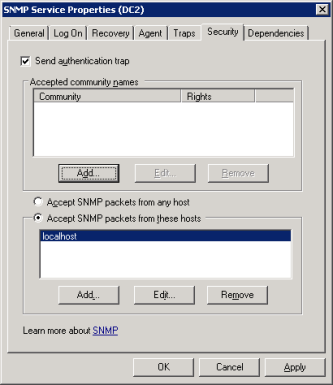
在这里,添加允许查询SNMP代理的远程主机。
编辑:
我知道这可能只回答您问题的一部分:不能从本地主机以外的主机查询Windows SNMP代理。
如何在Linux上安装/配置SNMP代理将是另一个完整的问题,它描述了您尝试过的内容以及哪些不起作用。
C#代码检查/调试应该张贴在SF姐妹站点:stackoverflow上
https://stackoverflow.com/questions/29876147
复制相似问题
腾讯云开发者

Copyright © 2013 - 2026 Tencent Cloud. All Rights Reserved. 腾讯云 版权所有
深圳市腾讯计算机系统有限公司 ICP备案/许可证号:粤B2-20090059  粤公网安备44030502008569号
腾讯云计算(北京)有限责任公司 京ICP证150476号 | 京ICP备11018762号