
模拟在用jQuery更改复选框属性时单击多个复选框以发出AJAX请求
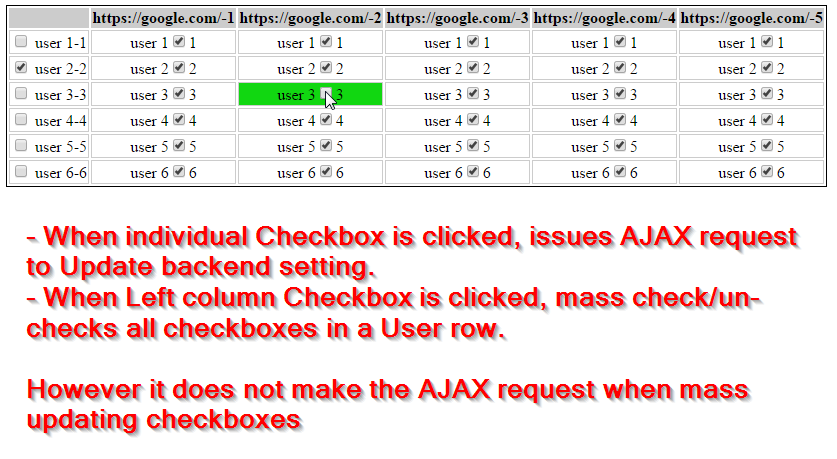
我有一个矩阵样式网格,允许更新项目的一些用户权限,在每个用户的基础上。
它使用一个表网格,并发出一个AJAX请求,以便在单击时立即更新每个设置。
我刚刚添加了一些jQuery代码到一个用户行的大量检查和取消选中所有复选框。
我的问题是,当行是checked或un-checked时,我还需要对行中的所有复选框发出AJAX请求
下面我有演示和JSFiddle演示的所有代码。
JSFiddle演示: http://jsfiddle.net/jasondavis/7597y7q5/
预览图像:
JavaScript/jQuery:
$(document).ready(function() {

    // Check/Un-check All checkboxes in a User Row
    $(".checkall").click(function(){
        $(this).parents('tr').find(':checkbox').prop('checked', this.checked);
    });

    // Make AJAX Request to Update User Permission setting in Backend Database
    $(".flipswitch").change(function () {
        var flip = $(this).closest('td');
        //alert("perm_id="+this.value+"&permissions=" + this.checked);
        $.ajax({
            type: 'post',
            url: '<?php echo $_SERVER['PHP_SELF']; ?>',
            data: "perm_id="+ this.value + "&permission=" + this.checked,
            success: function() {
                flip.effect("highlight", {color:"#12D812"}, 2000)
            }
        });
    });

});
表HTML:
<table>
<tbody>
<tr class="table_header">
<th> </th>
<th align="center">https://google.com/-1</th>
<th align="center">https://google.com/-2</th>
<th align="center">https://google.com/-3</th>
<th align="center">https://google.com/-4</th>
<th align="center">https://google.com/-5</th>
</tr>
<tr>
<td><input class="checkall" type="checkbox"> user 1-1</td>
<td align="center">user 1<input checked="checked" class=
"flipswitch" name="0" type="checkbox" value="1">1</td>
<td align="center">user 1<input checked="checked" class=
"flipswitch" name="1" type="checkbox" value="2">1</td>
<td align="center">user 1<input checked="checked" class=
"flipswitch" name="2" type="checkbox" value="3">1</td>
<td align="center">user 1<input checked="checked" class=
"flipswitch" name="3" type="checkbox" value="4">1</td>
<td align="center">user 1<input checked="checked" class=
"flipswitch" name="4" type="checkbox" value="5">1</td>
</tr>
<tr>
<td><input class="checkall" type="checkbox"> user 2-2</td>
<td align="center">user 2<input checked="checked" class=
"flipswitch" name="5" type="checkbox" value="6">2</td>
<td align="center">user 2<input checked="checked" class=
"flipswitch" name="6" type="checkbox" value="7">2</td>
<td align="center">user 2<input checked="checked" class=
"flipswitch" name="7" type="checkbox" value="8">2</td>
<td align="center">user 2<input checked="checked" class=
"flipswitch" name="8" type="checkbox" value="9">2</td>
<td align="center">user 2<input checked="checked" class=
"flipswitch" name="9" type="checkbox" value="10">2</td>
</tr>
<tr>
<td><input class="checkall" type="checkbox"> user 3-3</td>
<td align="center">user 3<input checked="checked" class=
"flipswitch" name="10" type="checkbox" value="11">3</td>
<td align="center">user 3<input checked="checked" class=
"flipswitch" name="11" type="checkbox" value="12">3</td>
<td align="center">user 3<input checked="checked" class=
"flipswitch" name="12" type="checkbox" value="13">3</td>
<td align="center">user 3<input checked="checked" class=
"flipswitch" name="13" type="checkbox" value="14">3</td>
<td align="center">user 3<input checked="checked" class=
"flipswitch" name="14" type="checkbox" value="15">3</td>
</tr>
<tr>
<td><input class="checkall" type="checkbox"> user 4-4</td>
<td align="center">user 4<input checked="checked" class=
"flipswitch" name="15" type="checkbox" value="16">4</td>
<td align="center">user 4<input checked="checked" class=
"flipswitch" name="16" type="checkbox" value="17">4</td>
<td align="center">user 4<input checked="checked" class=
"flipswitch" name="17" type="checkbox" value="18">4</td>
<td align="center">user 4<input checked="checked" class=
"flipswitch" name="18" type="checkbox" value="19">4</td>
<td align="center">user 4<input checked="checked" class=
"flipswitch" name="19" type="checkbox" value="20">4</td>
</tr>
<tr>
<td><input class="checkall" type="checkbox"> user 5-5</td>
<td align="center">user 5<input checked="checked" class=
"flipswitch" name="20" type="checkbox" value="21">5</td>
<td align="center">user 5<input checked="checked" class=
"flipswitch" name="21" type="checkbox" value="22">5</td>
<td align="center">user 5<input checked="checked" class=
"flipswitch" name="22" type="checkbox" value="23">5</td>
<td align="center">user 5<input checked="checked" class=
"flipswitch" name="23" type="checkbox" value="24">5</td>
<td align="center">user 5<input checked="checked" class=
"flipswitch" name="24" type="checkbox" value="25">5</td>
</tr>
<tr>
<td><input class="checkall" type="checkbox"> user 6-6</td>
<td align="center">user 6<input checked="checked" class=
"flipswitch" name="25" type="checkbox" value="26">6</td>
<td align="center">user 6<input checked="checked" class=
"flipswitch" name="26" type="checkbox" value="27">6</td>
<td align="center">user 6<input checked="checked" class=
"flipswitch" name="27" type="checkbox" value="28">6</td>
<td align="center">user 6<input checked="checked" class=
"flipswitch" name="28" type="checkbox" value="29">6</td>
<td align="center">user 6<input checked="checked" class=
"flipswitch" name="29" type="checkbox" value="30">6</td>
</tr>
</tbody>
</table>小CSS:
table {  border: 1px solid #000;  }
th {  background-color: #CCC;  }
td { border: 1px solid #CCC; }回答 2
Stack Overflow用户
发布于 2015-04-25 18:01:30
将同时触发许多请求,但首先可以尝试的是在设置change属性时触发checked事件。
$(".checkall").click(function(){
        $(this).parents('tr')
               .find(':checkbox')
               .prop('checked', this.checked)
               .change();// trigger change event
});Stack Overflow用户
发布于 2015-04-25 18:01:21
我想通了。
我添加了一个变更()调用来发出/触发一个change.
$(this).parents('tr').find(':checkbox').change();所以更新的jQuery代码是..。
$(document).ready(function() {

    $(".checkall").click(function(){
        $(this).parents('tr').find(':checkbox').prop('checked', this.checked);
        $(this).parents('tr').find(':checkbox').change();
    });


    $(".flipswitch").change(function () {
        var flip = $(this).closest('td');
        //alert("perm_id="+this.value+"&permissions=" + this.checked);
        $.ajax({
            type: 'post',
            url: '/echo/html/',
            data: "perm_id="+ this.value + "&permission=" + this.checked,
            success: function() {
                flip.effect("highlight", {color:"#12D812"}, 2000)
            }
        });
    });

});
现在单击要大量更新一行的复选框时,更新的JSFiddle http://jsfiddle.net/jasondavis/7597y7q5/6/发出AJAX请求X列数。因此,在一行中的所有复选框都会被选中和未选中,对于每个复选框也有一个AJAX请求。
希望这能帮到其他人。我贴出了这个答案,而不是删除这个问题,以供我个人将来参考。
如果有更好的方法,我当然也会接受的!谢谢
更新
根据@charlietfl的答案,最好将我的change()附加到当前jQuery元素搜索/查找的末尾,而不是进行第二次查找以查找复选框.
$(this).parents('tr').find(':checkbox').prop('checked', this.checked).change();https://stackoverflow.com/questions/29868723
复制相似问题
腾讯云开发者

Copyright © 2013 - 2026 Tencent Cloud. All Rights Reserved. 腾讯云 版权所有
深圳市腾讯计算机系统有限公司 ICP备案/许可证号:粤B2-20090059  粤公网安备44030502008569号
腾讯云计算(北京)有限责任公司 京ICP证150476号 | 京ICP备11018762号