
计算具有共享地面的两个同形平面之间的距离
我认为最简单的是解释图像的问题:
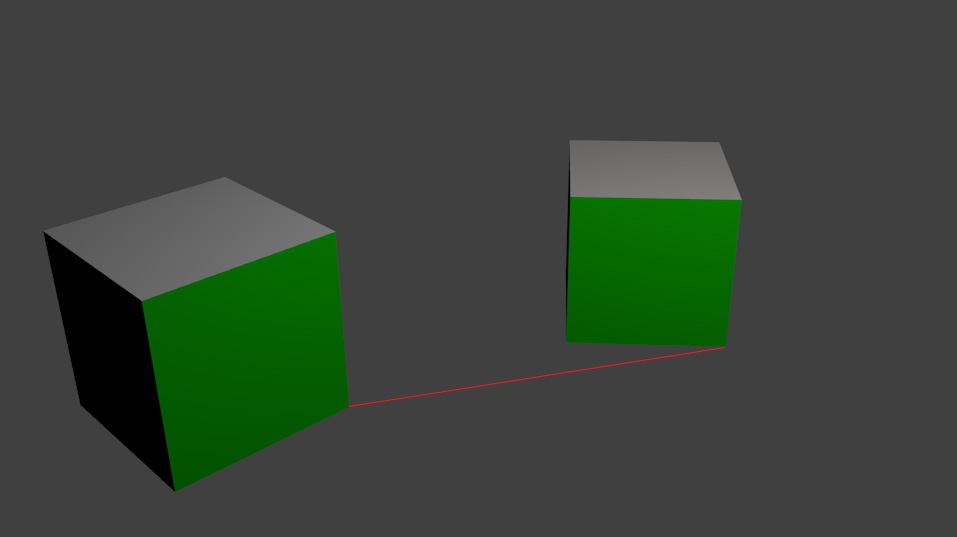
我有两个同样大小的立方体躺在桌子上。他们的一侧有绿色标记(便于追踪)。我想要计算左立方体到右立方体的相对位置(图片上的红线),在立方体大小单位中。
有可能吗?我知道问题会很简单,如果这两个绿色的边将有共同的平面一样,顶部的立方体,但我不能用它来跟踪。我只需计算一个正方形的同形,然后与另一个立方体角相乘。
我是否应该通过与90深度旋转矩阵相乘来“旋转”单形矩阵,从而得到“地面”的同形?我计划在智能手机场景中进行处理,这样也许陀螺仪、摄像机内嵌参数就可以具有任何价值。
回答 2
Stack Overflow用户
发布于 2015-04-25 19:26:12
这是可能的。让我们假设(或声明)表是z=0-平面,并且您的第一个方框位于这个平面的原点。这意味着左框的绿色角具有(表-)坐标(0,0,0),(1,0,0,0),(0,0,1)和(1,0,1)坐标。(您的盒子大小为1)。你也有这些点的像素坐标。如果你给出这些2d和3D值(以及相机的本质和变形)给cv::solvePnP,你就会得到相机相对于你的盒子(和飞机)的姿态。
在下一步中,您必须将桌面与从相机中心穿过第二个绿色框右下角像素的射线相交。这个交叉口看起来像(x,y,0)和x-1,y将在您的框的右角之间进行转换。
Stack Overflow用户
发布于 2015-04-27 09:59:34
如果你拥有所有的信息(相机的本质),你可以按照FooBar回答的方式来做。
但是,您可以使用点位于平面上的信息,甚至更直接地使用同调(不需要计算光线等):
计算图像平面和地面平面之间的同调。不幸的是,你需要4个点对应,但只有3个立方体点可见在图像,接触地面。相反,您可以使用立方体的顶部平面,在那里可以测量相同的距离。
第一,守则:
int main()
{
    // calibrate plane distance for boxes
    cv::Mat input = cv::imread("../inputData/BoxPlane.jpg");


    // if we had 4 known points on the ground plane, we could use the ground plane but here we instead use the top plane
    // points on real world plane: height = 1: // so it's not measured on the ground plane but on the "top plane" of the cube
    std::vector<cv::Point2f> objectPoints;
    objectPoints.push_back(cv::Point2f(0,0)); // top front
    objectPoints.push_back(cv::Point2f(1,0)); // top right
    objectPoints.push_back(cv::Point2f(0,1)); // top left
    objectPoints.push_back(cv::Point2f(1,1)); // top back

    // image points:
    std::vector<cv::Point2f> imagePoints;
    imagePoints.push_back(cv::Point2f(141,302));// top front
    imagePoints.push_back(cv::Point2f(334,232));// top right
    imagePoints.push_back(cv::Point2f(42,231)); // top left
    imagePoints.push_back(cv::Point2f(223,177));// top back

    cv::Point2f pointToMeasureInImage(741,200); // bottom right of second box


    // for transform we need the point(s) to be in a vector
    std::vector<cv::Point2f> sourcePoints;
    sourcePoints.push_back(pointToMeasureInImage);
    //sourcePoints.push_back(pointToMeasureInImage);
    sourcePoints.push_back(cv::Point2f(718,141));
    sourcePoints.push_back(imagePoints[0]);


    // list with points that correspond to sourcePoints. This is not needed but used to create some ouput
    std::vector<int> distMeasureIndices;
    distMeasureIndices.push_back(1);
    //distMeasureIndices.push_back(0);
    distMeasureIndices.push_back(3);
    distMeasureIndices.push_back(2);


    // draw points for visualization
    for(unsigned int i=0; i<imagePoints.size(); ++i)
    {
        cv::circle(input, imagePoints[i], 5, cv::Scalar(0,255,255));
    }
    //cv::circle(input, pointToMeasureInImage, 5, cv::Scalar(0,255,255));
    //cv::line(input, imagePoints[1], pointToMeasureInImage, cv::Scalar(0,255,255), 2);

    // compute the relation between the image plane and the real world top plane of the cubes
    cv::Mat homography = cv::findHomography(imagePoints, objectPoints);


    std::vector<cv::Point2f> destinationPoints;
    cv::perspectiveTransform(sourcePoints, destinationPoints, homography);

    // compute the distance between some defined points (here I use the input points but could be something else)
    for(unsigned int i=0; i<sourcePoints.size(); ++i)
    {
        std::cout << "distance: " << cv::norm(destinationPoints[i] - objectPoints[distMeasureIndices[i]]) << std::endl;

        cv::circle(input, sourcePoints[i], 5, cv::Scalar(0,255,255));
        // draw the line which was measured
        cv::line(input, imagePoints[distMeasureIndices[i]], sourcePoints[i], cv::Scalar(0,255,255), 2);
    }


    // just for fun, measure distances on the 2nd box:
    float distOn2ndBox = cv::norm(destinationPoints[0]-destinationPoints[1]);
    std::cout << "distance on 2nd box: " << distOn2ndBox << " which should be near 1.0" << std::endl;
    cv::line(input, sourcePoints[0], sourcePoints[1], cv::Scalar(255,0,255), 2);


    cv::imshow("input", input);
    cv::waitKey(0);
    return 0;
}
下面是我想解释的输出:
distance: 2.04674
distance: 2.82184
distance: 1
distance on 2nd box: 0.882265 which should be near 1.0
这些距离是:
1. the yellow bottom one from one box to the other
2. the yellow top one
3. the yellow one on the first box
4. the pink one
因此,红线(您所要求的)应该有一个长度几乎正好2x立方体边的长度。但正如你所看到的,我们有一些错误。
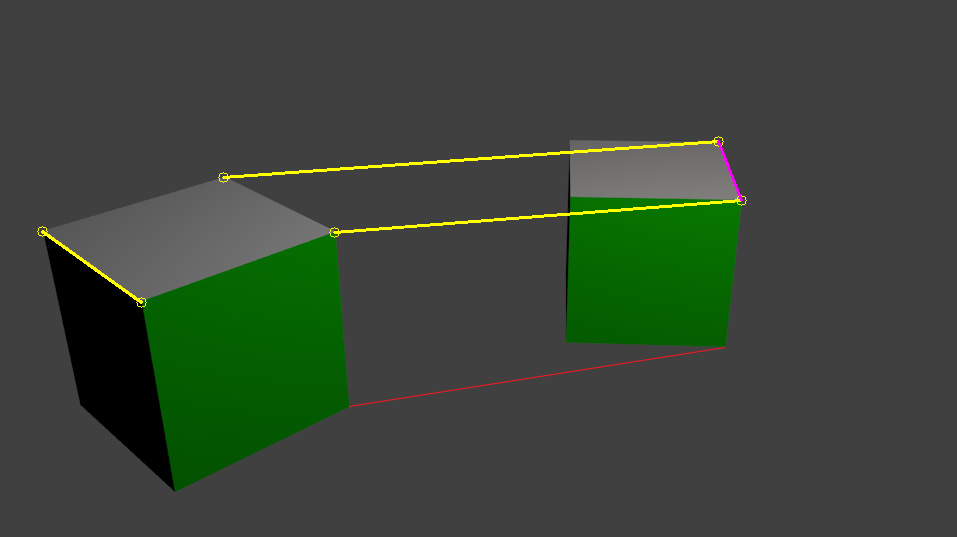
在同形计算之前,像素位置越好/越正确,结果就越准确。
你需要一个针孔相机模型,所以不扭曲你的相机(在现实世界中的应用)。
请记住,你可以计算地面上的距离,如果你有4个线性点在那里可见(不是在同一条线上)!
https://stackoverflow.com/questions/29863479
复制相似问题
腾讯云开发者

Copyright © 2013 - 2026 Tencent Cloud. All Rights Reserved. 腾讯云 版权所有
深圳市腾讯计算机系统有限公司 ICP备案/许可证号:粤B2-20090059  粤公网安备44030502008569号
腾讯云计算(北京)有限责任公司 京ICP证150476号 | 京ICP备11018762号