
在Matlab中过滤包含NaNs的图像?
我有一个表示某些数据的2d数组(doubles),其中包含一堆NaNs。数据的等高线图如下:
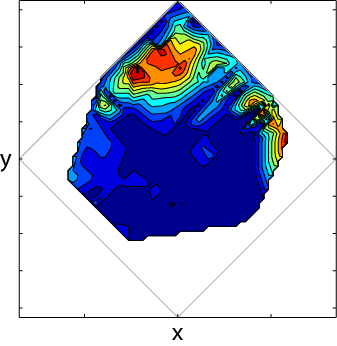
所有的空白都是NaNs,灰色菱形有参考,填充的轮廓显示了我的数据的形状。当我使用imfilt过滤数据时,NaNs会很大程度地咀嚼这些数据,因此我们最终得到的结果如下:
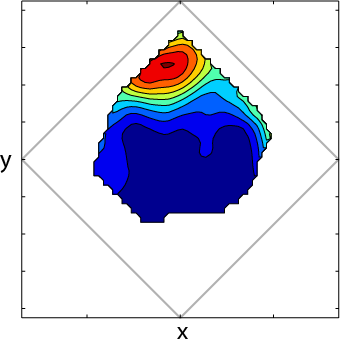
您可以看到,支持集是显著收缩的。我不能使用这个,因为它已经咀嚼了一些更有趣的变化在边缘(由于特定的原因,我的实验,这些边缘是重要的)。
在NaNs岛中是否有一个函数可以将边缘处理得类似于矩形过滤窗口的边缘,而不是仅仅删除边缘?有点像一个nanmean函数,除了卷积图像?
这是我的过滤代码:
filtWidth = 7;
imageFilter=fspecial('gaussian',filtWidth,filtSigma);
%convolve them
dataFiltered = imfilter(rfVals,imageFilter,'symmetric','conv');
以及绘制等高线图的代码:
figure
contourf(dataFiltered); hold on
plot([-850 0 850 0 -850], [0 850 0 -850 0], 'Color', [.7 .7 .7],'LineWidth', 1); %the square (limits are data-specific)
axis equal在Mathworks文件交换(ndanfilter.m)中有一些代码接近我想要的,但我相信它只插值了分散在图像内部的NaNs,而不是显示这种岛型效果的数据。
注意:我刚刚找到了nanconv.m,它可以做我想做的事情,它的用法非常直观(将图像转换,忽略NaN,就像nanmean工作一样)。我已经做了我接受的答案的这一部分,并包括一个与其他答案的表现比较。
相关问题
回答 4
Stack Overflow用户
发布于 2015-04-27 13:54:48
我最后使用的技术是Matlab文件交换中的函数nanconv.m。它所做的正是我想要做的:它以一种忽略NaNs的方式运行过滤器,就像Matlab的内置函数nanmean那样。这很难从函数的文档中破译,这是一个有点神秘的问题。
下面是我使用它的方法:
filtWidth = 7;
filtSigma = 5;
imageFilter=fspecial('gaussian',filtWidth,filtSigma);
dataFiltered = nanconv(data,imageFilter, 'nanout');我正在粘贴下面的nanconv函数(它由BSD许可证覆盖)。当我有机会的时候,我会发布图片等等,只是想发布我最后为那些对我所做的事情感兴趣的人所做的事情。
与其他答案的比较
使用格氏解,结果直观地看上去非常好,但在边缘有一些量化点,这是一个值得关注的问题。在实践中,外推图像的边缘导致许多伪造的高值在我的数据边缘。
使用用原始数据替换缺失位的克里斯德的建议,看起来也相当不错(特别是对于非常小的过滤器),但是(从设计上说)您最终会在边缘得到未经过滤的数据,这对我的应用程序来说是个问题。
nanconv
function c = nanconv(a, k, varargin)
% NANCONV Convolution in 1D or 2D ignoring NaNs.
%   C = NANCONV(A, K) convolves A and K, correcting for any NaN values
%   in the input vector A. The result is the same size as A (as though you
%   called 'conv' or 'conv2' with the 'same' shape).
%
%   C = NANCONV(A, K, 'param1', 'param2', ...) specifies one or more of the following:
%     'edge'     - Apply edge correction to the output.
%     'noedge'   - Do not apply edge correction to the output (default).
%     'nanout'   - The result C should have NaNs in the same places as A.
%     'nonanout' - The result C should have ignored NaNs removed (default).
%                  Even with this option, C will have NaN values where the
%                  number of consecutive NaNs is too large to ignore.
%     '2d'       - Treat the input vectors as 2D matrices (default).
%     '1d'       - Treat the input vectors as 1D vectors.
%                  This option only matters if 'a' or 'k' is a row vector,
%                  and the other is a column vector. Otherwise, this
%                  option has no effect.
%
%   NANCONV works by running 'conv2' either two or three times. The first
%   time is run on the original input signals A and K, except all the
%   NaN values in A are replaced with zeros. The 'same' input argument is
%   used so the output is the same size as A. The second convolution is
%   done between a matrix the same size as A, except with zeros wherever
%   there is a NaN value in A, and ones everywhere else. The output from
%   the first convolution is normalized by the output from the second
%   convolution. This corrects for missing (NaN) values in A, but it has
%   the side effect of correcting for edge effects due to the assumption of
%   zero padding during convolution. When the optional 'noedge' parameter
%   is included, the convolution is run a third time, this time on a matrix
%   of all ones the same size as A. The output from this third convolution
%   is used to restore the edge effects. The 'noedge' parameter is enabled
%   by default so that the output from 'nanconv' is identical to the output
%   from 'conv2' when the input argument A has no NaN values.
%
% See also conv, conv2
%
% AUTHOR: Benjamin Kraus (bkraus@bu.edu, ben@benkraus.com)
% Copyright (c) 2013, Benjamin Kraus
% $Id: nanconv.m 4861 2013-05-27 03:16:22Z bkraus $

% Process input arguments
for arg = 1:nargin-2
    switch lower(varargin{arg})
        case 'edge'; edge = true; % Apply edge correction
        case 'noedge'; edge = false; % Do not apply edge correction
        case {'same','full','valid'}; shape = varargin{arg}; % Specify shape
        case 'nanout'; nanout = true; % Include original NaNs in the output.
        case 'nonanout'; nanout = false; % Do not include NaNs in the output.
        case {'2d','is2d'}; is1D = false; % Treat the input as 2D
        case {'1d','is1d'}; is1D = true; % Treat the input as 1D
    end
end

% Apply default options when necessary.
if(exist('edge','var')~=1); edge = false; end
if(exist('nanout','var')~=1); nanout = false; end
if(exist('is1D','var')~=1); is1D = false; end
if(exist('shape','var')~=1); shape = 'same';
elseif(~strcmp(shape,'same'))
    error([mfilename ':NotImplemented'],'Shape ''%s'' not implemented',shape);
end

% Get the size of 'a' for use later.
sza = size(a);

% If 1D, then convert them both to columns.
% This modification only matters if 'a' or 'k' is a row vector, and the
% other is a column vector. Otherwise, this argument has no effect.
if(is1D);
    if(~isvector(a) || ~isvector(k))
        error('MATLAB:conv:AorBNotVector','A and B must be vectors.');
    end
    a = a(:); k = k(:);
end

% Flat function for comparison.
o = ones(size(a));

% Flat function with NaNs for comparison.
on = ones(size(a));

% Find all the NaNs in the input.
n = isnan(a);

% Replace NaNs with zero, both in 'a' and 'on'.
a(n) = 0;
on(n) = 0;

% Check that the filter does not have NaNs.
if(any(isnan(k)));
    error([mfilename ':NaNinFilter'],'Filter (k) contains NaN values.');
end

% Calculate what a 'flat' function looks like after convolution.
if(any(n(:)) || edge)
    flat = conv2(on,k,shape);
else flat = o;
end

% The line above will automatically include a correction for edge effects,
% so remove that correction if the user does not want it.
if(any(n(:)) && ~edge); flat = flat./conv2(o,k,shape); end

% Do the actual convolution
c = conv2(a,k,shape)./flat;

% If requested, replace output values with NaNs corresponding to input.
if(nanout); c(n) = NaN; end

% If 1D, convert back to the original shape.
if(is1D && sza(1) == 1); c = c.'; end

endStack Overflow用户
发布于 2015-04-23 21:12:21
一种方法是在执行过滤之前用最近邻插值替换NaN值(或者在较早的MATLAB版本中使用TriScatteredInterp ),然后再用NaN值替换这些点。这类似于使用'replicate'参数过滤完整的二维数组,而不是使用'symmetric'参数作为imfilter的边界选项(也就是说,您是在复制而不是在锯齿状的NaN边界上反映值)。
下面是代码的样子:
% Make your filter:
filtWidth = 7;
imageFilter = fspecial('gaussian', filtWidth, filtWidth);

% Interpolate new values for Nans:
nanMask = isnan(rfVals);
[r, c] = find(~nanMask);
[rNan, cNan] = find(nanMask);
F = scatteredInterpolant(c, r, rfVals(~nanMask), 'nearest');
interpVals = F(cNan, rNan);
data = rfVals;
data(nanMask) = interpVals;

% Filter the data, replacing Nans afterward:
dataFiltered = imfilter(data, imageFilter, 'replicate', 'conv');
dataFiltered(nanMask) = nan;Stack Overflow用户
发布于 2015-04-23 20:08:31
好吧不用你的情节函数我还是可以给你一个解决方案。你想要做的是找到所有新的NaN,用原始的未经过滤的数据(假设它是正确的)替换它。虽然它没有被过滤,但它比减少轮廓图像的域要好。
% Toy Example Data
rfVals= rand(100,100);
rfVals(1:2,:) = nan;
rfVals(:,1:2) = nan;

% Create and Apply Filter
filtWidth = 3;
imageFilter=fspecial('gaussian',filtWidth,filtWidth);
dataFiltered = imfilter(rfVals,imageFilter,'symmetric','conv');
sum(sum(isnan( dataFiltered ) ) )

% Replace New NaN with Unfiltered Data
newnan = ~isnan( rfVals) & isnan( dataFiltered );
dataFiltered( newnan ) = rfVals( newnan );
sum(sum(isnan( rfVals) ) )
sum(sum(isnan( dataFiltered ) ) )使用以下代码检测新的NaN。您还可以使用xor函数。
newnan = ~isnan( rfVals) & isnan( dataFiltered );然后,这一行将dataFiltered中的索引设置为rfVals中的值。
dataFiltered( newnan ) = rfVals( newnan );结果
从控制台和我的代码中打印的行中可以看到,NaN在dataFiltered中的数量从688减少到396,就像rfVals中的NaN数量一样。
ans =
   688
ans =
   396
ans =
   396
交替解决方案1
您还可以在边缘附近使用一个较小的过滤器,方法是指定一个较小的内核,然后将其合并,但是如果您只想要使用最少代码的有效数据,那么我的主要解决方案就可以了。
交替解决方案2
另一种方法是用您想要的零或某个常量来填充/替换NaN值,以便它能够工作,然后截断它。但是,对于信号处理/滤波,您可能需要我的主要解决方案。
https://stackoverflow.com/questions/29833068
复制相似问题
腾讯云开发者

Copyright © 2013 - 2026 Tencent Cloud. All Rights Reserved. 腾讯云 版权所有
深圳市腾讯计算机系统有限公司 ICP备案/许可证号:粤B2-20090059  粤公网安备44030502008569号
腾讯云计算(北京)有限责任公司 京ICP证150476号 | 京ICP备11018762号