
删除Js更新数据属性时更新ViewModel
我正在使用jQuery UI可排序与KnockoutJS ViewModel。
我在ViewModel中有一个数组,用于显示Div,用户可以根据jQueryUI可排序对这些Div进行排序。
我在JSFiddle:http://jsfiddle.net/swscgvvh/2/中创建了一个类似的场景
ko.applyBindings({
    items: [{
        ThisText: 'Bert',
        index: 1
    }, {
        ThisText: 'Charles',
        index: 2
    }, {
        ThisText: 'Denise',
        index: 3
    }]
});


$(function () {
    $(".sortable").sortable({
        forceHelperSize: true,
        revert: true,
        stop: function (event, ui) {
            var sorter = $(this);
            var sortables = sorter.children();

            sortables.each(function (i) {
                // HERE I Update the data-id attribute
                $(sortables[i]).attr('data-id', i + 1);
            });
        }
    });
});在代码的这一行:$(sortables[i]).attr('data-id', i + 1);
我正在更新div的attr:data-id。但这并没有在ViewModel中发挥作用。
如果在Div上执行检查元素,则当data-id=3被移动到第三个位置时,Charles。
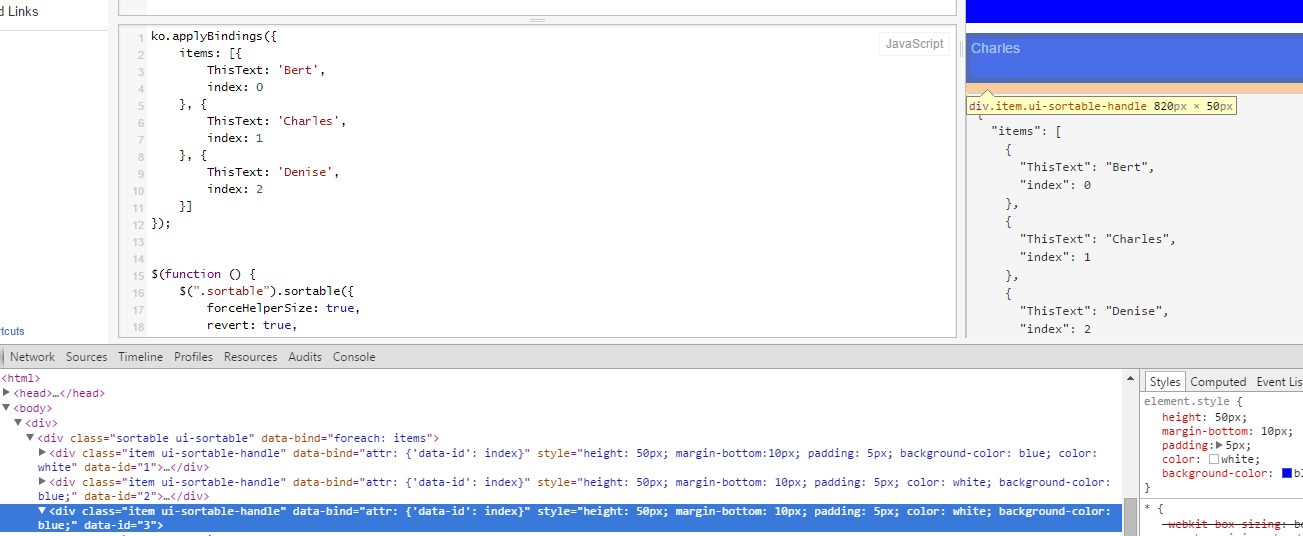
回答 2
Stack Overflow用户
发布于 2015-04-23 14:36:05
第一件事--如果您要更改属性--这将不会更新基础ViewModel (这是正确的,从代码中更新attribite以更改ViewModel是违反MVVM模式的概念的--在您的代码中,您应该更改ViewModel,而剔除将为您更新视图)。
关于你的例子,你有两个问题:
索引是普通整数,您应该将它定义为可观察的,即
index: ko.observable(1)与其更新数据id,不如使用ko.dataFor实用程序函数,并更新ViewModel:
ko.dataFor(this).index(i+1);整份样本:
小提琴
ko.applyBindings({
    items: ko.observableArray([{
        ThisText: 'Bert',
        index: ko.observable(1)
    }, {
        ThisText: 'Charles',
        index: ko.observable(2)
    }, {
        ThisText: 'Denise',
        index: ko.observable(3)
    }])
});


$(function () {
    $(".sortable").sortable({
        forceHelperSize: true,
        revert: true,
        stop: function (event, ui) {
            var sorter = $(this);
            var sortables = sorter.children();

            sortables.each(function (i) {
                // HERE I Update the data-id attribute
                ko.dataFor(this).index(i+1);
            });
        }
    });
});注意:也可以考虑使用插件击倒-拖拉,它支持排序以及示例 --这比将JQuery UI排序和Knockout混合起来要好得多。
Stack Overflow用户
发布于 2015-04-23 14:12:35
这是因为jquery脚本在html Dom准备就绪之前运行。您可以将您的非殖细胞功能放入"setTimeout“中。这是不好的做法,但会奏效的。
https://stackoverflow.com/questions/29825849
复制相似问题
腾讯云开发者

Copyright © 2013 - 2026 Tencent Cloud. All Rights Reserved. 腾讯云 版权所有
深圳市腾讯计算机系统有限公司 ICP备案/许可证号:粤B2-20090059  粤公网安备44030502008569号
腾讯云计算(北京)有限责任公司 京ICP证150476号 | 京ICP备11018762号