
Graphics32层旋转
我正在尝试将RotationLayer与常规TBitmapLayer结合起来,以便能够尽可能地使用ImgView32层。
所以我的想法是::
- 我有一个TBitmapLayer (我需要它是BitmapLayer,因为我用它做的不仅仅是旋转)。它加载了BMP图像。
- 我在表单上放置了一个TGaugeBar (就像GR32示例中的那样)
- 当在这个量规上有一个鼠标时,我开始计算:我创建一个RotationLayer,在这里我放置原始BitmapLayer.Bitmap的内容。
- OnChange,我使用在MouseDown中创建的RotLayer对象,并给它一个角度,并指定选择为TBitmap,RotLayer.Bitmap
- 在MouseUp上,我释放了使用的临时RotationLayer对象
因此,基本上:将图像从实际层移动到临时旋转层,在那里进行旋转,然后,完成后,将旋转图像移回BitmapLayer.
因此,最后,我的逻辑似乎是可行的,只是我需要使用另一个So问题中提供的函数(链接下面)手动在BitmapLayer上执行实际的旋转操作。因为看起来rotationLayer实际上并没有在它的位图中旋转图像。它似乎只显示它旋转..。
现在我的问题是:
- 我需要能够“调整”原始TBitmapLayer的大小,这样它就不会裁剪旋转的图像来适应旧的BitmapLayer。
- 当显示rotationLayer时,我使用BitmapCenter显示它的初始BitmapLayer的onTop (我找不到另一种方法将它定位到我想要的位置)。然而,这个BitmapCenter似乎有两种用法:一是定位层,二是设置旋转所围绕的点。如何才能将旋转层精确定位为原始onTop的BitmapLayer,而在位图的中间还有BitmapCenter (旋转中心)?
- 当我开始旋转时,rotationLayer被创建并加载到我的位图中,我认为alphaChannel会发生一些事情,因为我认为图像会变得更暗和更透明,每次我把BitmapLayer.Bitmap分配给RotationLayer.Bitmap时。我注意到,通过注释MasterAlpha:=200行,图像不会失去它的亮度,但是现在当RotationLayer可见时,图层矩形的空部分变成黑色。所以看起来很糟..。同样,当我执行MouseUP时(因此,当我将旋转的位图分配给BitmapLayer.Bitmap时,一些黑线在旋转图像的外部仍然是可见的,因此在空空间中也是如此)。对如何保持原始图像的清洁有任何建议吗?
请帮助我解决这三个问题。
到目前为止的工作代码是:
procedure TMainForm.myrotMouseDown(Sender: TObject; Button: TMouseButton;
  Shift: TShiftState; X, Y: Integer);
var
  l,r,t,b:single;
  flrect:TFloatRect;
begin
    ro:=TRotlayer.Create(imgView.Layers);
    ro.Bitmap:=TBitmap32.Create;
    with ro.Bitmap do
    begin
      BeginUpdate;
      ro.Bitmap.Assign((Selection as TBitmapLayer).Bitmap);
      TLinearResampler.Create(ro.Bitmap);
      //ensure good looking edge, dynamic alternative to SetBorderTransparent
      TCustomResampler(ro.Bitmap.Resampler).PixelAccessMode := pamTransparentEdge;
      ro.BitmapCenter := FloatPoint(-(Selection as TBitmapLayer).Location.Left, -(Selection as TBitmapLayer).Location.Top);
//      MasterAlpha := 200;
      FrameRectS(BoundsRect, $FFFFFFFF);
      DrawMode := dmBlend;
      EndUpdate;
      Changed;
    end;
    ro.Scaled := True;
    (Selection as TBitmapLayer).Bitmap.Assign(ro.Bitmap);
end;

procedure TMainForm.myrotChange(Sender: TObject);
begin
  ro.Angle := myRot.Position;
  (Selection as TBitmapLayer).Bitmap.Assign(ro.Bitmap);
end;

procedure TMainForm.myrotMouseUp(Sender: TObject; Button: TMouseButton;
  Shift: TShiftState; X, Y: Integer);
begin
    bmx:=TBitmap32.Create;
    bmx.Assign((Selection as TBitmapLayer).Bitmap);
    RotateBitmap(bmx, -(Round(ro.Angle)), false, clWhite32, true);
    (Selection as TBitmapLayer).Bitmap.Assign(bmx);
    bmx.Free;
    ro.Free;
end;RotateBitmap函数是从这个SO question中选择的。
当旋转透明图像时也有问题..。使用上面的代码对它们进行测试,并以透明的方式加载一些PNG,您就会了解问题所在。
回答 1
Stack Overflow用户
发布于 2015-04-23 16:42:15
答案(这些问题本来应该是单独的问题,但由于它们是密切相关的,我处理它们。)希望我没有被钉死。)
- 调整TBitmapLayer大小以容纳旋转图像。您可以在MyRotMouseUp过程中通过设置TBitmapLayer.Location来做到这一点。旋转位图具有正确的
Width和Height属性。有关示例,请参阅下面的代码。如图所示,将位置设置在ImgView的中心位置。 - 如何将
TRotationLayerTBitmapLayer精确地定位在TBitmapLayer之上,并在图像中心有旋转中心。ATRotationLayer是用Position属性定位的。位图旋转中心分别设置为BitmapCenter属性。 定位TRotLayer不同于定位其他层(f.ex )。TBitmapLayer),因为它使用Position: TFloatPointpoperty对Location: TFloatRect进行其他操作。Position定义了层的中心点。 与其他层一样,参考坐标系依赖于Scaled属性。如果是Scaled=False(默认),则引用是TImgView32边界。如果将更大的图像加载到TimgView32.Bitmap中,并使用滚动条滚动图像,则TRotLayer不会与图像一起移动。另一方面,如果是Scaled=True,则引用是对TImgView32.Bitmap的引用,而TRotLayer则在滚动时跟踪图像。 若要将旋转层绑定到位播放机,以便它们一起滚动,请将两个层Scaled属性设置为True,并更改设置Location和Position的方式。我在代码中添加了所需的修改。 - 当在旋转层和原始位图之间来回分配位图时,图像颜色会发生变化。
是的,我很清楚你原来的代码是什么意思。这就是为什么我在评论中建议保持原始图像的干净(未旋转),并跟踪角度,以便原始图像仅用于一个转换即可显示。仍然有一些退化可见,但它不会堆积如山,无法使用。
在myRotMouseDown():原始图像(代码中的bmo: TBitmap32)分配给旋转层(rol: TRotationLayer)位图。bml: TBitmapLayer是隐藏的(Visible := False)。这里没有其他位图的分配。
在myRotChange():旋转层的角度被改变,一个形式的全局变量用相同的角度数据被更新。这里没有其他位图的分配。
在myRotMouseUp():原始图像分配给位图层(bml: TBitmapLayer.Bitmap),该位图使用存储在表单中的角度随RotateBitmap()过程旋转。bml.Location被更新以适应旋转的图像。此处不分配任何其他位图(不需要bmx: TBitmap32)。bml再次可见。
我也建议不要保存旋转的图像,而只是保存角度。这样,原始图像可以保持不变,没有任何退化,并可以简单地显示在保存的角度时,需要。
代码(不需要更改RotateBitmap(),所以这里不包括)
形式字段
  private
    bmo: TBitmap32;     // original bitmap
    bml: TBitmapLayer;
//    bmx: TBitmap32;
    rol: TRotLayer;
    roa: single;        // rotation angle
方法
procedure TForm9.FormCreate(Sender: TObject);
var
  dstr, srcr: TRect;
  png: TPortableNetworkGraphic32;
begin
  png := TPortableNetworkGraphic32.Create;
  png.LoadFromFile('c:\tmp\imgs\arr-2.png');
  bmo:= TBitmap32.Create;
  bmo.Assign(png);
//  bmo.LoadFromFile('c:\tmp\imgs\arr.bmp');
  png.Free;
  bml := TBitmapLayer.Create(ImgView.Layers);
  bml.Bitmap.SetSize(bmo.Width, bmo.Height);
  bml.Scaled := True;  // !!! Changed to True for synching with rol !!!
  //bml.Location := FloatRect(
  //  (ImgView.Width  - bml.Bitmap.Width) * 0.5,
  //  (ImgView.Height - bml.Bitmap.Height)* 0.5,
  //  (ImgView.Width  + bml.Bitmap.Width) * 0.5,
  //  (ImgView.Height + bml.Bitmap.Height)* 0.5);
  // !!! Change follows to synch scrolling of bml and rol
  bml.Location := FloatRect(
    (ImgView.Bitmap.Width  - bml.Bitmap.Width) * 0.5,
    (ImgView.Bitmap.Height - bml.Bitmap.Height)* 0.5,
    (ImgView.Bitmap.Width  + bml.Bitmap.Width) * 0.5,
    (ImgView.Bitmap.Height + bml.Bitmap.Height)* 0.5);
  dstr := Rect(0, 0, bmo.Width, bmo.Height);
  srcr := Rect(0, 0, bmo.Width, bmo.Height);
  bml.Bitmap.DrawMode := dmBlend;
  bml.Bitmap.Draw(dstr, srcr, bmo.Handle);
end;

procedure TForm9.FormDestroy(Sender: TObject);
begin
  bmo.Free;
end;

procedure TForm9.myRotChange(Sender: TObject);
begin
  rol.Angle := myRot.Position * 3.6;
  roa := rol.Angle;
//  (Selection as TBitmapLayer).Bitmap.Assign(ro.Bitmap);
end;

procedure TForm9.myRotMouseDown(Sender: TObject; Button: TMouseButton;
  Shift: TShiftState; X, Y: Integer);
var
  l, r, t, b: single;
  flrect: TFloatRect;
begin
  rol := TRotLayer.Create(ImgView.Layers);
  rol.Scaled := True; // !!! Added for synching with bml
  with rol.Bitmap do
  begin
    BeginUpdate;
    Assign(bmo);
    // rol.Position := FloatPoint(ImgView.Width * 0.5, ImgView.Height* 0.5);
    // !!! Change follows to synch scrolling of bml and rol
    rol.Position := FloatPoint(
      (bml.Location.Right  + bml.Location.Left)*0.5,
      (bml.Location.Bottom + bml.Location.Top)*0.5);
//    rol.Bitmap.Assign((Selection as TBitmapLayer).Bitmap);
    TLinearResampler.Create(rol.Bitmap);
    // ensure good looking edge, dynamic alternative to SetBorderTransparent
    TCustomResampler(rol.Bitmap.Resampler).PixelAccessMode := pamTransparentEdge;
//    ro.BitmapCenter := FloatPoint(-(Selection as TBitmapLayer).Location.Left,
//      -(Selection as TBitmapLayer).Location.Top);
    rol.BitmapCenter := FloatPoint(Width * 0.5, Height * 0.5);
    // MasterAlpha := 200;
    FrameRectS(BoundsRect, $FFFFFFFF);
    DrawMode := dmBlend;
    rol.Angle := roa;
    EndUpdate;
    Changed;
  end;
  bml.Visible := False;
//  (Selection as TBitmapLayer).Bitmap.Assign(ro.Bitmap);
end;

procedure TForm9.myRotMouseUp(Sender: TObject; Button: TMouseButton;
  Shift: TShiftState; X, Y: Integer);
begin
  bml.Bitmap.Assign(bmo);
  RotateBitmap(bml.Bitmap, -(Round(roa)), True, clWhite32, True);
  //bml.Location := FloatRect(
  //  (ImgView.Width  - bml.Bitmap.Width) * 0.5,
  //  (ImgView.Height - bml.Bitmap.Height)* 0.5,
  //  (ImgView.Width  + bml.Bitmap.Width) * 0.5,
  //  (ImgView.Height + bml.Bitmap.Height)* 0.5);
  // !!! Change follows to synch scrolling of bml and rol
  bml.Location := FloatRect(
    (ImgView.Bitmap.Width  - bml.Bitmap.Width) * 0.5,
    (ImgView.Bitmap.Height - bml.Bitmap.Height)* 0.5,
    (ImgView.Bitmap.Width  + bml.Bitmap.Width) * 0.5,
    (ImgView.Bitmap.Height + bml.Bitmap.Height)* 0.5);
  bml.Bitmap.DrawMode := dmBlend;
  rol.Free;
  bml.Visible := True;
end;
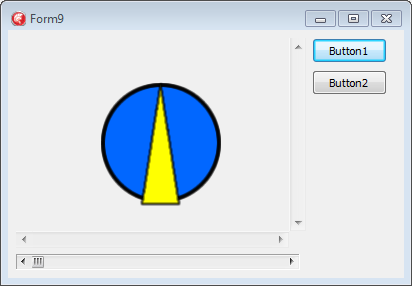
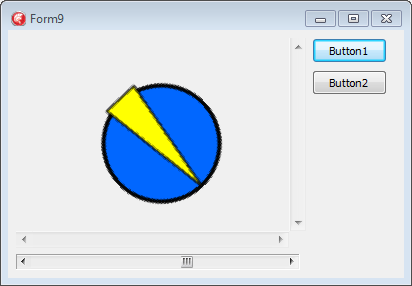
最后几张截图:第一,没有旋转图像像它一样好。第二次旋转,边缘不是像素完美,而是合理的。
https://stackoverflow.com/questions/29778156
复制相似问题
腾讯云开发者

Copyright © 2013 - 2026 Tencent Cloud. All Rights Reserved. 腾讯云 版权所有
深圳市腾讯计算机系统有限公司 ICP备案/许可证号:粤B2-20090059  粤公网安备44030502008569号
腾讯云计算(北京)有限责任公司 京ICP证150476号 | 京ICP备11018762号