
Android材料设计工具条与FAB按钮交叉
Android材料设计工具条与FAB按钮交叉
提问于 2015-04-21 16:11:33
在谷歌的材料设计规范中,他们经常显示浮动动作按钮,它位于工具栏的一半以上,并覆盖了内容。
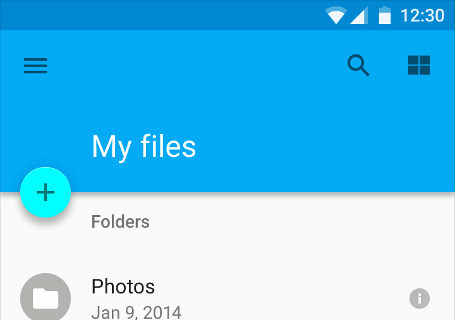
http://www.google.com/design/spec/components/buttons-floating-action-button.html
但是我尝试了一些变化,工具栏和内容之间仍然存在差距,这是由按钮造成的。
<LinearLayout>
 <include layout="@layout/toolbar" />

  <include layout="@layout/fab_button" />

  <ScrollView>
    Content
  </ScrollView>
</LinearLayout>
我也尝试将工具栏和FAB按钮放在一个FrameLayout中,而且它也有这个缺口。FAB按钮代码是从谷歌的示例中提取的,我在RecyclerView的底部有重叠的问题。
是否有一种方法来实现这个外观显示在材料设计规范。
回答 2
Stack Overflow用户
回答已采纳
发布于 2015-12-14 10:21:06
在FAB中添加layout_anchor属性并将其设置为Top。
将CoordinatorLayout作为您的根视图,这将是最佳的布局实践。
您可以在FAB中使用layout_anchorGravity属性来设置FAB重力。
<?xml version="1.0" encoding="utf-8"?>
<android.support.design.widget.CoordinatorLayout
    xmlns:android="http://schemas.android.com/apk/res/android"
    xmlns:app="http://schemas.android.com/apk/res-auto"
    android:layout_width="match_parent"
    android:layout_height="match_parent">

    <LinearLayout android:layout_width="match_parent"
        android:layout_height="match_parent"
        android:orientation="vertical">

        <LinearLayout
            android:id="@+id/viewA"
            android:layout_width="match_parent"
            android:layout_height="match_parent"
            android:layout_weight="0.6"
            android:background="@android:color/holo_blue_bright"
            android:orientation="horizontal"/>

        <LinearLayout
            android:id="@+id/viewB"
            android:layout_width="match_parent"
            android:layout_height="match_parent"
            android:layout_weight="0.4"
            android:background="@android:color/holo_green_light"
            android:orientation="horizontal"/>

    </LinearLayout>

    <android.support.design.widget.FloatingActionButton
        android:id="@+id/fab"
        android:layout_width="wrap_content"
        android:layout_height="wrap_content"
        android:layout_margin="16dp"
        android:clickable="true"
        android:src="@drawable/ic_done"
        app:layout_anchor="@id/viewA"
        app:layout_anchorGravity="bottom|right|end"/>
</android.support.design.widget.CoordinatorLayout>看看这个。希望这能帮到你。
Stack Overflow用户
发布于 2015-04-30 16:53:13
使用相对布局是最容易定位在两个视图之间的FAB。您可以为fab使用高程参数来使其通过工具栏。设置FAB的高度比工具栏的高。
<RelativeLayout xmlns:android="http://schemas.android.com/apk/res/android"
    xmlns:app="http://schemas.android.com/apk/res-auto"
    xmlns:tools="http://schemas.android.com/tools"
    xmlns:fab="http://schemas.android.com/apk/res-auto"
    android:layout_width="match_parent"
    android:layout_height="match_parent"
    android:orientation="vertical"
    tools:context=".MainActivity">

    <android.support.v7.widget.Toolbar
        android:id="@+id/toolbar"
        android:layout_width="match_parent"
        android:layout_height="wrap_content"
        android:elevation="4dp"
        android:background="?attr/colorPrimary"
        app:theme="@style/ThemeOverlay.AppCompat.Dark.ActionBar"/>

    <ListView
        android:id="@+id/listview"
        android:layout_below="@+id/toolbar"
        android:layout_width="match_parent"
        android:layout_height="match_parent"/>


    <com.getbase.floatingactionbutton.FloatingActionButton
        android:layout_width="wrap_content"
        android:layout_height="wrap_content"
        android:id="@+id/favorite"
        android:layout_alignBottom="@+id/toolbar"
        android:layout_alignParentRight="true"
        android:layout_alignParentEnd="true"
        android:layout_marginRight="8dp"
        android:layout_marginEnd="8dp"
        android:elevation="8dp"
        android:layout_marginBottom="-32dp"
        fab:fab_icon="@drawable/ic_favorite_outline_white_24dp"
        fab:fab_colorNormal="@color/accent"
        fab:fab_size="mini"
        />
</RelativeLayout>页面原文内容由Stack Overflow提供。腾讯云小微IT领域专用引擎提供翻译支持
原文链接:
https://stackoverflow.com/questions/29777695
复制相关文章
相似问题
腾讯云开发者

Copyright © 2013 - 2026 Tencent Cloud. All Rights Reserved. 腾讯云 版权所有
深圳市腾讯计算机系统有限公司 ICP备案/许可证号:粤B2-20090059  粤公网安备44030502008569号
腾讯云计算(北京)有限责任公司 京ICP证150476号 | 京ICP备11018762号