
在<Key>中显示<Row>超过2<Row>?
在<Key>中显示<Row>超过2<Row>?
提问于 2015-04-21 14:13:35
我为我的应用程序定制了键盘,这是基于Marteen:http://www.fampennings.nl/maarten/android/09keyboard/index.htm的一项惊人的研究。
效果很好。
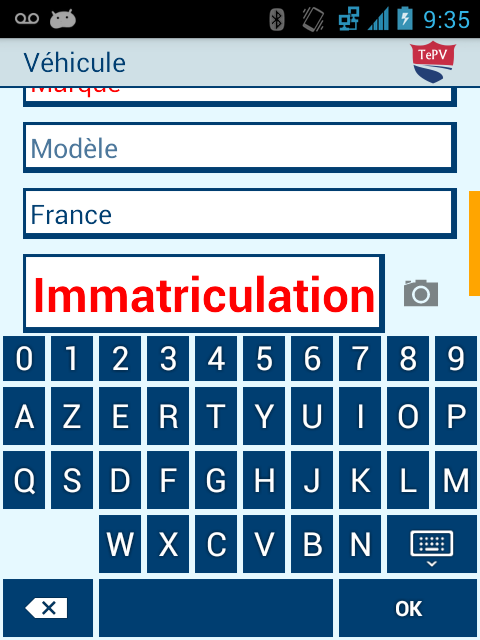
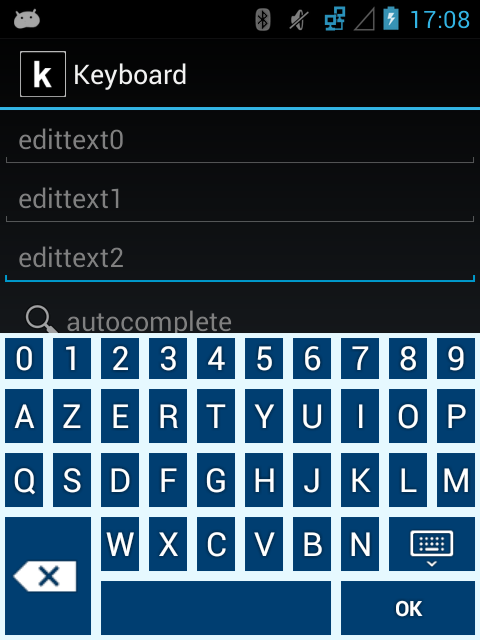
我想以“Enter”键构建在大多数硬件键盘上的方式显示一个OK键:大和2行高。
知道怎么做吗?将键高设置为双高度不能工作,键在屏幕外(底部)显示一半。
编辑:我的键盘底部行
    <Row>
    <Key android:codes="87"    android:keyLabel="W" android:keyWidth="10%p" android:horizontalGap="20%p"/>
    <Key android:codes="88"    android:keyLabel="X" android:keyWidth="10%p"/>
    <Key android:codes="67"    android:keyLabel="C" android:keyWidth="10%p"/>
    <Key android:codes="86"    android:keyLabel="V" android:keyWidth="10%p"/>
    <Key android:codes="66"    android:keyLabel="B" android:keyWidth="10%p"/>
    <Key android:codes="78"    android:keyLabel="N" android:keyWidth="10%p"/>
    <Key android:codes="-6"    android:keyIcon="@drawable/sym_keyboard_done_48" android:keyWidth="20%p"/>
</Row>
<Row >
    <Key android:codes="-5"     android:keyIcon="@drawable/sym_keyboard_delete" android:keyWidth="20%p"/>
    <Key android:codes="32"    android:keyLabel=" " android:keyWidth="50%p"/>
    <Key android:codes="-3" android:keyLabel="OK" android:keyWidth="30%p" />
我希望最后一行的左键和右键在上一行展开。
编辑:我发布了一张图片来解释我的痛苦:
已解决:
回答 1
Stack Overflow用户
回答已采纳
发布于 2015-04-28 14:21:44
您是否尝试将“OK”键放置在最后一行的第4行整数中,并将其设置为双高?
页面原文内容由Stack Overflow提供。腾讯云小微IT领域专用引擎提供翻译支持
原文链接:
https://stackoverflow.com/questions/29774745
复制相关文章
相似问题
腾讯云开发者

Copyright © 2013 - 2026 Tencent Cloud. All Rights Reserved. 腾讯云 版权所有
深圳市腾讯计算机系统有限公司 ICP备案/许可证号:粤B2-20090059  粤公网安备44030502008569号
腾讯云计算(北京)有限责任公司 京ICP证150476号 | 京ICP备11018762号