
旋转图像变得扭曲和模糊?
我使用图像视图:
@IBOutlet weak var imageView: UIImageView!绘制一个图像和另一个已旋转的图像。结果表明,旋转图像质量很差。在下面的图像中,黄色框中的眼镜不旋转。红色盒子里的眼镜旋转了4.39度。
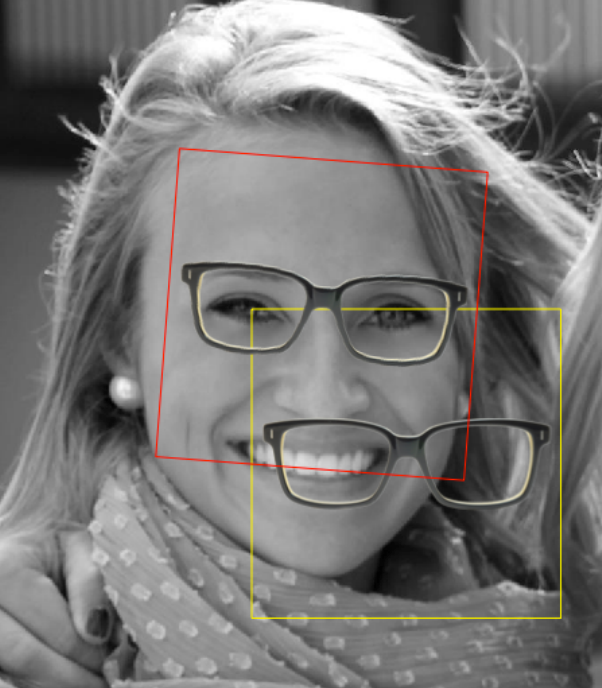
这是我用来画眼镜的代码:
UIGraphicsBeginImageContext(imageView.image!.size)
    imageView.image!.drawInRect(CGRectMake(0, 0, imageView.image!.size.width, imageView.image!.size.height))

var drawCtxt = UIGraphicsGetCurrentContext()

var glassImage = UIImage(named: "glasses.png")
let yellowRect = CGRect(...)

CGContextSetStrokeColorWithColor(drawCtxt, UIColor.yellowColor().CGColor)
CGContextStrokeRect(drawCtxt, yellowRect)
CGContextDrawImage(drawCtxt, yellowRect, glassImage!.CGImage)

// paint the rotated glasses in the red square
CGContextSaveGState(drawCtxt)
CGContextTranslateCTM(drawCtxt, centerX, centerY)
CGContextRotateCTM(drawCtxt, 4.398 * CGFloat(M_PI) / 180)
var newRect = yellowRect
newRect.origin.x = -newRect.size.width / 2
newRect.origin.y = -newRect.size.height / 2
CGContextAddRect(drawCtxt, newRect)
CGContextSetStrokeColorWithColor(drawCtxt, UIColor.redColor().CGColor)
CGContextSetLineWidth(drawCtxt, 1)

// draw the red rect
CGContextStrokeRect(drawCtxt, newRect)
// draw the image
CGContextDrawImage(drawCtxt, newRect, glassImage!.CGImage)
CGContextRestoreGState(drawCtxt)
我如何旋转和油漆眼镜而不失去质量或得到一个扭曲的图像?
回答 2
Stack Overflow用户
发布于 2015-04-20 17:47:17
您应该使用UIGraphicsBeginImageContextWithOptions(CGSize size, BOOL opaque, CGFloat scale)创建初始上下文。作为0.0传入scale将默认为当前屏幕的大小(例如,iPhone 6上的2.0和iPhone 6 Plus上的3.0 )。
请参阅UIGraphicsBeginImageContext()上的说明:
此函数等效于调用UIGraphicsBeginImageContextWithOptions函数,其不透明参数设置为NO,缩放因子为1.0。
Stack Overflow用户
发布于 2015-04-20 17:53:41
正如其他人所指出的,您需要设置您的上下文,以允许视网膜显示。
除此之外,您可能希望使用比目标显示大小更大的源图像,并将其缩小。(2倍于目标图像的像素尺寸将是一个很好的起点。)
旋转到奇数个角度是破坏性的。图形引擎必须将源像素的网格映射到不同的网格上,在网格中它们不对齐。源图像中的完全直线在目标图像中不再是直线,等等。图形引擎必须进行一些插值,一个源像素可能分布在几个像素上,或者在目标图像中小于一个完整像素。
通过提供更大的源映像,您可以为图形引擎提供更多的信息以供使用。它可以更好地将这些源像素切片和切成目标像素网格。
https://stackoverflow.com/questions/29754753
复制相似问题
腾讯云开发者

Copyright © 2013 - 2026 Tencent Cloud. All Rights Reserved. 腾讯云 版权所有
深圳市腾讯计算机系统有限公司 ICP备案/许可证号:粤B2-20090059  粤公网安备44030502008569号
腾讯云计算(北京)有限责任公司 京ICP证150476号 | 京ICP备11018762号