
提出步骤清单
我正在开发C#/XAML中的Windows 8应用程序。
我有一个步骤列表要显示,这个列表可以有一个到多个步骤。
我已经尝试过GridView和ListView控件,但是使用这些控件时,不可能让每个元素都有自己的高度(因为一步可能只有一行文本,而下一步可能只有3行)。VariableSizedGridview也无济于事。
我想要实现的是类似于微软必应食品饮料应用程序中烹饪步骤的方式。因此,步骤在第一列中以行形式显示,当到达页面末尾时,它将创建第二列,依此类推。就像这样:
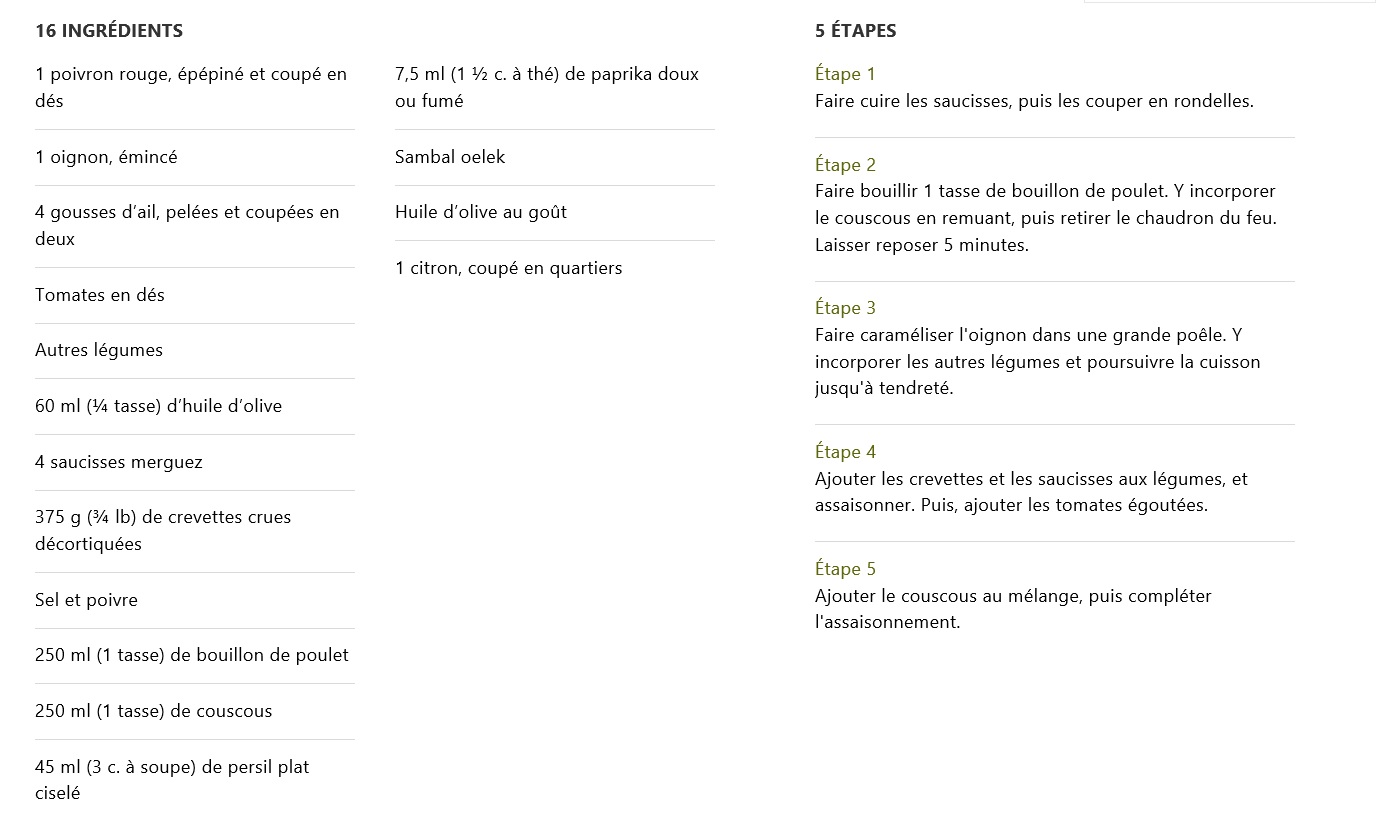
有谁能帮我找到办法来实现这一点吗?
使用什么控件以及如何使用?
这看起来很简单,但我在网上搜索时找不到任何解决方案。
谢谢
下面是我对Gridview控件所做的工作( Listview非常类似):
<Grid Name="gridSteps" Grid.Column="3" Margin="25,69,25,69">
                   <Grid.RowDefinitions>
                      <RowDefinition Height="Auto"/>
                      <RowDefinition Height="*"/>
                   </Grid.RowDefinitions>

                   <TextBlock Text="ÉTAPES" FontSize="22" FontWeight="Bold"></TextBlock>
                   <GridView Grid.Row="1" Name="gvGroupSteps" SelectionMode="None" IsHitTestVisible="False" VerticalAlignment="Top">
                      <GridView.ItemTemplate>
                         <DataTemplate>
                            <StackPanel Width="400">
                               <TextBlock Text="{Binding Order}" Margin="0,15,0,0" FontSize="20" Foreground="Bisque"></TextBlock>
                               <TextBlock Text="{Binding Description}" Margin="0,5,0,0" FontSize="18" TextWrapping="Wrap"></TextBlock>
                            </StackPanel>
                         </DataTemplate>
                      </GridView.ItemTemplate>

                      <GridView.GroupStyle>
                         <GroupStyle>
                            <GroupStyle.HeaderTemplate>
                               <DataTemplate>
                                  <StackPanel Background="#FFC9C9C9">
                                     <TextBlock Text="{Binding GroupName}" FontSize="20" FontWeight="SemiBold"></TextBlock>
                                  </StackPanel>
                               </DataTemplate>
                            </GroupStyle.HeaderTemplate>
                         </GroupStyle>
                      </GridView.GroupStyle>

                   </GridView>
</Grid>回答 3
Stack Overflow用户
发布于 2015-04-25 12:38:59
我一直在互联网上寻找一个解决方案,但什么也找不到。所以我决定自己用C#代码做所有事情。
简而言之,在有一个方向设置为水平的StackPanel中,我向它添加了一个网格,并为我拥有的每一项添加了行。当达到最大高度(基于屏幕高度)时,我向StackPanel添加一个新的网格,依此类推。
这是我的代码,如果有人需要的话:
// Nombre de lignes maximal (16 lignes à 1080p)
         int maxCharCount = (int)Window.Current.Bounds.Height * 16 / 1080;

         spIngredients.Children.Clear();
         foreach (var groupIngredient in db.Table<GroupIngredient>().Where(x => x.RecipeId == _currentRecipe.Id))
         {
            int linesCount = 0;
            int row = 0;
            var gGroup = new Grid();
            spIngredients.Children.Add(gGroup);
            gGroup.RowDefinitions.Add(new RowDefinition() { Height = GridLength.Auto });

            var groupName = new TextBlock() { Text = groupIngredient.Name, FontSize = 20, FontWeight = FontWeights.SemiBold, Margin = new Thickness(10) };
            gGroup.Children.Add(groupName);
            Grid.SetRow(groupName, row);

            foreach (var ingredient in db.Table<Ingredient>().Where(x => x.GroupIngredientId == groupIngredient.Id))
            {
               // Nombre de lignes, split à 45 char
               linesCount += 1 + ingredient.IngredientFull.Length / 45;

               if (linesCount >= maxCharCount)
               {
                  var gCol = new Grid();
                  spIngredients.Children.Add(gCol);
                  gCol.RowDefinitions.Add(new RowDefinition() { Height = GridLength.Auto });
                  var col = new TextBlock() { Text = "", FontSize = 20, FontWeight = FontWeights.SemiBold, Margin = new Thickness(10) };
                  gCol.Children.Add(col);
                  gGroup = gCol;

                  row = 0;
                  linesCount = 0;
                  Grid.SetRow(col, row);
               }

               row++;
               ingredient.Quantity = ingredient.Quantity * multiplier;

               gGroup.RowDefinitions.Add(new RowDefinition() { Height = GridLength.Auto });

               var ingredientName = new TextBlock() { Text = ingredient.IngredientFull, Margin = new Thickness(10), FontSize = 18, TextWrapping = TextWrapping.Wrap, MaxWidth = 300 };
               gGroup.Children.Add(ingredientName);
               Grid.SetRow(ingredientName, row);
            }
}Stack Overflow用户
发布于 2015-04-18 17:27:08
您可能想发布您尝试过的XAML。在我看来,您需要嵌套视图项。考虑这个非常简单的例子:
<Page xmlns="http://schemas.microsoft.com/winfx/2006/xaml/presentation" xmlns:x="http://schemas.microsoft.com/winfx/2006/xaml">
<Grid>
<ListView>
<ListViewItem>Step 1</ListViewItem>
<ListViewItem>
<ListView>
<ListViewItem>Step 1a</ListViewItem>
<ListViewItem>Step 1b</ListViewItem>
<ListViewItem>Step 1c</ListViewItem>
</ListView>
</ListViewItem>
<ListViewItem>Step 2</ListViewItem>
</ListView>
</Grid>
Stack Overflow用户
发布于 2015-04-18 17:34:40
我已经尝试过GridView和ListView控件,但是有了这些控件,不可能让每个元素都有自己的高度。
我记得,事实上,你可以使用这些控件拥有不同高度的元素。这两种类型的ItemsControl都支持数据模板,这反过来允许您自定义每个项的外观,包括其高度。
尽管如此,您可能会发现,在这种情况下,更简单的ListBox适合您的需要。如果没有代码示例或其他细节,很难说。
您应该阅读MSDN的数据模板概述,它对整个过程进行了深入的讨论,并提供了一些关于您可以做什么的好例子。请特别注意名为“基于数据对象的属性选择DataTemplate”的部分。虽然一个模板仍然可以有可变的高度,显然,通过使用不同的模板,根据您的具体需要,您可以定制每个项目的风格,以您的心的内容。
如果这不能解决你的问题,请提供一个更详细的问题。您应该包括代码示例,它清楚地显示了您尝试过的内容,精确地解释了该代码所做的事情,以及这与您希望它做的事情有什么不同。
https://stackoverflow.com/questions/29720282
复制相似问题
腾讯云开发者

Copyright © 2013 - 2026 Tencent Cloud. All Rights Reserved. 腾讯云 版权所有
深圳市腾讯计算机系统有限公司 ICP备案/许可证号:粤B2-20090059  粤公网安备44030502008569号
腾讯云计算(北京)有限责任公司 京ICP证150476号 | 京ICP备11018762号