
用自动生成的ID将值附加到excel访问表
我有一个access数据库,其中有一些表,每天都会用一些值进行更新。我需要这些表有一个ID字段,当从excel导入表的其他值时,这个字段是自动生成的。我想通过保留一个按钮和编写一个VBA代码来实现自动化。现在,我有一个表单,它将值导入到表中,但它只是导入了我所拥有的确切值。我还需要一个额外的ID列,它必须在导入时自动生成。请帮帮我。
Excel表格样本:
ProductName |   ProductValue
------------+------------------
ABC         |   76
SDF         |   87
数据库表
ID  |   ProductName |   Product Value
----+---------------+-----------------
1   |   ABC         |   76
2   |   SDF         |   87
Excel工作表用新值更新每个日期,并且必须将ID自动递增到access db。
回答 3
Stack Overflow用户
发布于 2015-04-17 12:20:00
在Access中创建表时,要创建的新列的数据类型有不同的选项。其中一种数据类型称为"AutoNumber“。这里有一些信息:http://en.wikipedia.org/wiki/AutoNumber
将列ID设置为autoNumber,并使其成为主键。现在,每次在表ID中插入一个关系时,都会自动增加一个新的数字。
Stack Overflow用户
发布于 2015-04-17 13:49:02
我创建了一个名为ExcelData.xlsx的Excel电子表格,它的示例数据已格式化为表:
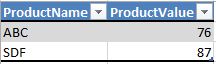
然后,我创建了一个带有按钮的表单来运行一些VBA,它将导入要访问的数据(按钮名为cmdImport):

作为表单VBA的一部分,我编写了一个函数来检查表是否存在。表的名称作为函数的参数给出,如果找到函数,则返回TRUE;如果未找到,则返回FALSE:
Public Function TableExists(name As String) As Boolean

    ' A function to check whether a table exists
    ' Pass the name of the table as the argument
    ' the function will return TRUE if found or FALSE if not found

    TableExists = DCount("*", "MSysObjects", "Name = '" & name & "' AND Type = 1")

End Function
然后,在..and按钮的cmdImport单击事件上,我有以下内容(您需要为您的特定情况替换一些东西,例如您的Excel电子表格的文件路径和文件名):
Private Sub cmdImport_Click()

' 1 - Delete your Access table "tblProducts" so we can reset the Autonumber field

    If _
        TableExists("tblProducts") = True _
    Then

        ' Delete old "tblProducts":
        DoCmd.DeleteObject acTable, "tblProducts"

    Else

        ' Do nothing as table doesn't already exist

    End If

' 2 - Create and define new Access table "tblProducts"... this allows us to reset the Autonumber values for the ID fields

    Dim db As DAO.Database
    Dim tdf As DAO.TableDef
    Dim fldID As DAO.Field, fldProductName As DAO.Field, fldValue As DAO.Field

    Set db = CurrentDb

    ' Create table defintion
    Set tdf = db.CreateTableDef("tblProducts")

    ' Create field definitions
    Set fldID = tdf.CreateField("ID", dbLong)
    fldID.Attributes = dbAutoIncrField
    fldID.Required = True

    Set fldProductName = tdf.CreateField("ProductName", dbText)
    fldProductName.AllowZeroLength = False
    fldProductName.Required = True

    Set fldValue = tdf.CreateField("ProductValue", dbText)
    fldValue.AllowZeroLength = False
    fldValue.Required = True

    ' Append fields to table
    tdf.Fields.Append fldID
    tdf.Fields.Append fldProductName
    tdf.Fields.Append fldValue

    ' Append table to db
    db.TableDefs.Append tdf

    ' Give it a nudge
    db.TableDefs.Refresh
    Application.RefreshDatabaseWindow

    ' Clean up memory
    Set fldID = Nothing
    Set fldProductName = Nothing
    Set fldValue = Nothing
    Set tdf = Nothing
    Set db = Nothing

' 3 - Check for the old imported data from Excel ("ExcelData") and delete it

    If _
        TableExists("ExcelData") = True _
    Then

        ' Delete old "Excel Data":
        DoCmd.DeleteObject acTable, "ExcelData"

    Else

        ' Do nothing as table doesn't already exist

    End If

' 4 - Import new data from Excel ("ExcelData")

    DoCmd.TransferSpreadsheet acImport, _
                              9, _
                              "ExcelData", _
                              "C:/Your/File_Path/And_File_Name.xlsx", _
                              -1

' 5 - Append new data from "ExcelData" in to "tblProducts"

    Dim sqlAppend As String

    sqlAppend = "INSERT INTO tblProducts ( ProductName, ProductValue )" _
              & " SELECT ExcelData.ProductName, ExcelData.ProductValue" _
              & " FROM ExcelData;"

    CurrentDb.Execute sqlAppend

End Sub
这应该会产生这些表。
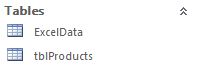
..with应用ID的tblProducts表中的新数据:
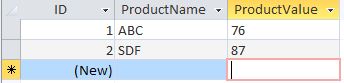
请注意,此方法完全覆盖之前导入的所有内容,然后重新导入它,并再次将ID字段分配给所有新数据。这意味着,例如,在以前的导入中ID为1的记录在下一次导入时可能会得到不同的ID号,这取决于Excel电子表格中的记录顺序是否会在新导入上发生更改。
Stack Overflow用户
发布于 2015-04-17 12:37:02
下面的内容将从excel写入access,并如前面提到的那样,在数据字段类型中使用自动编号。
Sub LogRecord()

 Dim strSQL As Variant
 Dim accApp As Object
 Dim srcs As Variant
 Dim msg1 As Variant


'your access db
srcs = "C:\Documents and Settings\user\My Documents\Programs\Past Versions\Database V2.mdb"  ''' Live location '''

strSQL = "Select * from [tablename];"


Set accApp = GetObject(srcs, "access.Application")
Set Db = DAO.OpenDatabase(srcs)
Set rs = Db.OpenRecordset(strSQL)
    accApp.Visible = False

 For clref = 1 To Range("A500000").End(xlUp).Row
   Cells(clref, 1).Activate

   On Error Resume Next
       If Len(Cells(clref, 1)) >= 1 Then
           rs.AddNew

           rs![Field1] = Sheets("Gather").Cells(clref, 1).Value
           rs![Field2] = Sheets("Gather").Cells(clref, 2).Value
           rs![Field3] = Sheets("Gather").Cells(clref, 3).Value

           rs.Update
       End If

   Next clref

       If Not rs Is Nothing Then rs.Close

       Set rs = Nothing
       Set Db = Nothing
       accApp.DoCmd.RunSQL strSQL
       accApp.Application.Quit


End Subhttps://stackoverflow.com/questions/29695180
复制相似问题
腾讯云开发者

Copyright © 2013 - 2026 Tencent Cloud. All Rights Reserved. 腾讯云 版权所有
深圳市腾讯计算机系统有限公司 ICP备案/许可证号:粤B2-20090059  粤公网安备44030502008569号
腾讯云计算(北京)有限责任公司 京ICP证150476号 | 京ICP备11018762号