
EnvDTE的类型库在哪里?
我在一个EnvDTE脚本中使用PowerShell来自动化Visual 2010。下面是我使用的代码片段:
[void][System.Reflection.Assembly]::LoadWithPartialName("EnvDTE") # (Obsolete!)

$DTE.MainWindow | %{$_.gettype().InvokeMember("Visible","SetProperty",$null,$_,$true)}据我所知,这是“迟到”代码。根据我的研究,我认为我需要EnvDTE程序集的类型库,这样我就可以在PowerShell中使用允许我直接访问COM对象方法/成员的代码,而不是使用InvokeMember。
EnvDTE的类型库在哪里?
回答 1
Stack Overflow用户
发布于 2015-04-17 06:46:06
"dte*.olb“是位于C:\Program (x86)\Common \Microsoft\MSEnv\中的注册类型库(更准确地说,可以在注册表usignLIBID中查找各自的路径,例如在dte*.olb中)。类型库名称为“”。例如:
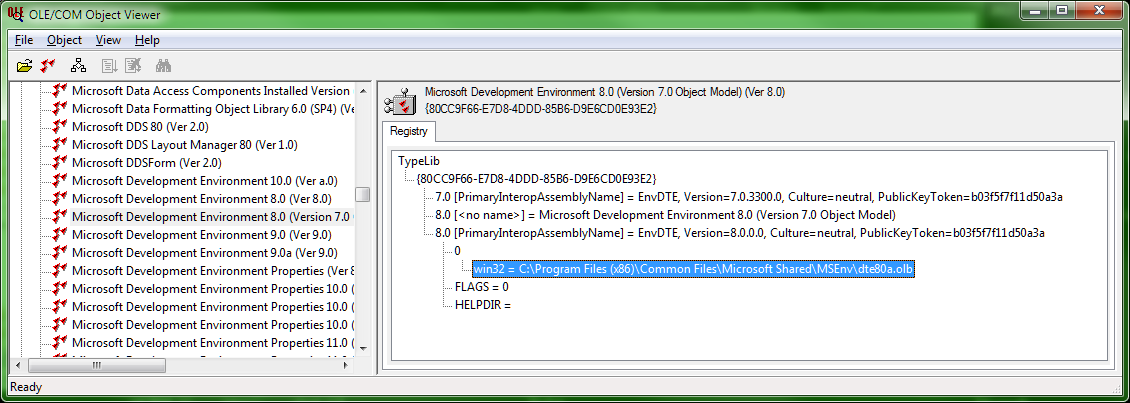
// Generated .IDL file (by the OLE/COM Object Viewer)
//
// typelib filename: dte80a.olb

[
  uuid(80CC9F66-E7D8-4DDD-85B6-D9E6CD0E93E2),
  version(8.0),
  helpstring("Microsoft Development Environment 8.0 (Version 7.0 Object Model)")
]
library EnvDTE // <<----------------
{
    // TLib :     // TLib : OLE Automation : {00020430-0000-0000-C000-000000000046}
    importlib("stdole2.tlb");

    // Forward declare all types defined in this typelib
    interface _DTE;
    interface Windows;
    interface Window;
[...]最新消息。通过查看MainWindow报告的信息类型,我看到了VisualStudio.DTE.9.0和VisualStudio.DTE.10.0 (VS2010和on)报告的信息之间的区别。
Good MainWindow reports (参考码)对有效注册类型库的引用,以及在MainWindow中包含类型库{F11EBD51-0035-3612-BFB9-7D9ED680A986}的较新的“坏”MainWindow报告,该报表未注册且没有有效的磁盘映像(可恢复动态创建)。
Trying VisualStudio.DTE.9.0
nTypeInfoCount 1
pTypeInfo 0x005CAF8C
pTypeLib 0x005CB064, nTypeLibIndex 67
sName "EnvDTE80", sDocumentation "Microsoft Development Environment 8.0"
pLibAttr->guid {1A31287A-4D7D-413E-8E32-3B374931BD89}, lcid 0x0000, syskind 1, wMajorVerNum 8, wMinorVerNum 0, wLibFlags 0x8
vVisible.vt 0xB

Trying VisualStudio.DTE.10.0
nTypeInfoCount 1
pTypeInfo 0x005CB1CC
pTypeLib 0x005CB2A4, nTypeLibIndex 8
sName "Microsoft_VisualStudio_Platform_WindowManagement", sDocumentation "Microsoft.VisualStudio.Platform.WindowManagement.dll"
pLibAttr->guid {F11EBD51-0035-3612-BFB9-7D9ED680A986}, lcid 0x0000, syskind 1, wMajorVerNum 10, wMinorVerNum 0, wLibFlags 0x0
vVisible.vt 0xB看起来PowerShell无法使用这种类型的信息,您唯一的解决办法就是使用InvokeHelper。
https://stackoverflow.com/questions/29687793
复制相似问题
腾讯云开发者

Copyright © 2013 - 2026 Tencent Cloud. All Rights Reserved. 腾讯云 版权所有
深圳市腾讯计算机系统有限公司 ICP备案/许可证号:粤B2-20090059  粤公网安备44030502008569号
腾讯云计算(北京)有限责任公司 京ICP证150476号 | 京ICP备11018762号