
将2:1等长方形全景图转换为立方体图
我目前正在为一个网站做一个简单的3D全景查看器。出于移动性能的原因,我使用的是Three.js CSS 3渲染器。这需要一个立方体地图,分成六个单独的图像。
我正在用Google 光球体在iPhone上录制图片,或者类似的创建2:1等长方形全景图的应用程序。然后,我调整大小,并将其转换为一个cubemap与这个网站:http://gonchar.me/panorama/ (闪存)
最好,我想自己进行转换,如果可能的话,可以在Three.js中运行,或者在Photoshop中进行。我发现Andrew的Photoshop操作,它们看起来很接近,但是没有直接的转换。有没有一种数学方法来转换这些,或者某种脚本来实现它呢?如果可能的话,我想避免使用像搅拌机这样的3D应用程序。
也许这是个很长的机会,但我想我应该问问。我对JavaScript有很好的经验,但我对Three.js还很陌生。我也对依赖WebGL功能犹豫不决,因为它在移动设备上看起来不是慢就是错误。支持也仍然不稳定。
回答 12
Stack Overflow用户
发布于 2015-04-16 17:12:37
如果您想要这样做,服务器端有许多选项。http://www.imagemagick.org/有一堆命令行工具,可以将您的图像分割成碎片。您可以将执行此操作的命令放入脚本中,并在每次获得新映像时运行该命令。
很难确定程序中使用的是什么算法。我们可以通过将正方形网格输入到程序中来尝试和逆向工程正在发生的事情。我用过维基百科网格

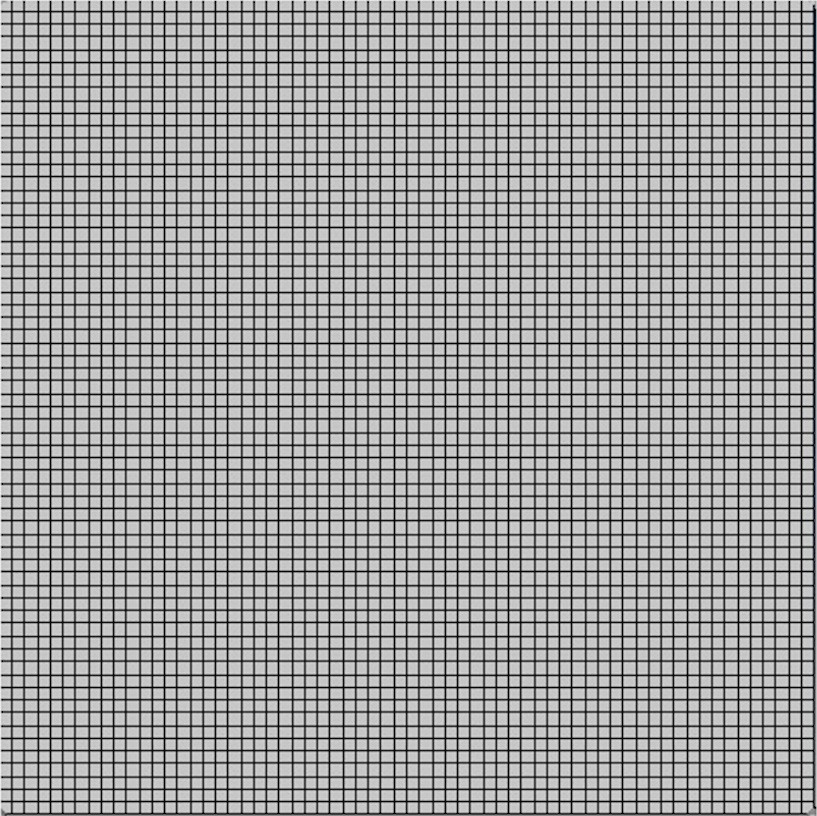
这意味着:
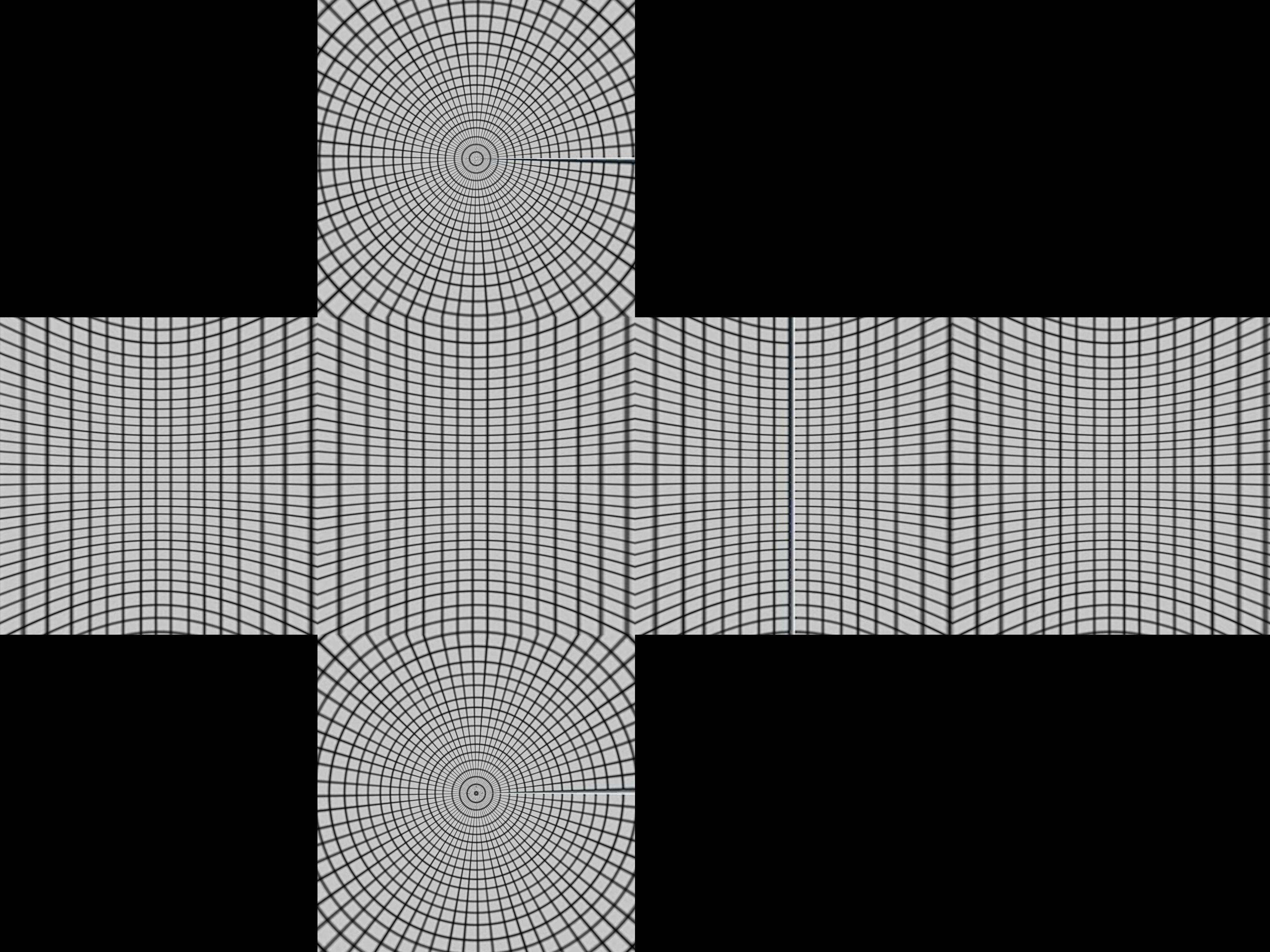
这给了我们一个关于盒子是如何构造的线索。
成像一个有经纬度线的球体,以及围绕它的立方体。现在,从球体中心的点伸出,在立方体上产生一个扭曲的网格。
从数学上讲,取球体r=1的极坐标r,θ,for,0<θ<π,-π/4< 7π/4。
- x= r sinθcos
- y= r sinθsin
- z= r cosθ
集中将这些投影到多维数据集。首先,我们将π/4 <π/4、π/4< 3π/4、3π/4 < 5π/4、5π/4 < of < 7π/4分为四个区域。
假设我们在第一边
- A sinθcos =1
所以
- A=1/ (sinθcos )
投影点是
- (1、tan、cotθ/ cos )
如果θ/ cos < 1,这将出现在正面。否则,它将被投影在顶部或底部,你将需要一个不同的投影。对顶部的一个更好的测试是,cos的最小值是cosπ/4 = 1/√2,所以投影点总是在顶部,如果cotθ/ ( 1/√2 ) >1或tanθ<1/√2,则计算出θ<35或0.615弧度。
将这些放在Python中:
import sys
from PIL import Image
from math import pi,sin,cos,tan

def cot(angle):
    return 1/tan(angle)

# Project polar coordinates onto a surrounding cube
# assume ranges theta is [0,pi] with 0 the north poll, pi south poll
# phi is in range [0,2pi]
def projection(theta,phi):
        if theta<0.615:
            return projectTop(theta,phi)
        elif theta>2.527:
            return projectBottom(theta,phi)
        elif phi <= pi/4 or phi > 7*pi/4:
            return projectLeft(theta,phi)
        elif phi > pi/4 and phi <= 3*pi/4:
            return projectFront(theta,phi)
        elif phi > 3*pi/4 and phi <= 5*pi/4:
            return projectRight(theta,phi)
        elif phi > 5*pi/4 and phi <= 7*pi/4:
            return projectBack(theta,phi)

def projectLeft(theta,phi):
        x = 1
        y = tan(phi)
        z = cot(theta) / cos(phi)
        if z < -1:
            return projectBottom(theta,phi)
        if z > 1:
            return projectTop(theta,phi)
        return ("Left",x,y,z)

def projectFront(theta,phi):
        x = tan(phi-pi/2)
        y = 1
        z = cot(theta) / cos(phi-pi/2)
        if z < -1:
            return projectBottom(theta,phi)
        if z > 1:
            return projectTop(theta,phi)
        return ("Front",x,y,z)

def projectRight(theta,phi):
        x = -1
        y = tan(phi)
        z = -cot(theta) / cos(phi)
        if z < -1:
            return projectBottom(theta,phi)
        if z > 1:
            return projectTop(theta,phi)
        return ("Right",x,-y,z)

def projectBack(theta,phi):
        x = tan(phi-3*pi/2)
        y = -1
        z = cot(theta) / cos(phi-3*pi/2)
        if z < -1:
            return projectBottom(theta,phi)
        if z > 1:
            return projectTop(theta,phi)
        return ("Back",-x,y,z)

def projectTop(theta,phi):
        # (a sin θ cos ø, a sin θ sin ø, a cos θ) = (x,y,1)
        a = 1 / cos(theta)
        x = tan(theta) * cos(phi)
        y = tan(theta) * sin(phi)
        z = 1
        return ("Top",x,y,z)

def projectBottom(theta,phi):
        # (a sin θ cos ø, a sin θ sin ø, a cos θ) = (x,y,-1)
        a = -1 / cos(theta)
        x = -tan(theta) * cos(phi)
        y = -tan(theta) * sin(phi)
        z = -1
        return ("Bottom",x,y,z)

# Convert coords in cube to image coords
# coords is a tuple with the side and x,y,z coords
# edge is the length of an edge of the cube in pixels
def cubeToImg(coords,edge):
    if coords[0]=="Left":
        (x,y) = (int(edge*(coords[2]+1)/2), int(edge*(3-coords[3])/2) )
    elif coords[0]=="Front":
        (x,y) = (int(edge*(coords[1]+3)/2), int(edge*(3-coords[3])/2) )
    elif coords[0]=="Right":
        (x,y) = (int(edge*(5-coords[2])/2), int(edge*(3-coords[3])/2) )
    elif coords[0]=="Back":
        (x,y) = (int(edge*(7-coords[1])/2), int(edge*(3-coords[3])/2) )
    elif coords[0]=="Top":
        (x,y) = (int(edge*(3-coords[1])/2), int(edge*(1+coords[2])/2) )
    elif coords[0]=="Bottom":
        (x,y) = (int(edge*(3-coords[1])/2), int(edge*(5-coords[2])/2) )
    return (x,y)

# convert the in image to out image
def convert(imgIn,imgOut):
    inSize = imgIn.size
    outSize = imgOut.size
    inPix = imgIn.load()
    outPix = imgOut.load()
    edge = inSize[0]/4   # the length of each edge in pixels
    for i in xrange(inSize[0]):
        for j in xrange(inSize[1]):
            pixel = inPix[i,j]
            phi = i * 2 * pi / inSize[0]
            theta = j * pi / inSize[1]
            res = projection(theta,phi)
            (x,y) = cubeToImg(res,edge)
            #if i % 100 == 0 and j % 100 == 0:
            #    print i,j,phi,theta,res,x,y
            if x >= outSize[0]:
                #print "x out of range ",x,res
                x=outSize[0]-1
            if y >= outSize[1]:
                #print "y out of range ",y,res
                y=outSize[1]-1
            outPix[x,y] = pixel

imgIn = Image.open(sys.argv[1])
inSize = imgIn.size
imgOut = Image.new("RGB",(inSize[0],inSize[0]*3/4),"black")
convert(imgIn,imgOut)
imgOut.show()projection函数接受theta和phi值,并在每个方向从-1到1返回立方体中的坐标。cubeToImg接受(x,y,z)坐标,并将它们转换为输出图像坐标。
上面的算法似乎是利用白金汉宫形象实现了正确的几何形状。我们得到:
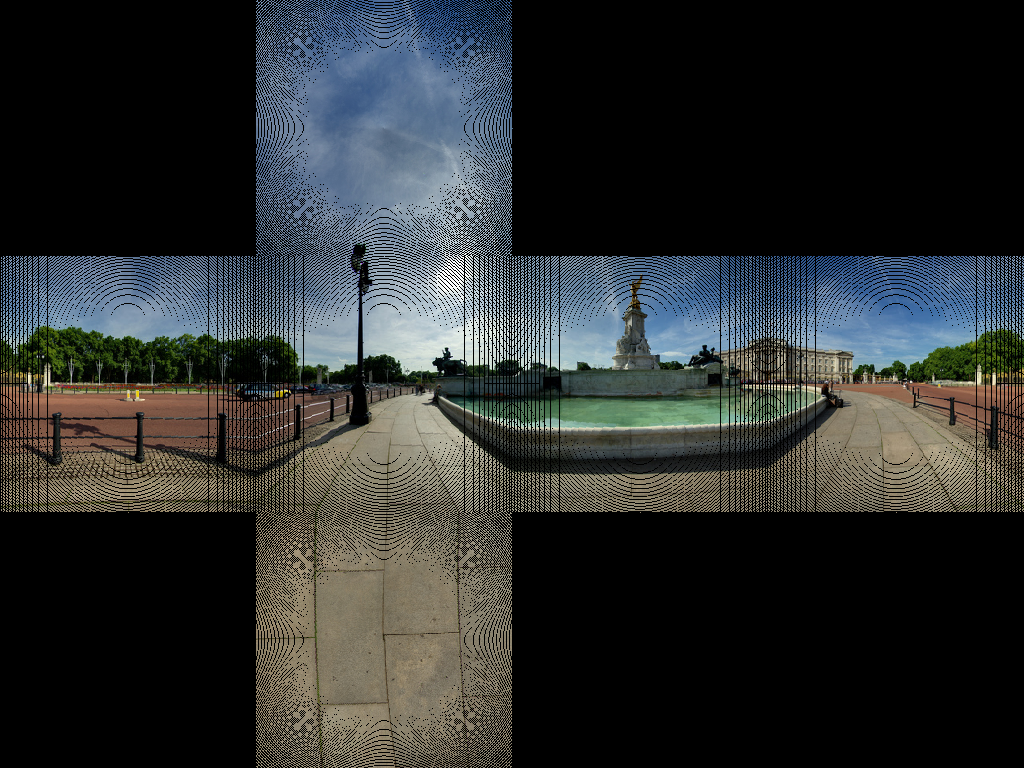
这似乎使铺路的大部分线路都是正确的。
我们得到了一些图像手工艺品。这是因为没有一对一的像素地图。我们需要做的是使用逆变换。与其通过源中的每个像素进行循环并在目标中找到相应的像素,不如循环遍历目标图像并找到最接近的对应源像素。
import sys
from PIL import Image
from math import pi,sin,cos,tan,atan2,hypot,floor
from numpy import clip

# get x,y,z coords from out image pixels coords
# i,j are pixel coords
# face is face number
# edge is edge length
def outImgToXYZ(i,j,face,edge):
    a = 2.0*float(i)/edge
    b = 2.0*float(j)/edge
    if face==0: # back
        (x,y,z) = (-1.0, 1.0-a, 3.0 - b)
    elif face==1: # left
        (x,y,z) = (a-3.0, -1.0, 3.0 - b)
    elif face==2: # front
        (x,y,z) = (1.0, a - 5.0, 3.0 - b)
    elif face==3: # right
        (x,y,z) = (7.0-a, 1.0, 3.0 - b)
    elif face==4: # top
        (x,y,z) = (b-1.0, a -5.0, 1.0)
    elif face==5: # bottom
        (x,y,z) = (5.0-b, a-5.0, -1.0)
    return (x,y,z)

# convert using an inverse transformation
def convertBack(imgIn,imgOut):
    inSize = imgIn.size
    outSize = imgOut.size
    inPix = imgIn.load()
    outPix = imgOut.load()
    edge = inSize[0]/4   # the length of each edge in pixels
    for i in xrange(outSize[0]):
        face = int(i/edge) # 0 - back, 1 - left 2 - front, 3 - right
        if face==2:
            rng = xrange(0,edge*3)
        else:
            rng = xrange(edge,edge*2)

        for j in rng:
            if j<edge:
                face2 = 4 # top
            elif j>=2*edge:
                face2 = 5 # bottom
            else:
                face2 = face

            (x,y,z) = outImgToXYZ(i,j,face2,edge)
            theta = atan2(y,x) # range -pi to pi
            r = hypot(x,y)
            phi = atan2(z,r) # range -pi/2 to pi/2
            # source img coords
            uf = ( 2.0*edge*(theta + pi)/pi )
            vf = ( 2.0*edge * (pi/2 - phi)/pi)
            # Use bilinear interpolation between the four surrounding pixels
            ui = floor(uf)  # coord of pixel to bottom left
            vi = floor(vf)
            u2 = ui+1       # coords of pixel to top right
            v2 = vi+1
            mu = uf-ui      # fraction of way across pixel
            nu = vf-vi
            # Pixel values of four corners
            A = inPix[ui % inSize[0],clip(vi,0,inSize[1]-1)]
            B = inPix[u2 % inSize[0],clip(vi,0,inSize[1]-1)]
            C = inPix[ui % inSize[0],clip(v2,0,inSize[1]-1)]
            D = inPix[u2 % inSize[0],clip(v2,0,inSize[1]-1)]
            # interpolate
            (r,g,b) = (
              A[0]*(1-mu)*(1-nu) + B[0]*(mu)*(1-nu) + C[0]*(1-mu)*nu+D[0]*mu*nu,
              A[1]*(1-mu)*(1-nu) + B[1]*(mu)*(1-nu) + C[1]*(1-mu)*nu+D[1]*mu*nu,
              A[2]*(1-mu)*(1-nu) + B[2]*(mu)*(1-nu) + C[2]*(1-mu)*nu+D[2]*mu*nu )

            outPix[i,j] = (int(round(r)),int(round(g)),int(round(b)))

imgIn = Image.open(sys.argv[1])
inSize = imgIn.size
imgOut = Image.new("RGB",(inSize[0],inSize[0]*3/4),"black")
convertBack(imgIn,imgOut)
imgOut.save(sys.argv[1].split('.')[0]+"Out2.png")
imgOut.show()
其结果是:
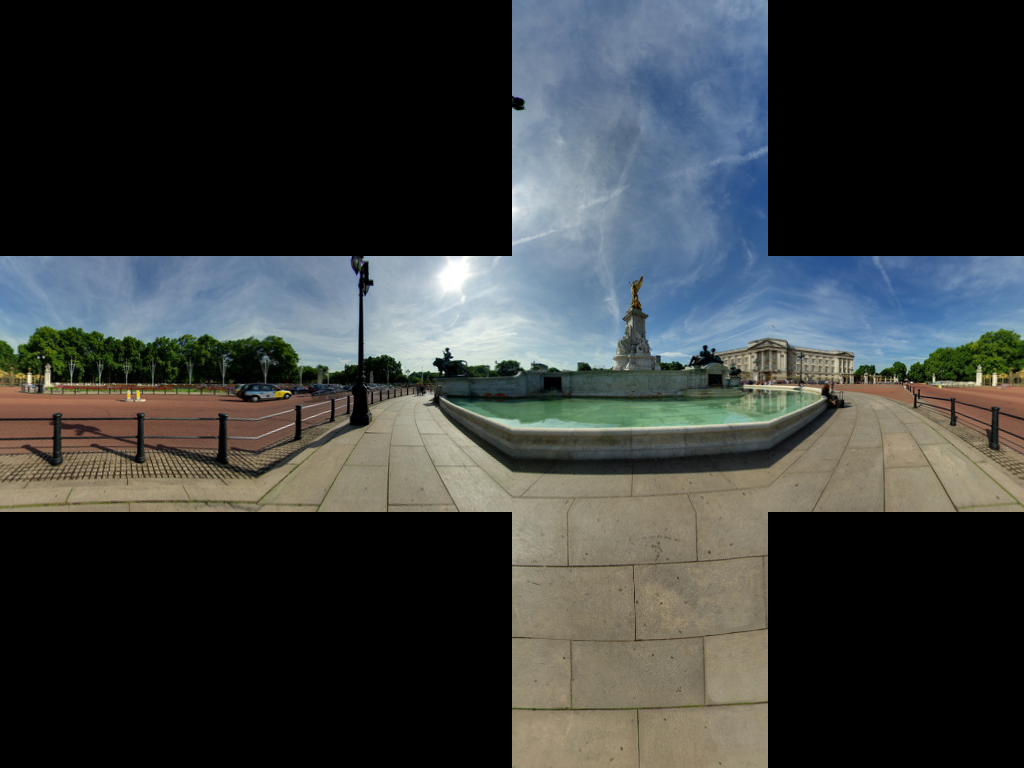
如果有人想相反,请参见JS Fiddle页面。
Stack Overflow用户
发布于 2016-01-11 11:42:38
给出了非常好的可接受的答案,我想添加相应的基于implementation,的C++ OpenCV。
对于那些不熟悉OpenCV的人来说,把Mat看作是一种形象。我们首先构造两个映射,从等长形图像重新映射到相应的cubemap面。然后,利用OpenCV进行重提升(即插值重映射)。
如果可读性不受关注,代码可以变得更紧凑。
// Define our six cube faces.
// 0 - 3 are side faces, clockwise order
// 4 and 5 are top and bottom, respectively
float faceTransform[6][2] =
{
    {0, 0},
    {M_PI / 2, 0},
    {M_PI, 0},
    {-M_PI / 2, 0},
    {0, -M_PI / 2},
    {0, M_PI / 2}
};

// Map a part of the equirectangular panorama (in) to a cube face
// (face). The ID of the face is given by faceId. The desired
// width and height are given by width and height.
inline void createCubeMapFace(const Mat &in, Mat &face,
        int faceId = 0, const int width = -1,
        const int height = -1) {

    float inWidth = in.cols;
    float inHeight = in.rows;

    // Allocate map
    Mat mapx(height, width, CV_32F);
    Mat mapy(height, width, CV_32F);

    // Calculate adjacent (ak) and opposite (an) of the
    // triangle that is spanned from the sphere center
    //to our cube face.
    const float an = sin(M_PI / 4);
    const float ak = cos(M_PI / 4);

    const float ftu = faceTransform[faceId][0];
    const float ftv = faceTransform[faceId][1];

    // For each point in the target image,
    // calculate the corresponding source coordinates.
    for(int y = 0; y < height; y++) {
        for(int x = 0; x < width; x++) {

            // Map face pixel coordinates to [-1, 1] on plane
            float nx = (float)y / (float)height - 0.5f;
            float ny = (float)x / (float)width - 0.5f;

            nx *= 2;
            ny *= 2;

            // Map [-1, 1] plane coords to [-an, an]
            // thats the coordinates in respect to a unit sphere
            // that contains our box.
            nx *= an;
            ny *= an;

            float u, v;

            // Project from plane to sphere surface.
            if(ftv == 0) {
                // Center faces
                u = atan2(nx, ak);
                v = atan2(ny * cos(u), ak);
                u += ftu;
            } else if(ftv > 0) {
                // Bottom face
                float d = sqrt(nx * nx + ny * ny);
                v = M_PI / 2 - atan2(d, ak);
                u = atan2(ny, nx);
            } else {
                // Top face
                float d = sqrt(nx * nx + ny * ny);
                v = -M_PI / 2 + atan2(d, ak);
                u = atan2(-ny, nx);
            }

            // Map from angular coordinates to [-1, 1], respectively.
            u = u / (M_PI);
            v = v / (M_PI / 2);

            // Warp around, if our coordinates are out of bounds.
            while (v < -1) {
                v += 2;
                u += 1;
            }
            while (v > 1) {
                v -= 2;
                u += 1;
            }

            while(u < -1) {
                u += 2;
            }
            while(u > 1) {
                u -= 2;
            }

            // Map from [-1, 1] to in texture space
            u = u / 2.0f + 0.5f;
            v = v / 2.0f + 0.5f;

            u = u * (inWidth - 1);
            v = v * (inHeight - 1);

            // Save the result for this pixel in map
            mapx.at<float>(x, y) = u;
            mapy.at<float>(x, y) = v;
        }
    }

    // Recreate output image if it has wrong size or type.
    if(face.cols != width || face.rows != height ||
        face.type() != in.type()) {
        face = Mat(width, height, in.type());
    }

    // Do actual resampling using OpenCV's remap
    remap(in, face, mapx, mapy,
         CV_INTER_LINEAR, BORDER_CONSTANT, Scalar(0, 0, 0));
}
鉴于以下投入:
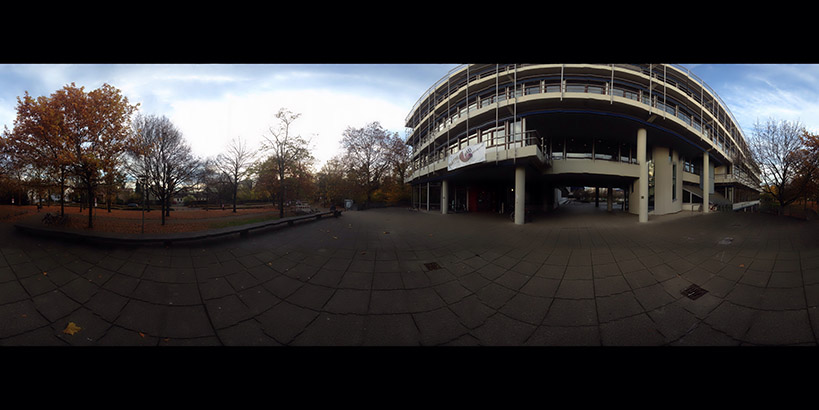
产生了下列面孔:
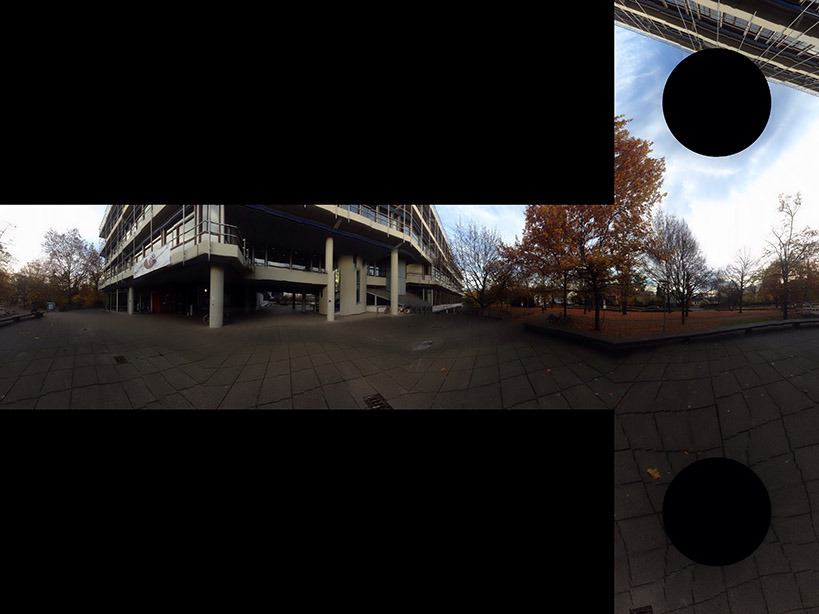
图片由Optonaut提供。
Stack Overflow用户
发布于 2016-05-02 06:47:07
更新2:看起来好像有人拥有构建了一个非常优秀的web应用程序而不是我自己的。他们的转换运行客户端,所以没有任何上传和下载需要担心。
我想如果你因为某种原因讨厌JavaScript,或者试图在你的手机上做这件事,那么我下面的web应用程序是可以的。
UPDATE:我已经发布了一个简单的web应用程序,您可以在这里上传全景图,并让它在一个ZIP文件中返回六个天框图像。
源是以下内容的清理后的重新实现,是可在GitHub上获得。
该应用程序目前运行在一个单一的自由层https://en.wikipedia.org/wiki/Heroku dyno,但请不要试图使用它作为API。如果您想要自动化,那么进行您自己的部署;单击Deploy to Heroku available__。
原始:这是一个(天真地)修改过的萨利克斯·阿尔巴的绝妙答案版本,它一次转换一张脸,发出六个不同的图像,并保留原始图像的文件类型。
除了大多数用例可能需要六个单独的映像之外,一次转换一张脸的主要优点是,它使处理大型图像的内存密集型大大降低。
#!/usr/bin/env python
import sys
from PIL import Image
from math import pi, sin, cos, tan, atan2, hypot, floor
from numpy import clip

# get x,y,z coords from out image pixels coords
# i,j are pixel coords
# faceIdx is face number
# faceSize is edge length
def outImgToXYZ(i, j, faceIdx, faceSize):
    a = 2.0 * float(i) / faceSize
    b = 2.0 * float(j) / faceSize

    if faceIdx == 0: # back
        (x,y,z) = (-1.0, 1.0 - a, 1.0 - b)
    elif faceIdx == 1: # left
        (x,y,z) = (a - 1.0, -1.0, 1.0 - b)
    elif faceIdx == 2: # front
        (x,y,z) = (1.0, a - 1.0, 1.0 - b)
    elif faceIdx == 3: # right
        (x,y,z) = (1.0 - a, 1.0, 1.0 - b)
    elif faceIdx == 4: # top
        (x,y,z) = (b - 1.0, a - 1.0, 1.0)
    elif faceIdx == 5: # bottom
        (x,y,z) = (1.0 - b, a - 1.0, -1.0)

    return (x, y, z)

# convert using an inverse transformation
def convertFace(imgIn, imgOut, faceIdx):
    inSize = imgIn.size
    outSize = imgOut.size
    inPix = imgIn.load()
    outPix = imgOut.load()
    faceSize = outSize[0]

    for xOut in xrange(faceSize):
        for yOut in xrange(faceSize):
            (x,y,z) = outImgToXYZ(xOut, yOut, faceIdx, faceSize)
            theta = atan2(y,x) # range -pi to pi
            r = hypot(x,y)
            phi = atan2(z,r) # range -pi/2 to pi/2

            # source img coords
            uf = 0.5 * inSize[0] * (theta + pi) / pi
            vf = 0.5 * inSize[0] * (pi/2 - phi) / pi

            # Use bilinear interpolation between the four surrounding pixels
            ui = floor(uf)  # coord of pixel to bottom left
            vi = floor(vf)
            u2 = ui+1       # coords of pixel to top right
            v2 = vi+1
            mu = uf-ui      # fraction of way across pixel
            nu = vf-vi

            # Pixel values of four corners
            A = inPix[ui % inSize[0], clip(vi, 0, inSize[1]-1)]
            B = inPix[u2 % inSize[0], clip(vi, 0, inSize[1]-1)]
            C = inPix[ui % inSize[0], clip(v2, 0, inSize[1]-1)]
            D = inPix[u2 % inSize[0], clip(v2, 0, inSize[1]-1)]

            # interpolate
            (r,g,b) = (
              A[0]*(1-mu)*(1-nu) + B[0]*(mu)*(1-nu) + C[0]*(1-mu)*nu+D[0]*mu*nu,
              A[1]*(1-mu)*(1-nu) + B[1]*(mu)*(1-nu) + C[1]*(1-mu)*nu+D[1]*mu*nu,
              A[2]*(1-mu)*(1-nu) + B[2]*(mu)*(1-nu) + C[2]*(1-mu)*nu+D[2]*mu*nu )

            outPix[xOut, yOut] = (int(round(r)), int(round(g)), int(round(b)))

imgIn = Image.open(sys.argv[1])
inSize = imgIn.size
faceSize = inSize[0] / 4
components = sys.argv[1].rsplit('.', 2)

FACE_NAMES = {
  0: 'back',
  1: 'left',
  2: 'front',
  3: 'right',
  4: 'top',
  5: 'bottom'
}

for face in xrange(6):
  imgOut = Image.new("RGB", (faceSize, faceSize), "black")
  convertFace(imgIn, imgOut, face)
imgOut.save(components[0] + "_" + FACE_NAMES[face] + "." + components[1])https://stackoverflow.com/questions/29678510
复制相似问题
腾讯云开发者

Copyright © 2013 - 2026 Tencent Cloud. All Rights Reserved. 腾讯云 版权所有
深圳市腾讯计算机系统有限公司 ICP备案/许可证号:粤B2-20090059  粤公网安备44030502008569号
腾讯云计算(北京)有限责任公司 京ICP证150476号 | 京ICP备11018762号