
在windows 8.1上安装JDK 8时回滚操作
在windows 8.1上安装JDK 8时回滚操作
提问于 2015-04-15 15:49:37
当我在Windows8.1 x64上安装JDK8u45时(最后一次更新),我收到向导的回滚操作,安装完成,这是错误日志
Action 22:26:50: PublishProduct. Publishing product information
1: {64A3A4F4-B792-11D6-A78A-00B0D0180450}
Action 22:26:50: unziptools. Extracting Installer
CustomAction unziptools returned actual error code 1603 (note this may not be 100% accurate if translation happened inside sandbox)
Action ended 22:26:51: InstallFinalize. Return value 3.
Action 22:26:51: Rollback. Rolling back action:
Rollback: Extracting Installer
Rollback: Publishing product information
Rollback: Publishing product features
Rollback: Registering product
Rollback: Registering user
Rollback: Writing system registry values
Rollback: Copying new files
Rollback: Creating folders
Rollback: Removing files
Rollback: Removing ODBC components
Rollback: Updating component registration
Action ended 22:26:51: INSTALL. Return value 3.
Action ended 22:26:51: ExecuteAction. Return value 3.
Action 22:26:51: SetupCompleteError.
Action start 22:26:51: SetupCompleteError.
Action 22:26:51: SetupCompleteError. Dialog created
Action ended 22:26:54: SetupCompleteError. Return value 2.
Action ended 22:26:54: INSTALL. Return value 3.
=== Logging stopped: 15/04/2015  22:26:54 ===
MSI (c) (F8:D4) [22:26:54:995]: Product: Java SE Development Kit 8 Update 45 (64-bit) -- Installation operation failed.

MSI (c) (F8:D4) [22:26:54:997]: Windows Installer installed the product. Product Name: Java SE Development Kit 8 Update 45 (64-bit). Product Version: 8.0.450.14. Product Language: 1033. Manufacturer: Oracle Corporation. Installation success or error status: 1603.
但是我成功地安装在windows 7 SP1 x64上,有人能帮我吗?
回答 2
Stack Overflow用户
回答已采纳
发布于 2015-05-10 11:49:44
我终于找到了一个解决方案,我正在卸载一些其他软件,它提到了临时文件夹的安全性,所以我所做的是:
- 运行并键入%temp%
- 获取该文件夹的属性(单击空的某个位置,然后选择属性)
- 转到安全性并添加EveryOne并给予它们完全权限,请记住选择替换所有子对象
尽情享受
我建议你只给系统用户访问权限,而不是给每个人它应该足够,但我没有时间去尝试它。
Stack Overflow用户
发布于 2015-04-15 16:03:23
这个错误似乎起源于解压缩工具。
CustomAction unziptools returned actual error code 1603 (note this may not be 100% accurate if translation happened inside sandbox)这是本地化W8.1中加入AD的已知错误,尽管它似乎被标记为固定的。
如果您使用的是英语以外的语言,则可能的解决方法是转到您的控制面板、区域设置并安装英语语言包。
还请确保检查如下图所示的选项:
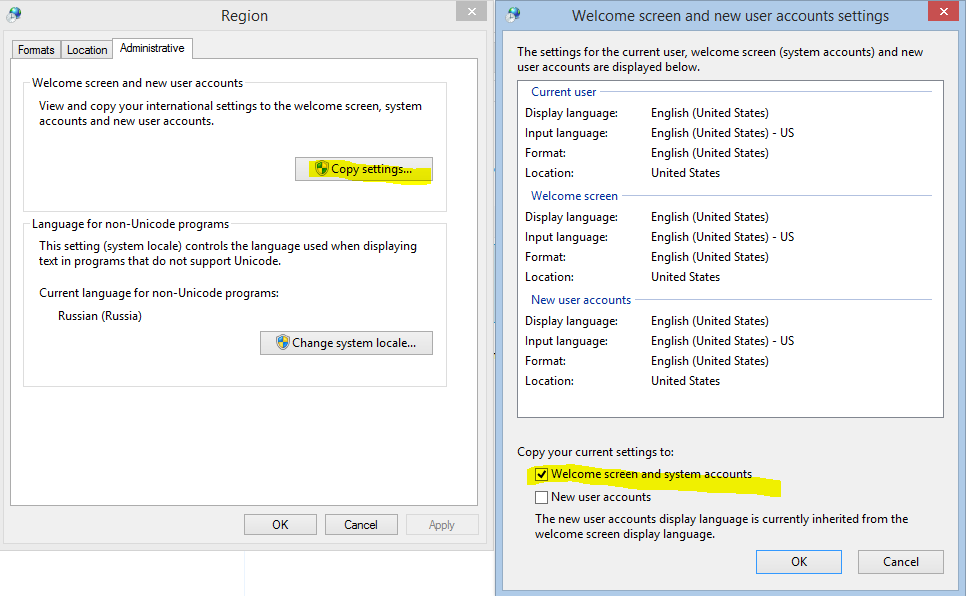
错误中标记了另一个可能的解决方案:https://bugs.openjdk.java.net/browse/JDK-8028366
解决方案是关闭所有打开的浏览器并终止它们的进程,因为分期付款无法删除与jre/jdk相关的一些文件。
错误不显示在日志中,因为这些错误被错误地标记为info,但是错误应该显示如下:
Info 1603.The file C:\Program Files\Java\jre6\bin\jp2ssv.dll is being held in use by the following process: Name: iexplore, ID: 1860, Window Title: (not determined yet). Close that application and retry.
Info 1603.The file C:\Program Files\Java\jre6\bin\jp2ssv.dll is being held in use by the following process: Name: iexplore, ID: 7708, Window Title: (not determined yet). Close that application and retry.
Info 1603.The file C:\Program Files\Java\jre6\bin\jp2ssv.dll is being held in use by the following process: Name: iexplore, ID: 6280, Window Title: (not determined yet). Close that application and retry.
Info 1603.The file C:\Program Files\Java\jre6\bin\ssv.dll is being held in use by the following process: Name: iexplore, ID: 1860, Window Title: (not determined yet). Close that application and retry.
Info 1603.The file C:\Program Files\Java\jre6\bin\ssv.dll is being held in use by the following process: Name: iexplore, ID: 7708, Window Title: (not determined yet). Close that application and retry.
Info 1603.The file C:\Program Files\Java\jre6\bin\ssv.dll is being held in use by the following process: Name: iexplore, ID: 6280, Window Title: (not determined yet). Close that application and retry. 页面原文内容由Stack Overflow提供。腾讯云小微IT领域专用引擎提供翻译支持
原文链接:
https://stackoverflow.com/questions/29654926
复制相关文章
相似问题
腾讯云开发者

Copyright © 2013 - 2026 Tencent Cloud. All Rights Reserved. 腾讯云 版权所有
深圳市腾讯计算机系统有限公司 ICP备案/许可证号:粤B2-20090059  粤公网安备44030502008569号
腾讯云计算(北京)有限责任公司 京ICP证150476号 | 京ICP备11018762号