
垂直滚动-在可见区域以下添加内容和设计UI - Windows 8.1 XAML C#
垂直滚动-在可见区域以下添加内容和设计UI - Windows 8.1 XAML C#
提问于 2015-04-14 23:05:01
我想要添加一个垂直滚动内容到一个页面。
我已经分裂了垂直空间使用5个网格高度,每个300像素,并添加滚动查看器,它的工作很好。
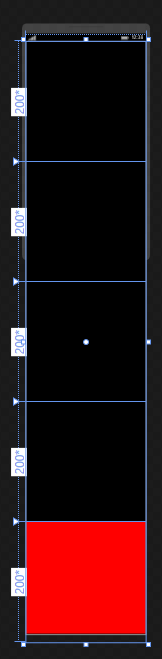
问题是,Visual在XAML可视化编辑器中只显示了2个网格高度,其余3个位于底部,没有任何可见的。
但是,如果使用XAML代码将项指定到其余网格,则它们已就位。
如何在可视化编辑器中查看它们并设计我的UI?
谢谢。
回答 1
Stack Overflow用户
回答已采纳
发布于 2015-04-15 00:11:07
也许有更好的方法,但我会在下面张贴我的解决办法。
在<Page>中指定一个最大设计高度,如下所示:
<Page
    x:Class="YOUR_CLASS.MainPage"
    xmlns="http://schemas.microsoft.com/winfx/2006/xaml/presentation"
    xmlns:x="http://schemas.microsoft.com/winfx/2006/xaml"
    xmlns:local="using:YOUR_CLASS"
    xmlns:d="http://schemas.microsoft.com/expression/blend/2008"
    xmlns:mc="http://schemas.openxmlformats.org/markup-compatibility/2006"
    mc:Ignorable="d"
    Background="{ThemeResource ApplicationPageBackgroundThemeBrush}"
d:DesignHeight="2000"> 关键是:d:DesignHeight="your_height"
然后你可以强迫它画“隐藏”内容,但它看起来有点丑。
例如:
<Grid>
    <ScrollViewer>
    <Grid Height="2000">
        <Grid.RowDefinitions>
            <RowDefinition Height="200*"/>
            <RowDefinition Height="200*"/>
            <RowDefinition Height="200*"/>
            <RowDefinition Height="200*"/>
            <RowDefinition Height="200*"/>
        </Grid.RowDefinitions>

        <Grid Grid.Row="4" Background="Red">
            <Border Background="Red" Height="200" Width="200" ></Border>
        </Grid>
    </Grid>
    </ScrollViewer>
</Grid>
会导致
页面原文内容由Stack Overflow提供。腾讯云小微IT领域专用引擎提供翻译支持
原文链接:
https://stackoverflow.com/questions/29638861
复制相关文章
相似问题
腾讯云开发者

Copyright © 2013 - 2026 Tencent Cloud. All Rights Reserved. 腾讯云 版权所有
深圳市腾讯计算机系统有限公司 ICP备案/许可证号:粤B2-20090059  粤公网安备44030502008569号
腾讯云计算(北京)有限责任公司 京ICP证150476号 | 京ICP备11018762号