
根据出生年龄,没有使用javascript显示
根据出生年龄,没有使用javascript显示
提问于 2015-04-14 10:23:26
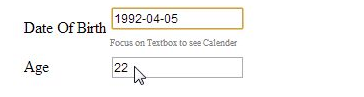
嗨,在下面的代码中,如何显示在选择出生日期后,我要显示的年龄。我的预期输出是上述屏幕截图。现在,当我选择出生日期时,什么也没有发生。
html
<input type="text" name="date_birth1"   class="login-input" placeholder="Date Of Birth" id="datepicker11"  autofocus>
   <input type="text" name="age" id="age" pattern = "^\D{0,100}$"  class="login-input" placeholder="Age" Onchange="return findage();" autofocus >
javascript
function findage() {
                var PresentDay = new Date();
                var dateOfBirth = (new Date(document.getElementById("datepicker11").value));
                var months = (PresentDay.getMonth() - dateOfBirth.getMonth() +
               (12 * (PresentDay.getFullYear() - dateOfBirth.getFullYear())));
                document.getElementById("age").value = Math.round(months / 12);
}回答 3
Stack Overflow用户
回答已采纳
发布于 2015-04-14 10:27:34
Onchange="return findage();"这应该是在第一个输入,而不是第二个!
Stack Overflow用户
发布于 2015-04-14 10:31:53
您不会使用您的生日字段触发任何事件,因为您使用的是Onchange而不是onchange,而且您使用它时使用的是年龄文本字段,在数据报头中调用它,这是工作代码:
function findage() {
                var PresentDay = new Date();
                var dateOfBirth = (new Date(document.getElementById("datepicker11").value));
                var months = (PresentDay.getMonth() - dateOfBirth.getMonth() +
               (12 * (PresentDay.getFullYear() - dateOfBirth.getFullYear())));
                document.getElementById("age").value = Math.round(months / 12);
  alert(Math.round(months / 12));
}<input type="text" name="date_birth1" class="login-input" placeholder="Date Of Birth" id="datepicker11" onchange="findage();" autofocus>
<input type="text" name="age" id="age" pattern = "^\D{0,100}$" class="login-input" placeholder="Age" >
Stack Overflow用户
发布于 2015-04-14 10:39:37
您应该将onchange事件放在“出生日期”输入框中,而不是在“年龄”输入框中。
当您从方框中失去焦点后更改出生日期时,将调用onchange事件。
我给你换好了
<input type="text" name="date_birth1"   class="login-input" placeholder="Date Of Birth" id="datepicker11"  onchange="findage();" autofocus>
   <input type="text" name="age" id="age" pattern = "^\D{0,100}$"  class="login-input" placeholder="Age"  autofocus >
希望这对你有帮助
页面原文内容由Stack Overflow提供。腾讯云小微IT领域专用引擎提供翻译支持
原文链接:
https://stackoverflow.com/questions/29624899
复制相关文章
相似问题
腾讯云开发者

Copyright © 2013 - 2026 Tencent Cloud. All Rights Reserved. 腾讯云 版权所有
深圳市腾讯计算机系统有限公司 ICP备案/许可证号:粤B2-20090059  粤公网安备44030502008569号
腾讯云计算(北京)有限责任公司 京ICP证150476号 | 京ICP备11018762号