
如何在iOS Swift中画一个圆圈?
let block = UIView(frame: CGRectMake(cellWidth-25, cellHeight/2-8, 16, 16))
block.backgroundColor = UIColor(netHex: 0xff3b30)
block.layer.cornerRadius = 9
block.clipsToBounds = true
这就是我现在所拥有的,但这显然不是正确的方法。
最简单的方法是什么?
回答 9
Stack Overflow用户
发布于 2015-04-14 00:27:46
警告!这是一个不正确的解决方案。层被无限地添加到方法中(每次绘制视图时)。您不应该在
drawRect方法中添加层。使用layoutSubview代替.
你可以用它画一个圆圈(Swift 3.0+):
let circlePath = UIBezierPath(arcCenter: CGPoint(x: 100, y: 100), radius: CGFloat(20), startAngle: CGFloat(0), endAngle: CGFloat(Double.pi * 2), clockwise: true)

let shapeLayer = CAShapeLayer()
shapeLayer.path = circlePath.cgPath

// Change the fill color
shapeLayer.fillColor = UIColor.clear.cgColor
// You can change the stroke color
shapeLayer.strokeColor = UIColor.red.cgColor
// You can change the line width
shapeLayer.lineWidth = 3.0

view.layer.addSublayer(shapeLayer)使用您发布的代码,您正在裁剪UIView的角,而不是在视图中添加一个圆圈。
下面是使用该方法的完整示例:
/// A special UIView displayed as a ring of color
class Ring: UIView {
    override func drawRect(rect: CGRect) {
        drawRingFittingInsideView()
    }

    internal func drawRingFittingInsideView() -> () {
        let halfSize:CGFloat = min( bounds.size.width/2, bounds.size.height/2)
        let desiredLineWidth:CGFloat = 1 // your desired value

        let circlePath = UIBezierPath(
                arcCenter: CGPoint(x:halfSize,y:halfSize),
                radius: CGFloat( halfSize - (desiredLineWidth/2) ),
                startAngle: CGFloat(0),
                endAngle:CGFloat(M_PI * 2),
                clockwise: true)

         let shapeLayer = CAShapeLayer()
         shapeLayer.path = circlePath.CGPath

         shapeLayer.fillColor = UIColor.clearColor().CGColor
         shapeLayer.strokeColor = UIColor.redColor().CGColor
         shapeLayer.lineWidth = desiredLineWidth

         layer.addSublayer(shapeLayer)
     }
}
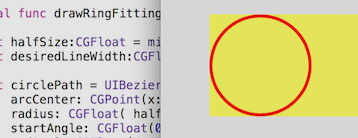
注意,但是有一个非常方便的呼叫:
let circlePath = UIBezierPath(ovalInRect: rect)
这做了所有的工作,创造了道路。(不要忘记将其嵌入到线的厚度中,这在CGRectInset中也是非常容易的。)
internal func drawRingFittingInsideView(rect: CGRect) {
    let desiredLineWidth:CGFloat = 4    // Your desired value
    let hw:CGFloat = desiredLineWidth/2

    let circlePath = UIBezierPath(ovalInRect: CGRectInset(rect,hw,hw))
    let shapeLayer = CAShapeLayer()
    shapeLayer.path = circlePath.CGPath
    shapeLayer.fillColor = UIColor.clearColor().CGColor
    shapeLayer.strokeColor = UIColor.redColor().CGColor
    shapeLayer.lineWidth = desiredLineWidth
    layer.addSublayer(shapeLayer)
}
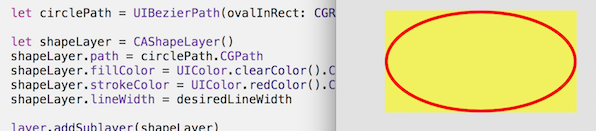
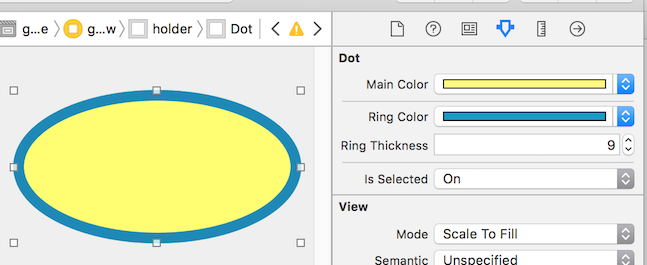
在目前的Swift实践中,您肯定会使用@IBDesignable和@IBInspectable。使用这些,您实际上可以在Storyboard!中查看和更改呈现。
如您所见,它实际上为故事板上的检查器添加了新功能,您可以在故事板上更改这些特性:
/// A dot with a border, which you can control completely in Storyboard
@IBDesignable class Dot: UIView {

    @IBInspectable var mainColor: UIColor = UIColor.blueColor() {
        didSet {
             print("mainColor was set here")
        }
    }

    @IBInspectable var ringColor: UIColor = UIColor.orangeColor() {
         didSet {
             print("bColor was set here")
        }
    }

    @IBInspectable var ringThickness: CGFloat = 4 {
        didSet {
            print("ringThickness was set here")
        }
    }

    @IBInspectable var isSelected: Bool = true

    override func drawRect(rect: CGRect) {
        let dotPath = UIBezierPath(ovalInRect:rect)
        let shapeLayer = CAShapeLayer()
        shapeLayer.path = dotPath.CGPath
        shapeLayer.fillColor = mainColor.CGColor
        layer.addSublayer(shapeLayer)

        if (isSelected) {
            drawRingFittingInsideView(rect)
        }
    }

    internal func drawRingFittingInsideView(rect: CGRect) {
        let hw:CGFloat = ringThickness/2
        let circlePath = UIBezierPath(ovalInRect: CGRectInset(rect,hw,hw) )

        let shapeLayer = CAShapeLayer()
        shapeLayer.path = circlePath.CGPath
        shapeLayer.fillColor = UIColor.clearColor().CGColor
        shapeLayer.strokeColor = ringColor.CGColor
        shapeLayer.lineWidth = ringThickness
        layer.addSublayer(shapeLayer)
    }
}最后,请注意,如果您有一个UIView (它是正方形的,并且在Storyboard中设置为红色),并且您只是想将它提交给一个红色的圆圈,那么您只需执行以下操作:
// Makes a UIView into a circular dot of color
class Dot: UIView {
    override func layoutSubviews() {
        layer.cornerRadius = bounds.size.width/2
    }
}Stack Overflow用户
发布于 2017-12-09 21:23:10
创建一个类UIView并为一个简单的循环分配以下代码
import UIKit
@IBDesignable
class DRAW: UIView {

    override func draw(_ rect: CGRect) {

        var path = UIBezierPath()
        path = UIBezierPath(ovalIn: CGRect(x: 50, y: 50, width: 100, height: 100))
        UIColor.yellow.setStroke()
        UIColor.red.setFill()
        path.lineWidth = 5
        path.stroke()
        path.fill()


    }


}Stack Overflow用户
发布于 2020-03-24 16:39:06
这是我使用Swift 5和核心图形的版本。
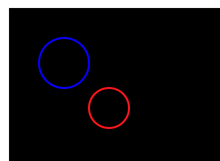
我创建了一个类来画两个圆圈。第一个圆是使用addEllipse()创建的。它将椭圆放入正方形,从而形成一个圆。我感到奇怪的是,没有函数addCircle()。第二个圆是使用2pi弧度的addArc()创建的。
import UIKit

@IBDesignable
class DrawCircles: UIView {

    override init(frame: CGRect) {
        super.init(frame: frame)
    }

    required public init?(coder aDecoder: NSCoder) {
        super.init(coder: aDecoder)
    }

    override func draw(_ rect: CGRect) {

        guard let context = UIGraphicsGetCurrentContext() else {
            print("could not get graphics context")
            return
        }

        context.setLineWidth(2)

        context.setStrokeColor(UIColor.blue.cgColor)

        context.addEllipse(in: CGRect(x: 30, y: 30, width: 50.0, height: 50.0))

        context.strokePath()

        context.setStrokeColor(UIColor.red.cgColor)

        context.beginPath() // this prevents a straight line being drawn from the current point to the arc

        context.addArc(center: CGPoint(x:100, y: 100), radius: 20, startAngle: 0, endAngle: 2.0*CGFloat.pi, clockwise: false)

        context.strokePath()
    }
}在ViewController的didViewLoad()中添加以下内容:
let myView = DrawCircles(frame: CGRect(x: 50, y: 50, width: 300, height: 300))

self.view.addSubview(myView)
当它运行时,应该是这样的。我希望你喜欢我的解决方案!
https://stackoverflow.com/questions/29616992
复制相似问题
腾讯云开发者

Copyright © 2013 - 2026 Tencent Cloud. All Rights Reserved. 腾讯云 版权所有
深圳市腾讯计算机系统有限公司 ICP备案/许可证号:粤B2-20090059  粤公网安备44030502008569号
腾讯云计算(北京)有限责任公司 京ICP证150476号 | 京ICP备11018762号