
Qt设计器对齐正确配置的项
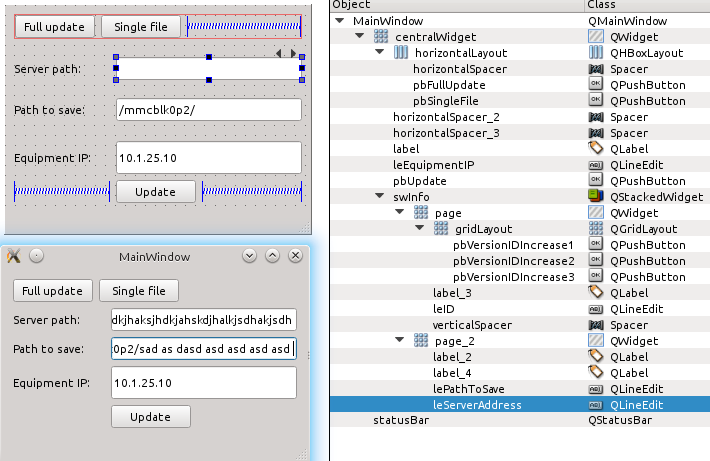
我试图在Qt设计器中显示一些项,但我无法这样做,因为尽管我正确地将它们放置在.ui中,但在编译和运行代码时,这些项被错误地放置:
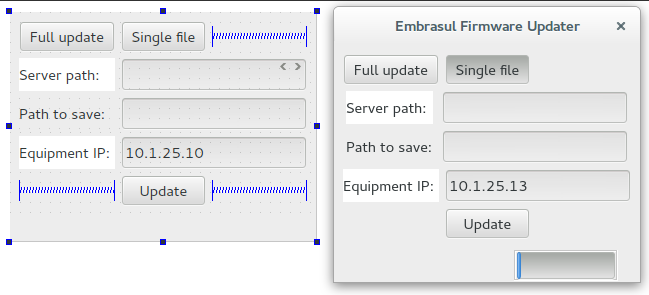
您可以通过上面的图片注意到,我想要的是左边: QStackedWidget中的四个项与其他项完全对齐,但我得到的是正确的部分: QStackedWidget中的所有四个项都错对齐了。
我试图尽可能多地操纵与保证金等相关的变量,但我只是不明白为什么这个应用程序显示的内容与编程不同。关于如何解决这个问题,有什么建议吗?
更新
添加以下图像以帮助对给定答案的注释进行帮助:
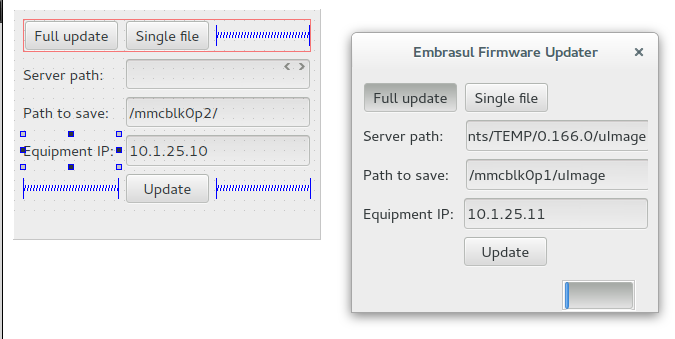
更新
.ui文件:
<?xml version="1.0" encoding="UTF-8"?>
<ui version="4.0">
 <class>MainWindow</class>
 <widget class="QMainWindow" name="MainWindow">
  <property name="geometry">
   <rect>
    <x>0</x>
    <y>0</y>
    <width>306</width>
    <height>229</height>
   </rect>
  </property>
  <property name="minimumSize">
   <size>
    <width>306</width>
    <height>0</height>
   </size>
  </property>
  <property name="maximumSize">
   <size>
    <width>306</width>
    <height>229</height>
   </size>
  </property>
  <property name="windowTitle">
   <string>MainWindow</string>
  </property>
  <widget class="QWidget" name="centralWidget">
   <layout class="QGridLayout" name="gridLayout_4">
    <item row="3" column="1">
     <widget class="QPushButton" name="pbUpdate">
      <property name="text">
       <string>Update</string>
      </property>
     </widget>
    </item>
    <item row="3" column="0">
     <spacer name="horizontalSpacer_2">
      <property name="orientation">
       <enum>Qt::Horizontal</enum>
      </property>
      <property name="sizeHint" stdset="0">
       <size>
        <width>40</width>
        <height>20</height>
       </size>
      </property>
     </spacer>
    </item>
    <item row="3" column="2">
     <spacer name="horizontalSpacer_3">
      <property name="orientation">
       <enum>Qt::Horizontal</enum>
      </property>
      <property name="sizeHint" stdset="0">
       <size>
        <width>40</width>
        <height>20</height>
       </size>
      </property>
     </spacer>
    </item>
    <item row="0" column="0" colspan="3">
     <layout class="QHBoxLayout" name="horizontalLayout">
      <item>
       <widget class="QPushButton" name="pbFullUpdate">
        <property name="text">
         <string>Full update</string>
        </property>
       </widget>
      </item>
      <item>
       <widget class="QPushButton" name="pbSingleFile">
        <property name="text">
         <string>Single file</string>
        </property>
       </widget>
      </item>
      <item>
       <spacer name="horizontalSpacer">
        <property name="orientation">
         <enum>Qt::Horizontal</enum>
        </property>
        <property name="sizeHint" stdset="0">
         <size>
          <width>89</width>
          <height>17</height>
         </size>
        </property>
       </spacer>
      </item>
     </layout>
    </item>
    <item row="1" column="0" colspan="3">
     <widget class="QStackedWidget" name="swInfo">
      <property name="currentIndex">
       <number>1</number>
      </property>
      <widget class="QWidget" name="page">
       <layout class="QGridLayout" name="gridLayout_3">
        <property name="leftMargin">
         <number>0</number>
        </property>
        <property name="topMargin">
         <number>0</number>
        </property>
        <property name="rightMargin">
         <number>0</number>
        </property>
        <item row="0" column="0">
         <widget class="QLabel" name="label_3">
          <property name="text">
           <string>Version ID:</string>
          </property>
         </widget>
        </item>
        <item row="0" column="2">
         <layout class="QGridLayout" name="gridLayout">
          <item row="0" column="0">
           <widget class="QPushButton" name="pbVersionIDIncrease1">
            <property name="maximumSize">
             <size>
              <width>31</width>
              <height>31</height>
             </size>
            </property>
            <property name="text">
             <string>^</string>
            </property>
           </widget>
          </item>
          <item row="0" column="1">
           <widget class="QPushButton" name="pbVersionIDIncrease2">
            <property name="maximumSize">
             <size>
              <width>31</width>
              <height>31</height>
             </size>
            </property>
            <property name="text">
             <string>^</string>
            </property>
           </widget>
          </item>
          <item row="0" column="2">
           <widget class="QPushButton" name="pbVersionIDIncrease3">
            <property name="maximumSize">
             <size>
              <width>31</width>
              <height>31</height>
             </size>
            </property>
            <property name="text">
             <string>^</string>
            </property>
           </widget>
          </item>
         </layout>
        </item>
        <item row="0" column="1">
         <widget class="QLineEdit" name="leID">
          <property name="text">
           <string>33.4550.1</string>
          </property>
         </widget>
        </item>
        <item row="1" column="0" colspan="3">
         <spacer name="verticalSpacer">
          <property name="orientation">
           <enum>Qt::Vertical</enum>
          </property>
          <property name="sizeHint" stdset="0">
           <size>
            <width>20</width>
            <height>40</height>
           </size>
          </property>
         </spacer>
        </item>
       </layout>
      </widget>
      <widget class="QWidget" name="page_2">
       <layout class="QGridLayout" name="gridLayout_2">
        <property name="sizeConstraint">
         <enum>QLayout::SetDefaultConstraint</enum>
        </property>
        <property name="leftMargin">
         <number>0</number>
        </property>
        <property name="topMargin">
         <number>0</number>
        </property>
        <property name="rightMargin">
         <number>0</number>
        </property>
        <property name="bottomMargin">
         <number>0</number>
        </property>
        <item row="0" column="1">
         <widget class="QLineEdit" name="leServerAddress">
          <property name="minimumSize">
           <size>
            <width>186</width>
            <height>0</height>
           </size>
          </property>
          <property name="maximumSize">
           <size>
            <width>186</width>
            <height>16777215</height>
           </size>
          </property>
          <property name="text">
           <string/>
          </property>
         </widget>
        </item>
        <item row="0" column="0">
         <widget class="QLabel" name="label_2">
          <property name="styleSheet">
           <string notr="true"/>
          </property>
          <property name="text">
           <string>Server path:</string>
          </property>
          <property name="buddy">
           <cstring>leServerAddress</cstring>
          </property>
         </widget>
        </item>
        <item row="1" column="1">
         <widget class="QLineEdit" name="lePathToSave">
          <property name="minimumSize">
           <size>
            <width>186</width>
            <height>0</height>
           </size>
          </property>
          <property name="maximumSize">
           <size>
            <width>186</width>
            <height>16777215</height>
           </size>
          </property>
          <property name="text">
           <string>/mmcblk0p2/</string>
          </property>
         </widget>
        </item>
        <item row="1" column="0">
         <widget class="QLabel" name="label_4">
          <property name="text">
           <string>Path to save:</string>
          </property>
         </widget>
        </item>
       </layout>
      </widget>
     </widget>
    </item>
    <item row="2" column="0">
     <widget class="QLabel" name="label">
      <property name="styleSheet">
       <string notr="true"/>
      </property>
      <property name="text">
       <string>Equipment IP:</string>
      </property>
      <property name="buddy">
       <cstring>leEquipmentIP</cstring>
      </property>
     </widget>
    </item>
    <item row="2" column="1" colspan="2">
     <widget class="QLineEdit" name="leEquipmentIP">
      <property name="minimumSize">
       <size>
        <width>186</width>
        <height>33</height>
       </size>
      </property>
      <property name="maximumSize">
       <size>
        <width>186</width>
        <height>33</height>
       </size>
      </property>
      <property name="text">
       <string>10.1.25.10</string>
      </property>
     </widget>
    </item>
   </layout>
  </widget>
  <widget class="QStatusBar" name="statusBar"/>
  <action name="actionExit">
   <property name="text">
    <string>Exit</string>
   </property>
  </action>
 </widget>
 <layoutdefault spacing="6" margin="11"/>
 <tabstops>
  <tabstop>leEquipmentIP</tabstop>
  <tabstop>pbUpdate</tabstop>
 </tabstops>
 <resources/>
 <connections/>
</ui>回答 2
Stack Overflow用户
发布于 2015-04-13 18:35:50
没有理由让中间的两行小部件与外部的小部件对齐,因为它们不是相同布局的一部分。
如果使底部的文本更长,这一点应该更明显:
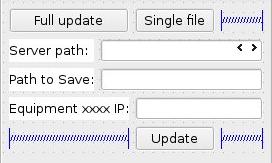
因此,您的结论似乎是反向的:实际上编译的版本是正确的,而Qt Designer版本需要进一步的解释。但是,如果不能测试真正的ui文件,就很难说得更多了。
更新
如果将MainWindow和leEquipmentIP的最大/最小大小重置为默认大小,您可以更容易地看到正在发生的事情。
当窗口水平调整大小时,标签和行之间的间隔以不同的速率变化。因此,有一个窗口的临界宽度,其中行编辑将完美地对齐。对我来说,这个宽度是303像素,但确切的值可能取决于窗口类型、当前小部件样式、当前窗口装饰等等。
这可能足以解释为什么Qt设计人员有时会以不同的方式显示事物。例如,在我的系统上,我使用停靠窗口接口模式,因此表单显示为MDI窗口。这意味着他们得到了与顶级窗口不同的窗口装饰(比如dimensions本身),因此它们的外部框架尺寸可能略有不同。
Stack Overflow用户
发布于 2015-04-13 13:57:04
您是否尝试过使用表单布局(有两列类似于表单)
更新:
我对上面和下面的部分使用了表格布局。中间有堆叠的小部件。线输入的右边是正确对齐的,左边也是对齐的。我通过将堆叠小部件的所有边距设置为0来实现这一点,而表单布局边距已经是0。此外,我使用垂直布局的整个形式,这是必要的适当对齐三个布局在一起。问题是如何在标签结束和行编辑开始之间对齐该部分。我认为这是不可能的,如果不黑客的最小/最大的标签大小或任何东西在左边。
如果可能的话,也许一些设计上的改变会比破解不同布局之间的(中间)对齐更好(我认为这是不可能的)。
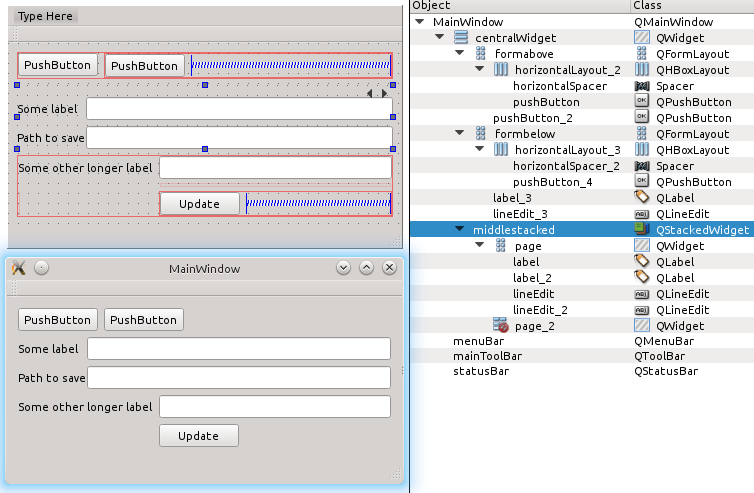
更新2:
好的,我拿了你的ui文件,放在我的QtCreator测试项目中,结果很好--我没有你在更新的屏幕截图中显示的剪裁行编辑的问题。也许有一些剩余的调整整个窗口的大小-如果你调整窗口的大小会发生什么。无论我在做什么,我都不能触发同样的行为
剩下的问题是--你的QtCreator版本,Qt版本,操作系统是什么?我的是QtCreator 3.3.2QT 5.4.1 Kubuntu 14.04
https://stackoverflow.com/questions/29606574
复制相似问题
腾讯云开发者

Copyright © 2013 - 2026 Tencent Cloud. All Rights Reserved. 腾讯云 版权所有
深圳市腾讯计算机系统有限公司 ICP备案/许可证号:粤B2-20090059  粤公网安备44030502008569号
腾讯云计算(北京)有限责任公司 京ICP证150476号 | 京ICP备11018762号