
用maven编译aspectj
我正在使用Maven用AspectJ编译一个非常琐碎的Helloworld java程序。尽管它在eclipse中工作,但当我创建一个jar文件并试图从命令行运行时,方面建议根本不被执行。
以下是我的java程序:
public class HelloWorld {

  /**
   * @param args
   */
  public static void main(String[] args) {
    HelloWorld world = new HelloWorld();
    world.greet();
    System.out.println("Hello you stupid world");
  }

  private void greet() {
    System.out.println("Hello foolish world!!!");
  }
}
我的方面文件: LogAspect.aj
package hello;

public aspect LogAspect {
  pointcut abc() : execution (* hello.HelloWorld.main(..));

  before() : abc() {
    System.out.println("Aspect:Executing HelloWorld method...");
  }

  after() : abc() {
    System.out.println("Aspect:Finished executing a Helloworld method.");
  }
}
这是我的pom.xml文件:
<project xmlns="http://maven.apache.org/POM/4.0.0" xmlns:xsi="http://www.w3.org/2001/XMLSchema-instance"
xsi:schemaLocation="http://maven.apache.org/POM/4.0.0 http://maven.apache.org/xsd/maven-4.0.0.xsd">
<modelVersion>4.0.0</modelVersion>
<groupId>com.comviva.hell</groupId>
<artifactId>hello</artifactId>
<version>0.0.1-SNAPSHOT</version>
<name>hello</name>
<description>world</description>
<packaging>jar</packaging>

<build>
    <pluginManagement>
        <plugins>
            <plugin>
                <groupId>org.codehaus.mojo</groupId>
                <artifactId>aspectj-maven-plugin</artifactId>
                <version>1.7</version>
                <configuration>
                    <complianceLevel>1.7</complianceLevel>
                </configuration>
                <executions>
                    <execution>
                        <goals>
                            <goal>compile</goal>
                            <goal>test-compile</goal>
                        </goals>
                        <configuration>
                            <!-- <complianceLevel>1.7</complianceLevel> -->
                            <source>1.7</source>
                            <target>1.7</target>
                        </configuration>
                        <!-- IMPORTANT -->
                        <phase>process-sources</phase>
                    </execution>
                </executions>
            </plugin>
            <plugin>
                <artifactId>maven-assembly-plugin</artifactId>
                <configuration>
                    <archive>
                        <manifest>
                            <mainClass>hello.HelloWorld</mainClass>
                        </manifest>
                    </archive>
                    <descriptorRefs>
                        <descriptorRef>jar-with-dependencies</descriptorRef>
                    </descriptorRefs>
                </configuration>
            </plugin>
            <plugin>
                <groupId>org.codehaus.mojo</groupId>
                <artifactId>exec-maven-plugin</artifactId>
                <executions>
                    <execution>
                        <goals>
                            <goal>java</goal>
                        </goals>
                    </execution>
                </executions>
                <configuration>
                    <mainClass>hello.HelloWorld</mainClass>
                </configuration>
            </plugin>
        </plugins>
    </pluginManagement>
</build>

<dependencies>
    <dependency>
        <groupId>org.aspectj</groupId>
        <artifactId>aspectjrt</artifactId>
        <version>1.8.4</version>
        <!-- <scope>compile</scope> -->
    </dependency>
    <dependency>
        <groupId>org.aspectj</groupId>
        <artifactId>aspectjweaver</artifactId>
        <version>1.7.4</version>
    </dependency>
</dependencies>
这是通过Eclipse运行时的输出(这是正确的)
方面:执行HelloWorld方法。 你好愚蠢的世界! 你好,你这个愚蠢的世界 方面:完成了Helloworld方法的执行。
但是,当我使用maven构建jar并运行得到的jar时,我根本得不到方面建议输出。
D:\projects\hell\target>java -jar hello-0.0.1-SNAPSHOT-jar-with-dependencies.jar
Hello foolish world!!!
Hello you stupid world

D:\projects\hell\target>
感谢任何人帮我解决这件事。
编辑:尝试将maven-plugin移出的建议之后
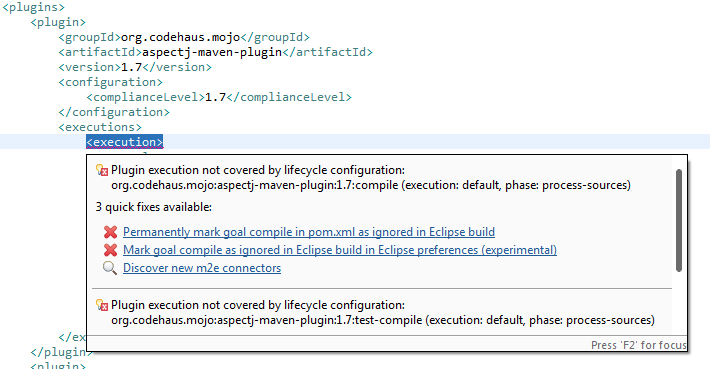
现在,我已经把标签去掉了。但是我得到了如下所示的错误。
回答 1
Stack Overflow用户
发布于 2015-04-10 03:40:25
我并没有真正回答我自己的问题。我只是承认khmarbaise和sheltem提出的建议对我来说是有效的:
这只是m2e插件的一个问题,您可以使用标记为红色x的两个快速修复程序之一来摆脱它。如果您不想在pom中使用IDE特定的内容,我建议使用第二个(中间)快速修复选项。尽管如此,您还是应该能够通过maven构建,您的方面现在在构建中实际使用了aspectj-maven-plugin吗?
以及:
您需要将aspectj plugin的定义移出pluginManagement。pluginManagement只定义插件的版本和配置,但不允许它们被执行。-4月9日至15日13时36分
https://stackoverflow.com/questions/29539723
复制相似问题
腾讯云开发者

Copyright © 2013 - 2026 Tencent Cloud. All Rights Reserved. 腾讯云 版权所有
深圳市腾讯计算机系统有限公司 ICP备案/许可证号:粤B2-20090059  粤公网安备44030502008569号
腾讯云计算(北京)有限责任公司 京ICP证150476号 | 京ICP备11018762号