
启动PowerShell会话时出错
我通常使用PowerShell (刚才提到的是使用posh git ),突然发生了一个奇怪的行为,我试图重新启动会话,当我重新启动时,我得到了许多错误,这些错误是:
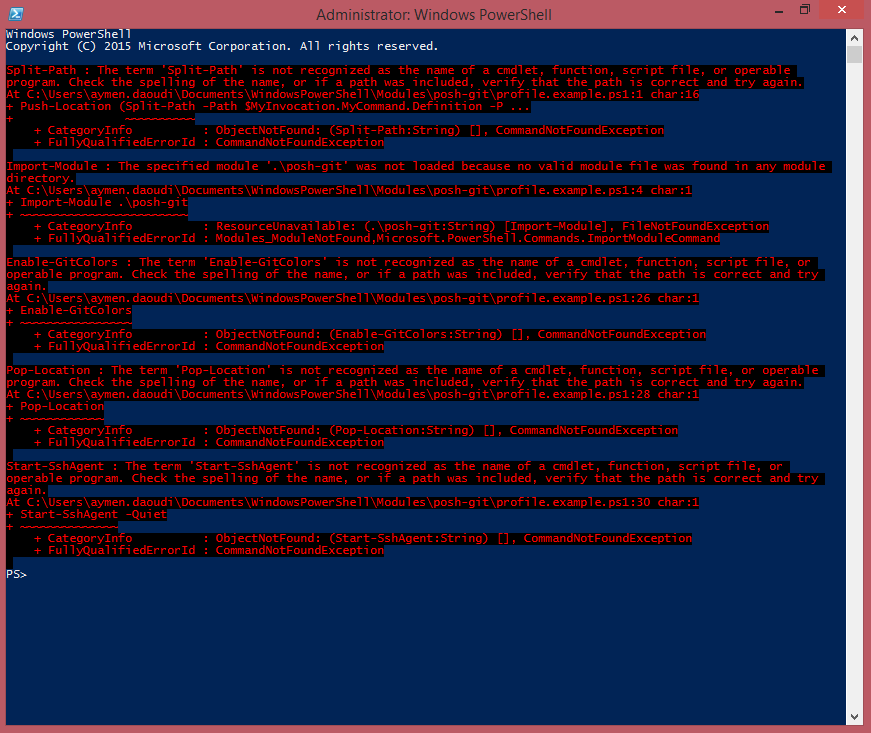
Split-Path : The term 'Split-Path' is not recognized as the name of a cmdlet, function, script file, or operable program. Check the spelling of the name, or if a path
was included, verify that the path is correct and try again.
At C:\Users\aymen.daoudi\Documents\WindowsPowerShell\Modules\posh-git\profile.example.ps1:1 char:16
+ Push-Location (Split-Path -Path $MyInvocation.MyCommand.Definition -P ...
+                ~~~~~~~~~~
    + CategoryInfo          : ObjectNotFound: (Split-Path:String) [], CommandNotFoundException
    + FullyQualifiedErrorId : CommandNotFoundException

Import-Module : The specified module '.\posh-git' was not loaded because no valid module file was found in any module directory.
At C:\Users\aymen.daoudi\Documents\WindowsPowerShell\Modules\posh-git\profile.example.ps1:4 char:1
+ Import-Module .\posh-git
+ ~~~~~~~~~~~~~~~~~~~~~~~~
    + CategoryInfo          : ResourceUnavailable: (.\posh-git:String) [Import-Module], FileNotFoundException
    + FullyQualifiedErrorId : Modules_ModuleNotFound,Microsoft.PowerShell.Commands.ImportModuleCommand

Enable-GitColors : The term 'Enable-GitColors' is not recognized as the name of a cmdlet, function, script file, or operable program. Check the spelling of the name, or
if a path was included, verify that the path is correct and try again.
At C:\Users\aymen.daoudi\Documents\WindowsPowerShell\Modules\posh-git\profile.example.ps1:26 char:1
+ Enable-GitColors
+ ~~~~~~~~~~~~~~~~
    + CategoryInfo          : ObjectNotFound: (Enable-GitColors:String) [], CommandNotFoundException
    + FullyQualifiedErrorId : CommandNotFoundException

Pop-Location : The term 'Pop-Location' is not recognized as the name of a cmdlet, function, script file, or operable program. Check the spelling of the name, or if a
path was included, verify that the path is correct and try again.
At C:\Users\aymen.daoudi\Documents\WindowsPowerShell\Modules\posh-git\profile.example.ps1:28 char:1
+ Pop-Location
+ ~~~~~~~~~~~~
    + CategoryInfo          : ObjectNotFound: (Pop-Location:String) [], CommandNotFoundException
    + FullyQualifiedErrorId : CommandNotFoundException

Start-SshAgent : The term 'Start-SshAgent' is not recognized as the name of a cmdlet, function, script file, or operable program. Check the spelling of the name, or if
a path was included, verify that the path is correct and try again.
At C:\Users\aymen.daoudi\Documents\WindowsPowerShell\Modules\posh-git\profile.example.ps1:30 char:1
+ Start-SshAgent -Quiet
+ ~~~~~~~~~~~~~~
    + CategoryInfo          : ObjectNotFound: (Start-SshAgent:String) [], CommandNotFoundException
    + FullyQualifiedErrorId : CommandNotFoundException
下面是这张照片:
我试着重新启动PC,但每次启动新的PowerShell会话时仍然存在相同的问题,我注意到许多命令不工作,是什么原因造成了这个问题?我该怎么做才能解决这个问题?
更新
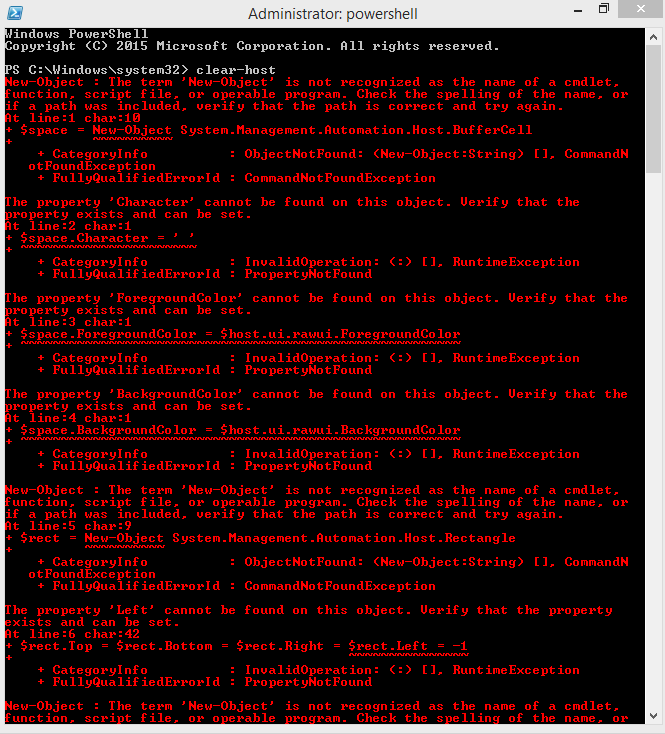
我删除了PoshGit添加的配置文件,在启动新会话时,我没有任何错误,但是powershell仍然不识别命令,例如调用清除主机,抛出了许多我无法理解原因的错误!
回答 3
Stack Overflow用户
发布于 2015-04-10 08:01:24
您是PSModulePath系统环境,但是缺少了C:\windows\system32\WindowsPowerShell\v1.0\Modules,它是PowerShell中所有“system”/内置模块的位置。
你安装的东西(也许是时髦的?)可能搞砸了。将其添加到系统变量中。
在不使用PowerShell的情况下,最简单的方法是使用GUI,如下所述:http://www.computerhope.com/issues/ch000549.htm
Stack Overflow用户
发布于 2015-04-08 15:34:59
如果您刚刚安装了posh,它添加了一些Powershell配置文件,基本上在每次启动powershell会话时都会执行一些.ps1文件。
只需删除(或修复)它们;从抛出的错误的路径中删除(或修复)--可能它们在C:\Users\aymen.daoudi\Documents\WindowsPowerShell\...中
Stack Overflow用户
发布于 2017-02-02 22:49:19
在安装posh-git . profile.example.ps1 is not recognized as the name of a cmdlet之后加载配置文件时,我收到了类似的shell错误消息。
当我从一台旧机器--旧的poshgit powershell用户配置文件也伴随而来。 --复制文件到我的用户目录时,我就遇到了这种情况。
我的解决办法是从下面的路径重命名旧的posh-git配置文件..。
原始轮廓路径
C:\Users\<username>\Documents\WindowsPowerShell\Microsoft.PowerShell_profile.ps1新配置文件名称
C:\Users\<username>\Documents\WindowsPowerShell\Microsoft.PowerShell_profile.ps1.notused在choco uninstall poshgit和choco install poshgit之后,使用正确的数据创建了一个新的配置文件(大小从5KB到1KB )。
https://stackoverflow.com/questions/29518969
复制相似问题
腾讯云开发者

Copyright © 2013 - 2026 Tencent Cloud. All Rights Reserved. 腾讯云 版权所有
深圳市腾讯计算机系统有限公司 ICP备案/许可证号:粤B2-20090059  粤公网安备44030502008569号
腾讯云计算(北京)有限责任公司 京ICP证150476号 | 京ICP备11018762号