
MySQL:强制查询在WHERE子句中使用带有局部变量的索引
上下文
我有一个应用程序,从一个表中选择一个加权随机条目,其中前缀求和(权重)是一个关键部分。简化的表定义如下所示:
CREATE TABLE entries (
    id INT NOT NULL PRIMARY KEY AUTO_INCREMENT,
    weight DECIMAL(9, 3),
    fenwick DECIMAL(9, 3)
) ENGINE=MEMORY;其中,`fenwick`将值存储在`weights`的芬威克树表示中。
让每个条目的“范围”介于其前缀和和+其权重之间。应用程序必须在0和SUM(weight)之间生成一个随机数SUM(weight),并查找其范围包括@r的条目,如下所示:
芬威克树与MEMORY引擎和二进制搜索相结合,应该允许我在O(lg^2(n)) time中找到适当的条目,而不是使用朴素查询的O(n)时间:
SELECT a.id-1 FROM (SELECT *, (@x:=@x+weight) AS counter FROM entries
    CROSS JOIN (SELECT @x:=0) a
    HAVING counter>@r LIMIT 1) a;
研究
由于多个查询的开销,我一直试图将前缀sum操作压缩为一个查询(与脚本语言中看到的几个数组访问相反)。在这个过程中,我意识到传统的求和方法,包括按降序访问元素,只会对第一个元素进行求和。当MySQL子句中存在变量时,我怀疑WHERE线性地遍历表。以下是查询:
SELECT
SUM(1) INTO @garbage
FROM entries
CROSS JOIN (
    SELECT @sum:=0,
        @n:=@entryid
) a
WHERE id=@n AND @n>0 AND (@n:=@n-(@n&(-@n))) AND (@sum:=@sum+entries.fenwick);
/*SELECT @sum*/其中@entryid是我们正在计算的前缀和项的ID。我创建了一个确实有效的查询(与返回整数最左边的一个函数lft一起使用):
SET @n:=lft(@entryid);
SET @sum:=0;
SELECT
    SUM(1) INTO @garbage
    FROM entries
    WHERE id=@n
      AND @n<=@entryid
      AND (@n:=@n+lft(@entryid^@n))
      AND (@sum:=@sum+entries.fenwick);
/*SELECT @sum*/但这只证实了我对线性搜索的怀疑。EXPLAIN查询也是如此:
+------+-------------+---------+------+---------------+------+---------+------+--------+-------------+
| id   | select_type | table   | type | possible_keys | key  | key_len | ref  | rows   | Extra       |
+------+-------------+---------+------+---------------+------+---------+------+--------+-------------+
|    1 | SIMPLE      | entries | ALL  | NULL          | NULL | NULL    | NULL | 752544 | Using where |
+------+-------------+---------+------+---------------+------+---------+------+--------+-------------+
1 row in set (0.00 sec)
指数:
SHOW INDEXES FROM entries;
+---------+------------+----------+--------------+-------------+-----------+-------------+----------+--------+------+------------+---------+---------------+
| Table   | Non_unique | Key_name | Seq_in_index | Column_name | Collation | Cardinality | Sub_part | Packed | Null | Index_type | Comment | Index_comment |
+---------+------------+----------+--------------+-------------+-----------+-------------+----------+--------+------+------------+---------+---------------+
| entries |          0 | PRIMARY  |            1 | id          | NULL      |       752544 |     NULL | NULL   |      | HASH       |         |               |
+---------+------------+----------+--------------+-------------+-----------+-------------+----------+--------+------+------------+---------+---------------+
1 row in set (0.00 sec)现在,我看到了许多问题,询问如何消除WHERE子句中的变量,以便优化器可以处理查询。但是,我想不出这个查询没有id=@n的方法。我已经考虑过将我想要的条目的键值放在一个表中并使用联接,但是我相信我会得到一些不良的结果:要么是过多的表,要么是通过对@entryid进行评估来进行线性搜索。
问题
是否有任何方法强制MySQL使用此查询的索引?如果他们提供这种功能,我甚至会尝试不同的DBMS。
回答 4
Stack Overflow用户
发布于 2015-09-03 08:39:10
免责声明
芬威克树对我来说是新的,我是在找到这个帖子的时候才发现的。这里的结果是基于我的理解和一些研究,但我绝不是一个芬威克树专家,我可能错过了一些东西。
参比材料
分域树工作原理的解释
https://stackoverflow.com/a/15444954/1157540复制自https://cs.stackexchange.com/a/10541/38148
https://cs.stackexchange.com/a/42816/38148
分域树的利用
问题1,找到给定条目的权重
给出下表
CREATE TABLE `entries` (
  `id` int(11) NOT NULL AUTO_INCREMENT,
  `weight` decimal(9,3) DEFAULT NULL,
  `fenwick` decimal(9,3) NOT NULL DEFAULT '0.000',
  PRIMARY KEY (`id`)
) ENGINE=INNODB;给定已经填充的数据(请参阅concat提供的http://sqlfiddle.com/#!9/be1f2/1 ),如何计算给定条目@entryid的权重?
这里要理解的关键概念是,芬威克索引的结构是基于id值本身的数学和按位操作。
查询通常应该只使用主键查找(WHERE ID = value)。
任何使用排序(ORDER BY)或范围的查询(WHERE (value1 < ID) AND (ID < value2))漏点,并且不按预期顺序遍历树)。
例如,键60:
SET @entryid := 60;让我们用二进制分解60的值
mysql> SELECT (@entryid & 0x0080) as b8,
    ->        (@entryid & 0x0040) as b7,
    ->        (@entryid & 0x0020) as b6,
    ->        (@entryid & 0x0010) as b5,
    ->        (@entryid & 0x0008) as b4,
    ->        (@entryid & 0x0004) as b3,
    ->        (@entryid & 0x0002) as b2,
    ->        (@entryid & 0x0001) as b1;
+------+------+------+------+------+------+------+------+
| b8   | b7   | b6   | b5   | b4   | b3   | b2   | b1   |
+------+------+------+------+------+------+------+------+
|    0 |    0 |   32 |   16 |    8 |    4 |    0 |    0 |
+------+------+------+------+------+------+------+------+
1 row in set (0.00 sec)
换句话说,只保留位集,我们就有
32 + 16 + 8 + 4 = 60现在,依次删除设置为导航树的最低位:
32 + 16 + 8 + 4 = 60
32 + 16 + 8 = 56
32 + 16 = 48
32
这给出了访问元素60的路径(32、48、56、60)。
注意,将60转换为(32, 48, 56, 60)只需要对ID值本身进行一些数学运算:不需要访问表或数据库,这种计算可以在发出查询的客户机中完成。
在此基础上,确定了元素60的芬威克纬。
mysql> select sum(fenwick) from entries where id in (32, 48, 56, 60);
+--------------+
| sum(fenwick) |
+--------------+
|       32.434 |
+--------------+
1 row in set (0.00 sec)
验证
mysql> select sum(weight) from entries where id <= @entryid;
+-------------+
| sum(weight) |
+-------------+
|      32.434 |
+-------------+
1 row in set (0.00 sec)
现在,让我们比较一下这些查询的效率。
mysql> explain select sum(fenwick) from entries where id in (32, 48, 56, 60);
+----+-------------+---------+------------+-------+---------------+---------+---------+------+------+----------+-------------+
| id | select_type | table   | partitions | type  | possible_keys | key     | key_len | ref  | rows | filtered | Extra       |
+----+-------------+---------+------------+-------+---------------+---------+---------+------+------+----------+-------------+
|  1 | SIMPLE      | entries | NULL       | range | PRIMARY       | PRIMARY | 4       | NULL |    4 |   100.00 | Using where |
+----+-------------+---------+------------+-------+---------------+---------+---------+------+------+----------+-------------+
或者,不同的呈现方式
explain format=json select sum(fenwick) from entries where id in (32, 48, 56, 60);
{
  "query_block": {
    "select_id": 1,
    "cost_info": {
      "query_cost": "5.61"
    },
    "table": {
      "table_name": "entries",
      "access_type": "range",
      "possible_keys": [
        "PRIMARY"
      ],
      "key": "PRIMARY",
      "used_key_parts": [
        "id"
      ],
      "key_length": "4",
      "rows_examined_per_scan": 4,
      "rows_produced_per_join": 4,
      "filtered": "100.00",
      "cost_info": {
        "read_cost": "4.81",
        "eval_cost": "0.80",
        "prefix_cost": "5.61",
        "data_read_per_join": "64"
      },
      "used_columns": [
        "id",
        "fenwick"
      ],
      "attached_condition": "(`test`.`entries`.`id` in (32,48,56,60))"
    }
  }
因此,优化器按主键获取4行( in子句中有4个值)。
当不使用芬威克指数时,我们有
mysql> explain select sum(weight) from entries where id <= @entryid;
+----+-------------+---------+------------+-------+---------------+---------+---------+------+------+----------+-------------+
| id | select_type | table   | partitions | type  | possible_keys | key     | key_len | ref  | rows | filtered | Extra       |
+----+-------------+---------+------------+-------+---------------+---------+---------+------+------+----------+-------------+
|  1 | SIMPLE      | entries | NULL       | range | PRIMARY       | PRIMARY | 4       | NULL |   60 |   100.00 | Using where |
+----+-------------+---------+------------+-------+---------------+---------+---------+------+------+----------+-------------+
或者,不同的呈现方式
explain format=json select sum(weight) from entries where id <= @entryid;
{
  "query_block": {
    "select_id": 1,
    "cost_info": {
      "query_cost": "25.07"
    },
    "table": {
      "table_name": "entries",
      "access_type": "range",
      "possible_keys": [
        "PRIMARY"
      ],
      "key": "PRIMARY",
      "used_key_parts": [
        "id"
      ],
      "key_length": "4",
      "rows_examined_per_scan": 60,
      "rows_produced_per_join": 60,
      "filtered": "100.00",
      "cost_info": {
        "read_cost": "13.07",
        "eval_cost": "12.00",
        "prefix_cost": "25.07",
        "data_read_per_join": "960"
      },
      "used_columns": [
        "id",
        "weight"
      ],
      "attached_condition": "(`test`.`entries`.`id` <= (@`entryid`))"
    }
  }
在这里,优化器执行索引扫描,读取60行。
使用ID=60,芬威克的效益为4次,而非60次。
现在,考虑一下这个值是如何扩展的,例如,值高达64K。
使用fenwick时,16位值最多设置为16位,因此要查找的元素最多为16位。
如果没有芬威克,扫描最多可以读取64K条目(平均读取32K )。
问题2,找到给定权重的条目
操作问题是为给定的权重找到一个条目。
例如
SET @search_weight := 35.123;为了说明算法,这篇文章详细介绍了如何完成查找(如果太冗长的话对不起)
SET @found_id := 0;首先,找出有多少个条目。
SET @max_id := (select id from entries order by id desc limit 1);在测试数据中,max_id为156个。
因为128个<= max_id <256个,所以开始搜索的最高位是128个。
mysql> set @search_id := @found_id + 128;
mysql> select id, fenwick, @search_weight,
    ->    if (fenwick <= @search_weight, "keep", "discard") as action
    ->    from entries where id = @search_id;
+-----+---------+----------------+---------+
| id  | fenwick | @search_weight | action  |
+-----+---------+----------------+---------+
| 128 |  66.540 |         35.123 | discard |
+-----+---------+----------------+---------+
重量66.540比我们的搜索要大,所以128被丢弃,移到下一位。
mysql> set @search_id := @found_id + 64;
mysql> select id, fenwick, @search_weight,
    ->    if (fenwick <= @search_weight, "keep", "discard") as action
    ->    from entries where id = @search_id;
+----+---------+----------------+--------+
| id | fenwick | @search_weight | action |
+----+---------+----------------+--------+
| 64 |  33.950 |         35.123 | keep   |
+----+---------+----------------+--------+
在这里,我们需要保留此位(64),并计算所找到的权重:
set @found_id := @search_id, @search_weight := @search_weight - 33.950;然后继续到下一个阶段:
mysql> set @search_id := @found_id + 32;
mysql> select id, fenwick, @search_weight,
    ->    if (fenwick <= @search_weight, "keep", "discard") as action
    ->    from entries where id = @search_id;
+----+---------+----------------+---------+
| id | fenwick | @search_weight | action  |
+----+---------+----------------+---------+
| 96 |  16.260 |          1.173 | discard |
+----+---------+----------------+---------+

mysql> set @search_id := @found_id + 16;
mysql> select id, fenwick, @search_weight,
    ->    if (fenwick <= @search_weight, "keep", "discard") as action
    ->    from entries where id = @search_id;
+----+---------+----------------+---------+
| id | fenwick | @search_weight | action  |
+----+---------+----------------+---------+
| 80 |   7.394 |          1.173 | discard |
+----+---------+----------------+---------+

mysql> set @search_id := @found_id + 8;
mysql> select id, fenwick, @search_weight,
    ->    if (fenwick <= @search_weight, "keep", "discard") as action
    ->    from entries where id = @search_id;
+----+---------+----------------+---------+
| id | fenwick | @search_weight | action  |
+----+---------+----------------+---------+
| 72 |   3.995 |          1.173 | discard |
+----+---------+----------------+---------+

mysql> set @search_id := @found_id + 4;
mysql> select id, fenwick, @search_weight,
    ->    if (fenwick <= @search_weight, "keep", "discard") as action
    ->    from entries where id = @search_id;
+----+---------+----------------+---------+
| id | fenwick | @search_weight | action  |
+----+---------+----------------+---------+
| 68 |   1.915 |          1.173 | discard |
+----+---------+----------------+---------+

mysql> set @search_id := @found_id + 2;
mysql> select id, fenwick, @search_weight,
    ->    if (fenwick <= @search_weight, "keep", "discard") as action
    ->    from entries where id = @search_id;
+----+---------+----------------+--------+
| id | fenwick | @search_weight | action |
+----+---------+----------------+--------+
| 66 |   1.146 |          1.173 | keep   |
+----+---------+----------------+--------+
我们在这里又发现了一点
set @found_id := @search_id, @search_weight := @search_weight - 1.146;

mysql> set @search_id := @found_id + 1;
mysql> select id, fenwick, @search_weight,
    ->    if (fenwick <= @search_weight, "keep", "discard") as action
    ->    from entries where id = @search_id;
+----+---------+----------------+--------+
| id | fenwick | @search_weight | action |
+----+---------+----------------+--------+
| 67 |   0.010 |          0.027 | keep   |
+----+---------+----------------+--------+
再来一次
set @found_id := @search_id, @search_weight := @search_weight - 0.010;最终的搜索结果是:
mysql> select @found_id, @search_weight;
+-----------+----------------+
| @found_id | @search_weight |
+-----------+----------------+
|        67 |          0.017 |
+-----------+----------------+
验证
mysql> select sum(weight) from entries where id <= 67;
+-------------+
| sum(weight) |
+-------------+
|      35.106 |
+-------------+

mysql> select sum(weight) from entries where id <= 68;
+-------------+
| sum(weight) |
+-------------+
|      35.865 |
+-------------+
事实上,
35.106 (fenwick[67]) <= 35.123 (search) <= 35.865 (fenwick[68])搜索查找值一次解析1位,每个查找结果决定要搜索的下一个ID的值。
这里给出的查询是为了说明。在实际应用程序中,代码应该只是包含以下内容的循环:
SELECT fenwick from entries where id = ?;使用应用程序代码(或存储过程)实现与@found_id、@search_id和@search_weight相关的逻辑。
一般性意见
- 芬威克树用于前缀计算。只有当要解决的问题首先涉及前缀时,使用这些树才有意义。维基百科有一些应用程序的指针。不幸的是,OP没有描述芬威克树的用途。
- 芬威克树是查找复杂度和更新复杂度之间的一种折衷,因此它们只对非静态数据有意义。对于静态数据,计算一个完整的前缀一次将更有效。
- 所执行的测试使用了一个INNODB表,该表对主键索引进行排序,因此计算max_id是一个简单的O(1)操作。如果max_id已经在其他地方可用,我认为即使使用ID上带有散列索引的内存表也可以,因为只使用主键查找。
附注:
sqlfiddle今天已经关闭,所以发布使用的原始数据(最初由concat提供),这样人们就可以重新运行测试。
INSERT INTO `entries` VALUES (1,0.480,0.480),(2,0.542,1.022),(3,0.269,0.269),(4,0.721,2.012),(5,0.798,0.798),(6,0.825,1.623),(7,0.731,0.731),(8,0.181,4.547),(9,0.711,0.711),(10,0.013,0.724),(11,0.930,0.930),(12,0.613,2.267),(13,0.276,0.276),(14,0.539,0.815),(15,0.867,0.867),(16,0.718,9.214),(17,0.991,0.991),(18,0.801,1.792),(19,0.033,0.033),(20,0.759,2.584),(21,0.698,0.698),(22,0.212,0.910),(23,0.965,0.965),(24,0.189,4.648),(25,0.049,0.049),(26,0.678,0.727),(27,0.245,0.245),(28,0.190,1.162),(29,0.214,0.214),(30,0.502,0.716),(31,0.868,0.868),(32,0.834,17.442),(33,0.566,0.566),(34,0.327,0.893),(35,0.939,0.939),(36,0.713,2.545),(37,0.747,0.747),(38,0.595,1.342),(39,0.733,0.733),(40,0.884,5.504),(41,0.218,0.218),(42,0.437,0.655),(43,0.532,0.532),(44,0.350,1.537),(45,0.154,0.154),(46,0.721,0.875),(47,0.140,0.140),(48,0.538,8.594),(49,0.271,0.271),(50,0.739,1.010),(51,0.884,0.884),(52,0.203,2.097),(53,0.361,0.361),(54,0.197,0.558),(55,0.903,0.903),(56,0.923,4.481),(57,0.906,0.906),(58,0.761,1.667),(59,0.089,0.089),(60,0.161,1.917),(61,0.537,0.537),(62,0.201,0.738),(63,0.397,0.397),(64,0.381,33.950),(65,0.715,0.715),(66,0.431,1.146),(67,0.010,0.010),(68,0.759,1.915),(69,0.763,0.763),(70,0.537,1.300),(71,0.399,0.399),(72,0.381,3.995),(73,0.709,0.709),(74,0.401,1.110),(75,0.880,0.880),(76,0.198,2.188),(77,0.348,0.348),(78,0.148,0.496),(79,0.693,0.693),(80,0.022,7.394),(81,0.031,0.031),(82,0.089,0.120),(83,0.353,0.353),(84,0.498,0.971),(85,0.428,0.428),(86,0.650,1.078),(87,0.963,0.963),(88,0.866,3.878),(89,0.442,0.442),(90,0.610,1.052),(91,0.725,0.725),(92,0.797,2.574),(93,0.808,0.808),(94,0.648,1.456),(95,0.817,0.817),(96,0.141,16.260),(97,0.256,0.256),(98,0.855,1.111),(99,0.508,0.508),(100,0.976,2.595),(101,0.353,0.353),(102,0.840,1.193),(103,0.139,0.139),(104,0.178,4.105),(105,0.469,0.469),(106,0.814,1.283),(107,0.664,0.664),(108,0.876,2.823),(109,0.390,0.390),(110,0.323,0.713),(111,0.442,0.442),(112,0.241,8.324),(113,0.881,0.881),(114,0.681,1.562),(115,0.760,0.760),(116,0.760,3.082),(117,0.518,0.518),(118,0.313,0.831),(119,0.008,0.008),(120,0.103,4.024),(121,0.488,0.488),(122,0.135,0.623),(123,0.207,0.207),(124,0.633,1.463),(125,0.542,0.542),(126,0.812,1.354),(127,0.433,0.433),(128,0.732,66.540),(129,0.358,0.358),(130,0.594,0.952),(131,0.897,0.897),(132,0.701,2.550),(133,0.815,0.815),(134,0.973,1.788),(135,0.419,0.419),(136,0.175,4.932),(137,0.620,0.620),(138,0.573,1.193),(139,0.004,0.004),(140,0.304,1.501),(141,0.508,0.508),(142,0.629,1.137),(143,0.618,0.618),(144,0.206,8.394),(145,0.175,0.175),(146,0.255,0.430),(147,0.750,0.750),(148,0.987,2.167),(149,0.683,0.683),(150,0.453,1.136),(151,0.219,0.219),(152,0.734,4.256),(153,0.016,0.016),(154,0.874,0.891),(155,0.325,0.325),(156,0.002,1.217);P.S. 2
现在用一个完整的琴:
http://sqlfiddle.com/#!9/d2c82/1
Stack Overflow用户
发布于 2015-04-07 14:58:56
(使用答案框,因为它有格式化选项)。
正如Rick所指出的,在这种情况下,引擎是主要问题。您可以在索引创建中使用“使用BTREE”来影响创建索引的类型(BTREE或散列在这种情况下似乎并不重要:迭代范围:那么BTREE是最佳的。无论您按值检索它,哈希都是最优的:您的查询具有两种行为)。
当您切换到INNODB时,缓存将使查询速度可能与内存表一样快。这样,您就有了索引的好处。为了保证BTREE索引,我将创建模式如下:
CREATE TABLE `entries` (
  `id` int(11) NOT NULL AUTO_INCREMENT,
  `weight` decimal(9,3) DEFAULT NULL,
  `fenwick` decimal(9,3) NOT NULL DEFAULT '0.000',
  PRIMARY KEY (`id`)
) ENGINE=INNODB DEFAULT CHARSET=latin1;

CREATE UNIQUE INDEX idx_nn_1 ON entries (id,fenwick) USING BTREE;
这在主计算中使用了idx_nn_1索引(而且只使用索引:由于所有数据都在索引中,所以根本不使用整个表)。然而,100个记录的样本规模太小,无法给出任何关于性能的明确答案。但是,与仅使用表访问的数据相比,构建索引所需的时间可能会使您根本没有任何性能增益。所以最后的答案将在你的测试中。
其他数据库引擎( Server、Oracle、Postgres):它们将显示类似的行为。因此,切换到任何这些引擎将不会产生巨大的变化,除非可能是为了更好的处理,在一般情况下(没有办法预测)。
SQL Server在构建索引方面可能会更好一些(=更快),因为这将只在id上使用唯一的索引,并包含fenwick值,因此不必对该值进行真正的索引。
Oracle确实可以强制索引,但这是不建议的:在Oracle中,假设表中的有序数据,读取表比读取索引和表进行查找要快。在这个场景中,您只需添加id、fenwick索引,就可以永远不访问该表。考虑到索引创建时间,Oracle无论如何必须读取一次完整的表,在这段时间内(或更少地取决于达到退出条件所需的记录),Oracle还将执行您的计算。
Stack Overflow用户
发布于 2015-08-30 03:46:48
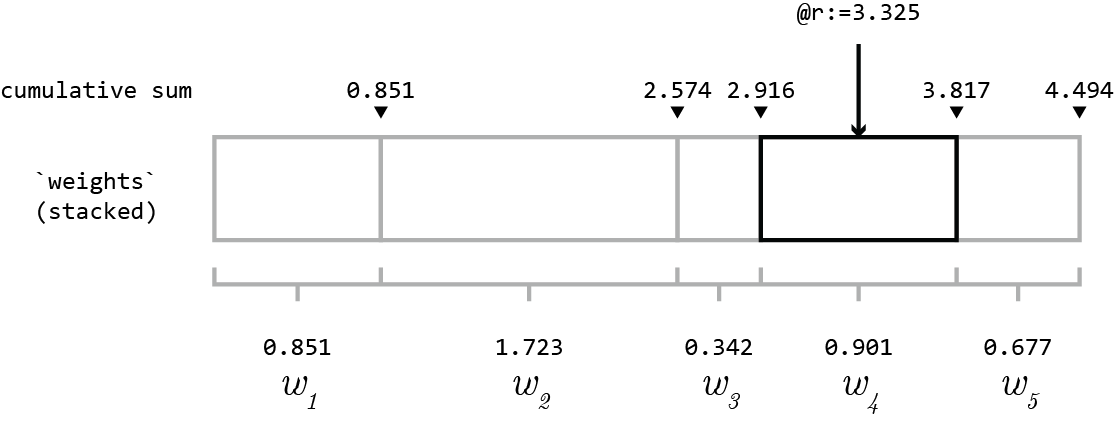
芬威克树是静态的,足以预先计算一些东西吗?如果是这样的话,我可以给出一个实际的O(1)解决方案:
- 构建一个2列表(n,cumulative_sum)
- 预先填充表:(1,0.851),(2,2.574),(3,2.916),(4,3.817),.
- 在浮点数上创建索引
然后查找:
SELECT n FROM tbl WHERE cumulative_sum > 3.325
ORDER BY cumulative_sum LIMIT 1;如果@变量有问题,那么让存储过程通过CONCAT、PREPARE和EXECUTE构造SQL。
增编
如果它是一个周期性的总替换,则在重新构建表时计算累积和。我的SELECT只查看一行,所以是O(1) (忽略BTree查找)。
关于“完全替换”,我建议:
CREATE TABLE new LIKE real;
load the data into `new`                -- this is the slowest step
RENAME TABLE real TO old, new TO real;  -- atomic and fast, so no "downtime"
DROP TABLE old;https://stackoverflow.com/questions/29475470
复制相似问题
腾讯云开发者

Copyright © 2013 - 2026 Tencent Cloud. All Rights Reserved. 腾讯云 版权所有
深圳市腾讯计算机系统有限公司 ICP备案/许可证号:粤B2-20090059  粤公网安备44030502008569号
腾讯云计算(北京)有限责任公司 京ICP证150476号 | 京ICP备11018762号