
使用css和Javascript创建park标记
我为圆圈标签创建了4个预定义的大小。我想要创建一个公园标签(云标签),那里的标签是随机的分散剂,这是第一次。但我不能让它在这里工作是我的代码:
<div id="tags-cloud">
    <div class="tag-1 tag">tag name</div>
    <div class="tag-2 tag">tag name</div>
    <div class="tag-3 tag">tag name</div>
    <div class="tag-4 tag">tag name</div>
</div>
CSS
tags-cloud {
 background-color:white;
 padding:10px;
 margin-top:10px;
 position:relative;
 width:100%;
 height:600px;
}

.tag {
 color:#FFFFFF;
 text-align:center;
 text-transform:capitalize;
 border-radius:100%;
 display:inline-block;
 position:absolute;
}

.tag-1{width:46px;height:46px;background:#DC5E0A;line-height:46px;}
.tag-2{width:58px;height:58px;background:#05F9EB;line-height:58px;}
.tag-3{width:76px;height:76px;background:#4B05F9;line-height:76px;}
.tag-4{width:89px;height:89px;background:#9EDC0A;line-height:89px;}
JS代码
$('.tag').each(function() {
        var size = Math.round(Math.random()*550+20);
        $(this).css({
            'top':size/2,
            'bottom':size/2,
            'left':size/2,
            'right':size/2,
            zIndex:size
        })
    });
我想要的结果:
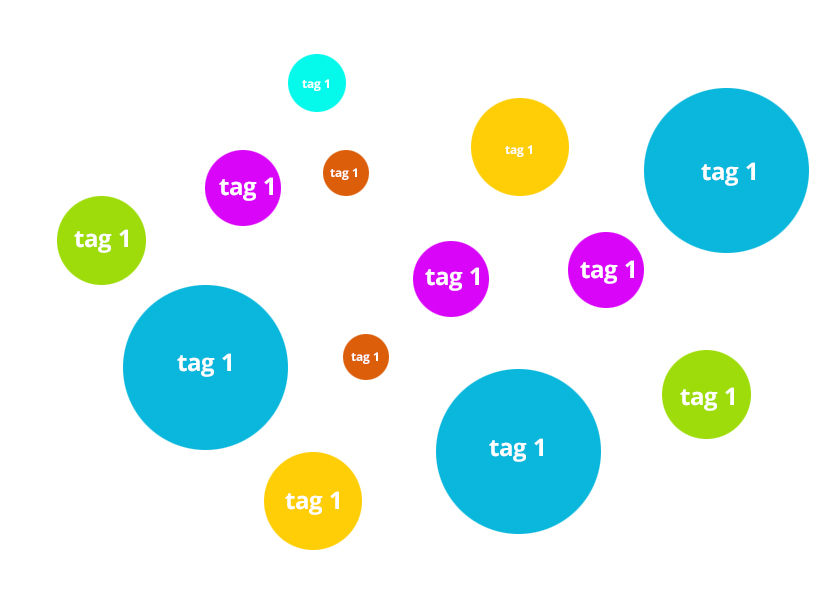
我的结果
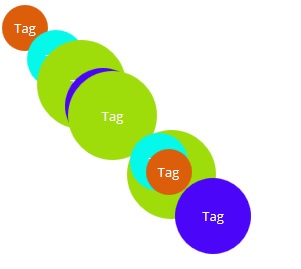
JS小提琴
回答 3
Stack Overflow用户
发布于 2015-04-06 17:27:10
正如已经指出的,您需要不同的顶部和左侧坐标。否则,所有的圆都会沿着对角线排列。
然后,您需要一种方法来确定两个圆圈是否在接触(或在给定的“范围内”彼此)。您可以通过确定圆的中心(原点)并应用距离公式来做到这一点:
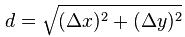
如果距离大于半径之和加上边距,那么圆圈就可以了。
这是它的代码:
function touching(margin) {
  var result= false;
  $('.tag').each(function() {
    var t1= $(this),
        t1radius= t1.width()/2,
        t1x= t1.offset().left + t1radius,
        t1y= t1.offset().top  + t1radius;

    $('.tag').not(t1).each(function() {
      var t2= $(this);
          t2radius= t2.width()/2,
          t2x= t2.offset().left + t2radius,
          t2y= t2.offset().top  + t2radius,
          dist= Math.sqrt((t2x-t1x)*(t2x-t1x) + (t2y-t1y)*(t2y-t1y));

      if(t1radius && t2radius && dist<t1radius+t2radius+margin) {
        result= true;
      }
    })
  });
  return result;
} //touching
在下面的代码中,圆圈被随机放置在它们的容器中,直到它们在20 In内没有“接触”。背景颜色是随机分配的。字体大小是圆圈大小的函数:
$('.tag').each(function(idx) {
  do {
    var container= $(this).parent(),
        diam= Math.round(Math.random() * 75 + 50),
        top = Math.round(Math.random() * (container.height() - diam)),
        left= Math.round(Math.random() * (container.width()  - diam)),
        bg= '#'+(Math.random()*128+32<<0).toString(16)+(Math.random()*128+32<<0).toString(16)+(Math.random()*128+32<<0).toString(16);

    $(this)
      .css({
        top         : top,
        left        : left,
        width       : diam,
        font        : diam/5+'px verdana',
        lineHeight  : diam+'px',
        background  : bg
      })
      .html('tag '+(idx+1));
  } while(touching(20));
});Stack Overflow用户
发布于 2015-04-06 15:18:10
您需要为左边和顶部添加随机变量。在绝对定位元素上,您只需要左或右、上或下。
$(function() {
  $('.tag').each(function() {
    var size = Math.round(Math.random() * 550 + 20);
    var left = Math.round(Math.random() * 550 + 20);
    var top = Math.round(Math.random() * 550 + 20);
    $(this).css({
      'top': top / 2,
      'left': left / 2,
      zIndex: size
    })
  });
});
$(function() {
  $('.tag').each(function() {
    var size = Math.round(Math.random() * 550 + 20);
    var left = Math.round(Math.random() * 550 + 20);
    var top = Math.round(Math.random() * 550 + 20);
    $(this).css({
      'top': top / 2,
      'left': left / 2,
      zIndex: size
    })
  });
})tags-cloud {
background-color: white;
padding: 10px;
margin-top: 10px;
position: relative;
width: 100%;
height: 600px;
}
.tag {
color: #FFFFFF;
text-align: center;
text-transform: capitalize;
border-radius: 100%;
display: inline-block;
position: absolute;
}
.tag-1 {
width: 46px;
height: 46px;
background: #DC5E0A;
line-height: 46px;
}
.tag-2 {
width: 58px;
height: 58px;
background: #05F9EB;
line-height: 58px;
}
.tag-3 {
width: 76px;
height: 76px;
background: #4B05F9;
line-height: 76px;
}
.tag-4 {
width: 89px;
height: 89px;
background: #9EDC0A;
line-height: 89px;
}<script src="https://ajax.googleapis.com/ajax/libs/jquery/2.1.1/jquery.min.js"></script>
<div id="tags-cloud">
    <div class="tag-1 tag">tag name</div>
    <div class="tag-2 tag">tag name</div>
    <div class="tag-3 tag">tag name</div>
    <div class="tag-4 tag">tag name</div>
</div>
Stack Overflow用户
发布于 2015-04-07 14:03:48
我找到了一个有效的解决方案。对我来说,我想要的标签分散剂只是随机的第一次,而不是不同的数字在每一个重新装载。但我的解决方案并不是随机位置的标签,而是使圆圈分散剂在该地区。
HTML代码
<div id="tags-cloud">
<div class="tag-1 tag">tag name</div>
<div class="tag-2 tag">tag name</div>
<div class="tag-3 tag">tag name</div>
<div class="tag-4 tag">tag name</div>
</div>CSS代码
tags-cloud {
 background-color:white;
 padding:10px;
 margin-top:10px;
 position:relative;
 width:100%;
 height:600px;
}

.tag {
 color:#FFFFFF;
 text-align:center;
 text-transform:capitalize;
 border-radius:100%;
 display:inline-block;
}

.tag-1{width:46px;height:46px;background:#DC5E0A;line-height:46px;}
.tag-2{width:58px;height:58px;background:#05F9EB;line-height:58px;}
.tag-3{width:76px;height:76px;background:#4B05F9;line-height:76px;}
.tag-4{width:89px;height:89px;background:#9EDC0A;line-height:89px;}
为了让它发挥作用,我使用了砖石
JS代码
var $container = $('#tags-cloud');
    $container.masonry({
      columnWidth: 50,
      itemSelector: '.tag'
    });
JS小提琴
http://jsfiddle.net/anp6uro8/1/
这只是其他许多解决方案之间的一个解决方案,比如@kay的解决方案和的解决方案。
https://stackoverflow.com/questions/29473829
复制相似问题
腾讯云开发者

Copyright © 2013 - 2026 Tencent Cloud. All Rights Reserved. 腾讯云 版权所有
深圳市腾讯计算机系统有限公司 ICP备案/许可证号:粤B2-20090059  粤公网安备44030502008569号
腾讯云计算(北京)有限责任公司 京ICP证150476号 | 京ICP备11018762号